

CopyCat - Clip History
CopyCat - Clip History is made and published by Raghava Naidu. AppBrain is an independent app data site and isn't affiliated with Raghava Naidu. The app name, icon, screenshots and description belong to Raghava Naidu and are shown as published on the App Store.
AppBrain's verdict
- Last updated
- June 10, 2026
Rankings
App Store top chartsApp Store Rankings for CopyCat - Clip History
Competitors
Similar apps and more from Raghava NaiduAlternatives to CopyCat - Clip History


More from Raghava Naidu


Releases
Updates seen on the App Store- Version
- 1.1
- Launched
- February 2026
No changelog data
User feedback
Ratings and reviews on the App StoreComments on CopyCat - Clip History for iOS
We don't have enough comments to show example comments. Please check back later.
Technology
Found in the app by AppBrain- Price
- Free
- App size
- 7.69 MB
- Content rating
- Everyone
Technologies used by CopyCat - Clip History
About the app and developer
About CopyCat - Clip History
CopyCat - Clip History is a productivity app developed by Raghava Naidu.
User Ratings
The app has no ratings yet.
App Information
CopyCat - Clip History is freely available from the App Store. The app size is 7.69 MB. The latest version available is 1.1. The last update was on June 10, 2026.
Technical Requirements
The app has a content rating of Everyone. The app has been available on the App Store since February 2026.
Developer information for Raghava Naidu
Address:
Frequently asked questions about CopyCat - Clip History
Is CopyCat - Clip History free?
Yes. CopyCat - Clip History is free on the App Store.
Is CopyCat - Clip History still available?
Yes. CopyCat - Clip History is on the App Store, and the last update we saw was on June 10, 2026.
How large is CopyCat - Clip History?
CopyCat - Clip History is 7.69 MB.
Is CopyCat - Clip History suitable for children?
App Store rates the content of CopyCat - Clip History as suitable for everyone.
Who made CopyCat - Clip History?
CopyCat - Clip History was developed by Raghava Naidu. It is listed in the productivity category on the App Store.
What are the best alternatives to CopyCat - Clip History?
People looking at CopyCat - Clip History also look at these productivity apps: Knowledge Notes, Pique: Keep thoughts afloat, Simple Shopping CheckList, IVIS Security, Afterthought: Voice Notes.
Store listing
By Raghava Naidu, from the App Store


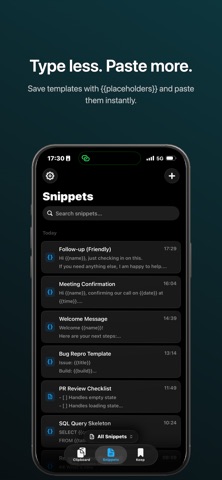
Description by Raghava Naidu Written by the developer, not by AppBrain. Click to read.
CLIPBOARD HISTORY
Every text, link, image, and code snippet you copy is saved automatically. Scroll through your history organized by date, search across all your clips, or filter by type. Tap any clip to copy it back instantly.
BOARDS
Organize clips into custom boards by project, client, or topic. Create Smart Boards that auto-filter by content type, source app, date range, or keywords — your clips sort themselves.
KEEP — ENCRYPTED NOTES
Store passwords, API keys, and sensitive text in Keep. Protected with Face ID and end-to-end encryption. Create multiple boards, tag with colors, and access securely across all your devices.
SNIPPETS — TEXT TEMPLATES
Save text you paste often — email signatures, canned replies, code boilerplate, meeting templates. Use {{placeholders}} for dynamic content that fills in when you paste.
SMART FEATURES
- Auto-detect sensitive content like passwords, tokens, and personal data
- AI-powered categories and summaries for long clips
- Source app tracking — see where each clip came from
- Text transforms — change case, trim, encode, and more
iCLOUD SYNC
Your clipboard history, boards, Keep notes, and snippets sync seamlessly across your Mac and iPhone through iCloud. Copy on one device, paste on another.
PRIVACY FIRST
Your data stays yours. Clipboard content is stored locally and synced only through your private iCloud container. Sensitive items are encrypted end-to-end — not even we can read them.
Full experience with CopyCat early access:
- Unlimited clipboard history
- Search, filters, and boards
- Pin important clips
- Keep — encrypted secure notes
- Snippets with smart placeholders
- Text transforms
- Auto-delete rules
- AI auto-tags and summaries
- Sensitive content detection
Download CopyCat and never lose a copy again.