

CopyReady 3i
CopyReady 3i is made and published by Tomoyuki Okawa. AppBrain is an independent app data site and isn't affiliated with Tomoyuki Okawa. The app name, icon, screenshots and description belong to Tomoyuki Okawa and are shown as published on the App Store.
AppBrain's verdict
- Last updated
- October 4, 2025
Rankings
App Store top chartsApp Store Rankings for CopyReady 3i
Competitors
Similar apps and more from Tomoyuki OkawaMore from Tomoyuki Okawa



Releases
Updates seen on the App Store- Version
- 3.2.1
- Launched
- October 2025
No changelog data
User feedback
Ratings and reviews on the App StoreComments on CopyReady 3i for iOS
We don't have enough comments to show example comments. Please check back later.
Technology
Found in the app by AppBrain- Price
- Free
- App size
- 8.77 MB
- Content rating
- Everyone
Technologies used by CopyReady 3i
About the app and developer
About CopyReady 3i
CopyReady 3i is a productivity app developed by Tomoyuki Okawa.
User Ratings
The app has no ratings yet.
App Information
CopyReady 3i is freely available from the App Store. The app size is 8.77 MB. The latest version available is 3.2.1. The last update was on October 4, 2025.
Technical Requirements
The app has a content rating of Everyone. The app has been available on the App Store since October 2025.
Developer information for Tomoyuki Okawa
Address:
Store listing
By Tomoyuki Okawa, from the App Store



Description by Tomoyuki Okawa Written by the developer, not by AppBrain. Click to read.
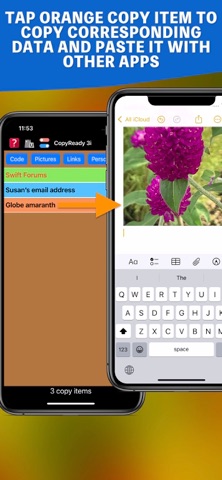
CopyReady 3i is a direct conversion of a desktop application titled CopyReady 3. Just like the desktop version, it lets you manage three different types of files: Text, Image and URL. After you create a group, open the copy item menu and tap the Cr button to create copy items. When you tap a light blue copy item button under the current group button (in red), CopyReady will copy the corresponding text content into the system clipboard. So you can use it long-pressing and selecting Paste with other apps. When you tap an orange copy item button, CopyReady will copy the corresponding image into the system clipboard. You can preview it with this app, or you can use it with other apps by long-press and selecting Paste. Finally, tap a light green copy item button, and CopyReady will open the corresponding URL with your default web browser.
Light blue copy item -> Text
Orange copy item -> Image
Light green copy item -> URL
You can have multiple groups, even tens or hundreds of them. If you have more than one, tap one. And make it active. The current group is shown in red, others being blue. Of course, you can change these group colors.
It's free to download and use it. And you can create as many as 10 copy items without a subscription.
In summary, get copy-ready with CopyReady 3i!
- End user license agreement */
https://blog.mhvt.net/?p=7629#termsofuse