

CopySage - Pasteboard Analyzer
CopySage - Pasteboard Analyzer is made and published by Bryan Marshall. AppBrain is an independent app data site and isn't affiliated with Bryan Marshall. The app name, icon, screenshots and description belong to Bryan Marshall and are shown as published on the App Store.
AppBrain's verdict
- Last updated
- April 26, 2026
- Size
- 4.24 MB
User feedback
Ratings and reviews on the App StoreComments on CopySage - Pasteboard Analyzer for iOS
We don't have enough comments to show example comments. Please check back later.
Store listing
By Bryan Marshall, from the App Store


Description by Bryan Marshall Written by the developer, not by AppBrain. Click to read.
Ever wondered why your paste operations don't work as expected? CopySage reveals exactly what's in your clipboard.
Born from frustration with paste formatting issues, CopySage is a diagnostic tool that provides detailed insights into your device's pasteboard (clipboard) content. What started as a quick debugging solution is now a powerful analyzer that can save you hours of troubleshooting.
THE STORY
I was struggling to paste text with links into email clients and messaging apps with proper formatting. Despite countless attempts, nothing worked—yet other apps pasted similar content perfectly. After building a quick diagnostic tool to inspect what successful apps were putting in the pasteboard, I discovered I was missing a critical type. Ten minutes later, everything pasted beautifully. If this app saves someone else days of aggravation, it will have been worth it.
WHAT IT ANALYZES
Text - Content with encoding details
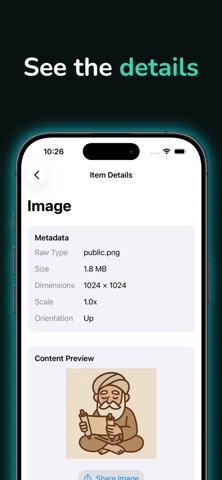
Images - Dimensions and format information
URLs - Web links and deep links
Colors - RGB and HSB values
Dates & Times - Temporal data
Numbers - Numeric values
Files - Document information
Raw Data - Binary content with hex viewer
PERFECT FOR
Developers debugging pasteboard interactions
Discovering what format apps use when copying content
Troubleshooting failed paste operations
Inspecting rich content before pasting
Understanding how the clipboard works
HOW IT WORKS
Copy any content from any app on your device
Open CopySage
Tap the paste button (you'll be asked to allow clipboard access each time)
Browse the detected pasteboard items
Tap any item for detailed information and preview
The app handles multiple format representations of the same content, as apps often place several versions in the pasteboard for compatibility.
YOUR PRIVACY MATTERS
CopySage only reads your pasteboard when you tap the paste button. It does not store, transmit, or track any clipboard content. All analysis happens locally on your device.
Simple. Local. Essential for anyone working with clipboard data.
Safety and technology
Found in the app by AppBrain- Price
- Free
- App size
- 4.24 MB
- Content rating
- Everyone
Technologies used by CopySage - Pasteboard Analyzer
Releases
Updates seen on the App Store- Version
- 1.0.1
- Launched
- January 2026
No changelog data
Alternatives
Similar apps and more from Bryan MarshallMore from Bryan Marshall


Rankings
App Store top chartsApp Store Rankings for CopySage - Pasteboard Analyzer
About the app and developer
About CopySage - Pasteboard Analyzer
CopySage - Pasteboard Analyzer is an overall app developed by Bryan Marshall.
What is the rating of CopySage - Pasteboard Analyzer?
CopySage - Pasteboard Analyzer has no ratings yet.
Is CopySage - Pasteboard Analyzer free?
CopySage - Pasteboard Analyzer is free. The app size is 4.24 MB. The latest version available is 1.0.1. The last update was on April 26, 2026.
What are the requirements for CopySage - Pasteboard Analyzer?
The app has a content rating of Everyone. The app has been available on the App Store since January 2026.
Developer information for Bryan Marshall
Address: