

CoreWing
CoreWing is made and published by Zhuhai Kuyi Technology Co., Ltd. AppBrain is an independent app data site and isn't affiliated with Zhuhai Kuyi Technology Co., Ltd. The app name, icon, screenshots and description belong to Zhuhai Kuyi Technology Co., Ltd. and are shown as published on the App Store.
AppBrain's verdict
- Last updated
- October 31, 2026
Rankings
App Store top chartsApp Store Rankings for CoreWing
Competitors
Similar apps and more from Zhuhai Kuyi Technology Co., Ltd.Alternatives to CoreWing


Releases
Updates seen on the App Store- Version
- 2.1.6
- Launched
- January 2026
No changelog data
User feedback
Ratings and reviews on the App StoreComments on CoreWing for iOS
We don't have enough comments to show example comments. Please check back later.
Technology
Found in the app by AppBrain- Price
- Free
- App size
- 143.8 MB
- Content rating
- Everyone
Technologies used by CoreWing
About the app and developer
About CoreWing
CoreWing is an utilities app developed by Zhuhai Kuyi Technology Co., Ltd.
User Ratings
The app has no ratings yet.
App Information
CoreWing is freely available from the App Store. The app size is 143.83 MB. The latest version available is 2.1.6. The last update was on October 31, 2026.
Technical Requirements
The app has a content rating of Everyone. The app has been available on the App Store since January 2026.
Developer information for Zhuhai Kuyi Technology Co., Ltd.
Zhuhai Kuyi Technology Co., Ltd.
Address:
Frequently asked questions about CoreWing
Is CoreWing free?
Yes. CoreWing is free on the App Store.
Is CoreWing still available?
Yes. CoreWing is on the App Store, and the last update we saw was on October 31, 2026.
How large is CoreWing?
CoreWing is 143.83 MB.
Is CoreWing suitable for children?
App Store rates the content of CoreWing as suitable for everyone.
Who made CoreWing?
CoreWing was developed by Zhuhai Kuyi Technology Co., Ltd. It is listed in the utilities category on the App Store.
What are the best alternatives to CoreWing?
People looking at CoreWing also look at these utilities apps: RunCam Fly, 飞翼飞行助手, 小蜜蜂AAT, 信号大师, Oxbot FPV.
Store listing
By Zhuhai Kuyi Technology Co., Ltd., from the App Store


Description by Zhuhai Kuyi Technology Co., Ltd. Written by the developer, not by AppBrain. Click to read.
With a clean and intuitive interface, the app is easy to use. Combined with one-click setup features, even beginners who are new to flight controller tuning can quickly complete aircraft configuration. More powerful features are waiting for you to explore.
Key Features
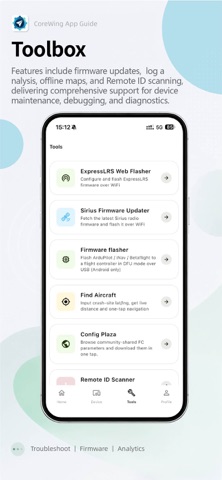
• Parameter Setup: Supports Mavlink / MSP protocols and provides a complete parameter configuration interface, delivering an experience close to native ground control stations. Real-time parameter reading, writing, and one-click setup make tuning easier and more efficient.
• Telemetry View: Displays key flight data in real time, including voltage, current, battery capacity, altitude, flight distance, GPS status, heading, aircraft position, and more, helping you stay fully aware of your aircraft status.
• Waypoint Planning: Designed for ArduPilot firmware, supporting multiple waypoint types and one-click mission upload. Take full control of autonomous flight missions.
• Map Navigation: Supports switching between vector and satellite maps, displays real-time flight tracks, and provides automatic map-follow mode for more intuitive positioning.
• Flight Logs: Records flight data and supports flight track replay, allowing every flight to be reviewed and traced.
• Firmware Update: Supports one-click flashing of ArduPilot and INAV firmware without installing drivers, making firmware upgrades easier than ever.
• Module Update: Supports one-click firmware updates for CoreWing wireless modules, bringing continuous optimization and a better user experience over time.
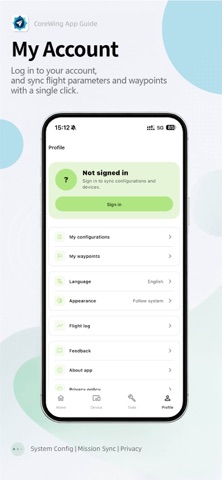
• Parameter Storage: Supports cloud saving and sharing of ArduPilot and INAV parameters, making it easy to reuse configurations anytime and share them with fellow pilots.
• ELRS Firmware Update: Supports firmware flashing for ELRS transmitters and receivers, making upgrades simple and worry-free for more stable flights.
• Find My Aircraft Tool: No need to panic after an unexpected crash. Enter the coordinates to quickly locate your aircraft and easily recover your device.
Connection Methods
Supports BLE / WiFi connection for CoreWing flight controllers.
Compatible with flight controllers running CoreWing INAV / ArduPilot firmware.
Contact Us
Thank you for choosing the CoreWing App. If you have any questions or suggestions, feel free to contact us through the following methods:
• Tap “Me — Feedback” in the app to submit your issue
• Follow our official WeChat account: CoreWing
• Call our official customer service hotline: +86 15018866740