

Countdown Widget Go
Countdown Widget Go is made and published by Wanja Hemmerich. AppBrain is an independent app data site and isn't affiliated with Wanja Hemmerich. The app name, icon, screenshots and description belong to Wanja Hemmerich and are shown as published on the App Store.
AppBrain's verdict
- Last updated
- August 27, 2026
Rankings
App Store top chartsApp Store Rankings for Countdown Widget Go
Competitors
Similar apps and more from Wanja HemmerichAlternatives to Countdown Widget Go


Releases
Updates seen on the App Store- Version
- 1.3
- Launched
- July 2026
No changelog data
User feedback
Ratings and reviews on the App StoreComments on Countdown Widget Go for iOS
We don't have enough comments to show example comments. Please check back later.
Technology
Found in the app by AppBrain- Price
- Free
- App size
- 3.87 MB
- Content rating
- Everyone
Technologies used by Countdown Widget Go
About the app and developer
About Countdown Widget Go
Countdown Widget Go is a productivity app developed by Wanja Hemmerich.
What is the rating of Countdown Widget Go?
Countdown Widget Go has no ratings yet.
Is Countdown Widget Go free?
Countdown Widget Go is free. The app size is 3.87 MB. The latest version available is 1.3. The last update was on August 27, 2026.
What are the requirements for Countdown Widget Go?
The app has a content rating of Everyone. The app has been available on the App Store since July 2026.
Developer information for Wanja Hemmerich
Address:
Store listing
By Wanja Hemmerich, from the App Store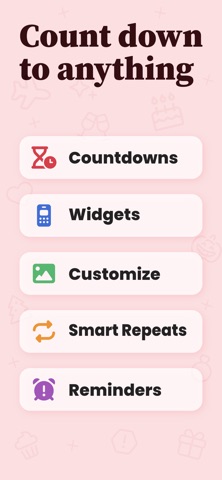


Description by Wanja Hemmerich Written by the developer, not by AppBrain. Click to read.
Every countdown is yours to customize. Pick an emoji, set a color or let it adapt to light and dark mode, drop in your own photo as the background, and tag it however you like. Set it as an all-day event or count down to the minute. Repeating events roll forward on their own, and the repeats are smart: "last Friday of the month" stays the last Friday instead of drifting to a fixed date.
The widgets are the point for a lot of people. Single-event widgets come in four styles — a big number, a progress ring, a progress bar, or number tiles — for the Home Screen, plus circular, rectangular, and inline versions for the Lock Screen. Track several events at once with the medium and large widgets. Empty slots fill in with whatever's coming up next, and anything you pin jumps to the front.
What you get:
- Count down to a future date or up from a past one
- Home Screen widgets in four styles, plus Lock Screen widgets
- Your own photos as widget backgrounds
- Smart repeats: daily, weekly, monthly, yearly, including patterns like "2nd Tuesday" that don't drift
- Emoji, custom colors, and tags
- Pin your favorites and reorder by hand
- Reminders the day before, a week before, or when the day arrives
- Choose which units you see, from years down to seconds
- Count only the days that matter by skipping weekends or any weekday you pick
- Sort by soonest, latest, name, or date added
- Works in nine languages
Everything stays on your device. No account, no sign-up, no servers, no tracking. The app is free, has no ads, and nothing is locked behind a purchase.