

CPCam is made and published by 永强 彭. AppBrain is an independent app data site and isn't affiliated with 永强 彭. The app name, icon, screenshots and description belong to 永强 彭 and are shown as published on the App Store.
AppBrain's verdict
- Rating on App Store
- 5.00
- 1 ratings
- Last updated
- August 30, 2026
- Size
- 61.9 MB
It doesn't have enough ratings yet to judge what users think.
User feedback
Ratings and reviews on the App StoreComments on CPCam for iOS
We don't have enough comments to show example comments. Please check back later.
Store listing
By 永强 彭, from the App Store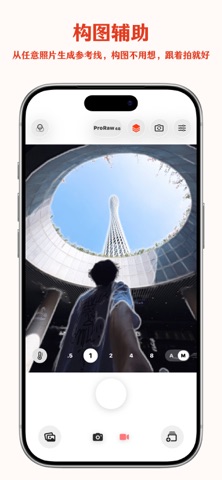


Description by 永强 彭 Written by the developer, not by AppBrain. Click to read.
Great for:
- Recreating reference compositions while traveling
- Aligning poses for selfies, group photos, outfits, and café or store shots
- Creating covers for Xiaohongshu, Instagram, and short-form videos
- Getting film-style photos in one tap while retaining manual control
- Shooting high-quality photos, unsharpened ProRAW images, or video
Key features:
- Reference contour overlay: convert reference photos into clean outlines and overlay them on the viewfinder for composition guidance
- AI composition assistant: analyzes the current view, suggests framing, and automatically applies optimal focal length, white balance, exposure, and other camera settings
- Multiple contour modes: full image, subject only, subject with internal structure, or original-image overlay
- Curated templates: use built-in shooting templates or import and reuse your own reference images
- Auto capture: automatically trigger the shutter when the subject and composition are steadily aligned
- Film filters: preview and render a wide range of film-inspired looks in real time
- Film bracketing: create multiple film-style versions with one press of the shutter for quick comparison
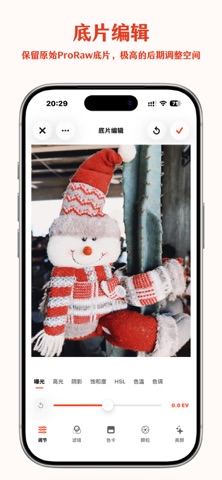
- ProRAW capture: shoot unsharpened ProRAW photos for greater editing flexibility
- Film editing: apply film-inspired edits to photos and continue your creative workflow
- Video recording: record high-quality video at up to 4K or 240 fps
- 48MP photography: capture high-resolution photos at up to 48 megapixels
- Auto/Manual modes: switch between automatic and manual controls for a flexible shooting experience
- Grain effects: add adjustable film grain for an authentic analog texture
- Beauty and fill light: adjust beauty effects, front fill light, and multiple light colors
- Half-frame color card: apply and adjust a half-frame color-card effect during import
- Date watermark: customize timestamp style, position, alignment, and size
- Post-import editing: adjust filters, beauty, grain, and half-frame effects for imported photos
On-device processing and privacy:
Reference imports, contour extraction, filter rendering, automatic matching, and photo saving are processed on device. When you use AI Composition Assist, the current camera frame is sent to the selected AI service to generate composition suggestions. The app requests camera, photo library read/write, and optional location permissions only when needed.
Privacy Policy:
https://storm-salamander-137.notion.site/Privacy-Policy-2ef934e1a39b80bd8f19feb07917351b/
Terms of Use (EULA):
https://www.apple.com/legal/internet-services/itunes/dev/stdeula/
Safety and technology
Found in the app by AppBrain- Price
- Free
- App size
- 61.9 MB
- Content rating
- Everyone
Technologies used by CPCam
Releases
Updates seen on the App Store- Version
- 2.6
- Launched
- March 2026
No changelog data
Rankings
App Store top chartsApp Store Rankings for CPCam
About the app and developer
About CPCam
CPCam is a photo & video app developed by 永强 彭.
What is the rating of CPCam?
CPCam is rated 5.00 out of 5 stars, based on one rating ratings.
Is CPCam free?
CPCam is free. The app size is 61.88 MB. The latest version available is 2.6. The last update was on August 30, 2026.
What are the requirements for CPCam?
The app has a content rating of Everyone. The app has been available on the App Store since March 2026.
Developer information for 永强 彭
Address:
Frequently asked questions about CPCam
Is CPCam free?
Yes. CPCam is free on the App Store.
Is CPCam still available?
Yes. CPCam is on the App Store, and the last update we saw was on August 30, 2026.
How large is CPCam?
CPCam is 61.88 MB.
Is CPCam suitable for children?
App Store rates the content of CPCam as suitable for everyone.
How do people rate CPCam?
CPCam has one rating of 5.00 stars on the App Store.
Who made CPCam?
CPCam was developed by 永强 彭. It is listed in the photo & video category on the App Store.