CPFlash is a photo & video app developed by Innovatronix Incorporated.
User Ratings
CPFlash is rated 3.00 out of 5 stars. The rating is based on one rating ratings.
App Information
CPFlash is freely available from the App Store. The app size is 27.08 MB. The latest version available is 1.2.3. The last update was on April 3, 2024.
Technical Requirements
The app has a content rating of Everyone. The app has been available on the App Store since February 2020.
CPFlash is made and published by
Innovatronix Incorporated.
AppBrain is an independent app data site and isn't affiliated with Innovatronix Incorporated.
The app name, icon, screenshots and description belong to Innovatronix Incorporated and are shown as published on the App Store.
Description by Innovatronix Incorporated(from the App Store)
CONNECT YOUR INNOVATRONIX CPFLASH 550W DEVICE
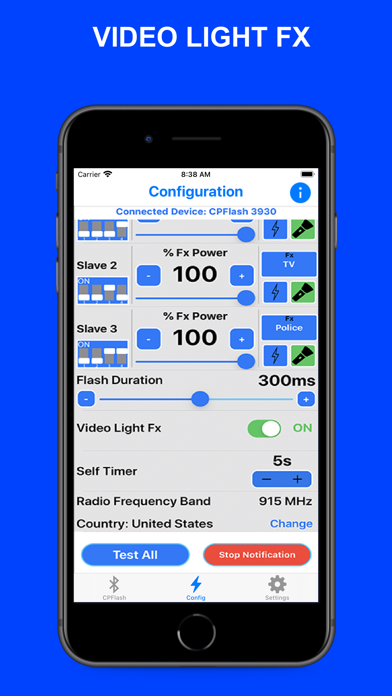
Have full control of your Device by connecting it to the App through Bluetooth Pairing. The connected Device will be your Master Device and you can use up to 4 Slave/Channel. You can change the Address of your Slave/Channel from Slave 0 to 7 or make it Inactive.
ADJUST THE FLASH & FX POWER
Adjust the Flash Power Settings of your Master Device and Slaves separately. If the Video Light Fx is On, you can adjust the Fx Power Settings. The Power range is 0.5% to 100%.
FLASH DURATION & TEST FLASH
Set the Flash Duration of your Devices from 80 to 500 ms. Adjust it higher if the Flash and Camera is not in sync. You can also test your Devices individually or all at once.
VIDEO LIGHT FX
There are 8 different Effects to choose from (Continuous, Flickering, Lightning, TV, Paparazzi, Police, Strobe and Fire). You can set different effects for each Device. You can also Turn On or Off your Devices individually or all at once. If the Light Effect is On, you can change the Power of the Effect.
TRIGGER YOUR DEVICE
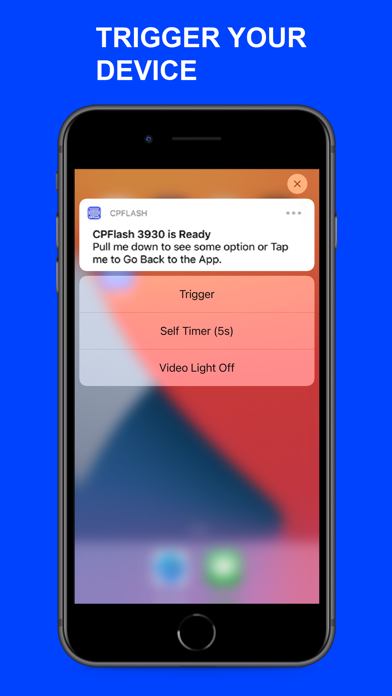
Trigger your Device using the App's Notification Actions. Make sure the Notification is Started. Once you minimize the App, Open the Camera App and wait for the Notification Informing you that your Device is Ready. Drag it down to see the Actions then click the Trigger button. You can also delay the Trigger by clicking the Self Timer button or Turn ON/OFF the Video Light Fx.
Each subscription will automatically renew 3 days before the expiration date for
the same time period. Subscriptions can be cancelled at any time before the renewal.