Download Android Apps and Games
AppBrain
  • Apps
  • Apps being viewed right now Trending apps today Most popular apps All-time most downloaded apps Top rated apps iPhone and iPad apps
  • Intelligence ▾
    Intelligence overview → Track any Android app or your whole market
    Track & analyze
    Keyword Tracker & OptimizerTrack & improve Play rankings App Performance ReportOne-off PDF for any app StatisticsFree Android & Play market stats
    Promote your app
    Featured Apps App Links
  • Intelligence
  • Pricing
  • Dashboard
  • Sign up
  • Log in
Last updated on: 2026-09-22
App Store Apps > Education > Crammer: study in one night
Crammer: study in one night icon

Crammer: study in one night

24
Pranoy Chowdhury
0.00
0 reviews
Free

Crammer: study in one night Screenshot 1 of 10
Crammer: study in one night Screenshot 2 of 10
Crammer: study in one night Screenshot 3 of 10
Crammer: study in one night Screenshot 4 of 10
Crammer: study in one night Screenshot 5 of 10
Crammer: study in one night Screenshot 6 of 10
Crammer: study in one night Screenshot 7 of 10
Crammer: study in one night Screenshot 8 of 10
Crammer: study in one night Screenshot 9 of 10
Crammer: study in one night Screenshot 10 of 10
Download from the App Store

About Crammer: study in one night

Crammer: study in one night is an education app developed by Pranoy Chowdhury.

User Ratings

The app has no ratings yet.

App Information

Crammer: study in one night is FREE to download. The download size is 8.73 MB. The latest version available is 24. The last update was on September 19, 2026.

Technical Requirements

The app has a content rating of Everyone. The app has been available on the App Store since June 2026.

Description
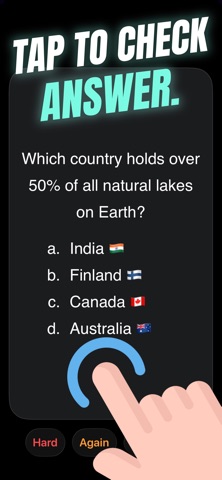
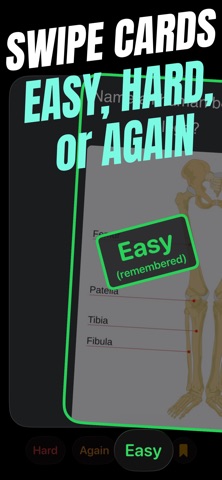
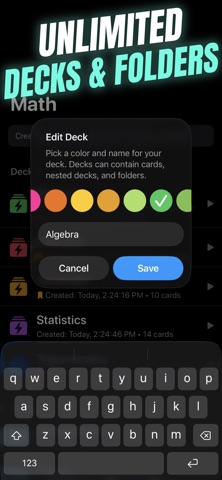
Crammer lets you create unlimited flashcards, decks and folders for every subject for free. It's the most efficient way to memorize your study material before quizzes and exams. It drastically improves your learning speed. It uses an advanced spaced repetition and smart active recall algorithm to ensure that you review flashcards right before you may forget them. After reviewing a flashcard, you tap it to reveal the answer on the back of the card. You swipe right if you easily remembered it, left if you forgot it, or down if it took some effort and would like to review again. Crammer's algorithm will show you harder cards first and more often to help you really optimize your memory and prevent you from forgetting your study materials. Practice it a few times before your quizzes and exams to remember the study material.

Here's how to use Crammer in your studies:

- Create flashcards by either manually typing the Front and Back of the card or importing multiple cards in a long text (Front & Back separated by 3 hyphens --- and each card separated by 3 equal signs ===).

The Front can have your question and the Back can have the answer.

The Front & Back text supports Markdown and also LaTeX for Math formulas. So you can format text such as bold, italics, text color, text highlight, headings, links, images etc. You can also include diagrams (photos) in it.

To use coloured text, use curly bracket format:
{red}coloured text{}
or
{#FF0000}coloured text{}

To highlight text, use square bracket format:
[red]highlighted text[]
or
[#FF0000]highlighted text[]

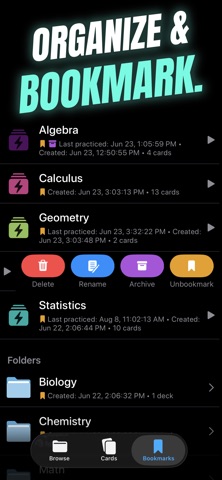
- Organize your flashcards into decks and folders for each subject as needed. Cards can belong to multiple decks at the same time. Decks and folders can also have subdecks and subfolders.

- Practice decks or just bookmarked cards.

- After reviewing the question on the front of the card, tap the card to flip it and reveal the answer on the back. Swipe RIGHT if the card was easy, LEFT if it you forgot it, or DOWN if you remembered but took some effort and would like to review again.

- Once the whole deck is practiced, Crammer tells you how long you took to practice, and how many cards were hard.

- Once you have reviewed a deck, you can instantly practice again with just a single tap.

- Crammer notifies you if there's some card which you are constantly failing as it might be poorly designed. You can edit it to improve it. Make sure to swipe and reset its practice history after such fixes.

- Swipe/Right Click on Mac to Bookmark important cards, decks, and folders for easy access.

- Swipe/Right Click on Mac to Archive cards, decks, and folders which you no longer need.

- Supports multiple choice questions (e.g. a, b, c, d). Use "1." before each option in markdown and it will automatically be rendered as a list of options. A setting lets you switch between numerical or alphabetical options.

- All your decks, folders, and flashcards are seamlessly auto-synced across all your devices using iCloud. So you can create them on iPad/Mac and access them on iPhone.

- All features are free. No Ads. No subscriptions.

- Crammer is available on iPhone, iPad, and Mac.

Supported keyboard shortcuts on Mac:
- Enter or Spacebar to flip card
- Left, Down and Right arrow keys for Hard, Again, and Easy ratings
- Command + Z to undo a rating and go back to previous card
- When editing a card, right click text to add photo

Crammer lets you create unlimited flashcards, decks and folders for FREE. All features are free. A one-time only purchase gives you lifetime access to updates, supports a small indie developer, and helps me continue to develop it. No subscriptions. Thank you for your support.

Please also support me by leaving a review on the App Store.

If you have questions or new feature ideas, please email me at:

pran@pranapps.com
Show more Show less

More data about Crammer: study in one night

Price Free to download
Rating No ratings
Ranking Not ranked
Version 24
App download size 8.73 MB
Suitable for Everyone

Alternative downloads for the Crammer: study in one night app

Yet Another Flashcards App icon Yet Another Flashcards App
Gregoire Geis
0.0
Free
Speakwiz: Learn Spanish Fast icon Speakwiz: Learn Spanish Fast
Jesse Deng
0.0
Free
JustFlip: Flashcards icon JustFlip: Flashcards
DANIEL CECH
0.0
Free
BoxVitals icon BoxVitals
Christopher Sigler
5.0
Free
1 ratings
Discito: FSRS Flashcards icon Discito: FSRS Flashcards
CHRISTOPHER JAMES HINCKLEY
5.0
Free
2 ratings
Papers & Quizzes icon Papers & Quizzes
Percy Ng'uni
0.0
Free
Memoranda | Flash Cards icon Memoranda | Flash Cards
Arda Emin Cimen
0.0
Free
Minimal Flashcards icon Minimal Flashcards
Lim Sangjin
0.0
Free

More from Pranoy Chowdhury

HACK for Hacker News YC Reader icon HACK for Hacker News YC Reader
Pranoy Chowdhury
4.7
Free
1.6K ratings
Note Flash Music Sight Reading icon Note Flash Music Sight Reading
Pranoy Chowdhury
4.0
Free
957 ratings
Sudoku Extreme: Easy Hard Math icon Sudoku Extreme: Easy Hard Math
Pranoy Chowdhury
4.5
Free
826 ratings
School Timetable - class study icon School Timetable - class study
Pranoy Chowdhury
4.5
Free
438 ratings
MoodWell: moody tracker diary icon MoodWell: moody tracker diary
Pranoy Chowdhury
4.8
Free
253 ratings
Image Text OCR Photo Scanner icon Image Text OCR Photo Scanner
Pranoy Chowdhury
4.7
Free
135 ratings
Keyboard Warrior Speed Typing icon Keyboard Warrior Speed Typing
Pranoy Chowdhury
4.2
Free
119 ratings
Painteresque Photo to Sketch icon Painteresque Photo to Sketch
Pranoy Chowdhury
4.9
Free
31 ratings

Changelog of Crammer: study in one night

No changelog data

Developer information for Pranoy Chowdhury

Pranoy Chowdhury

Address:

Share Crammer: study in one night

Comments on Crammer: study in one night for iOS

We don't have enough comments to show example comments. Please check back later.

App Store Rankings for Crammer: study in one night

This app is not ranked

Technologies used by Crammer: study in one night

Today's trending apps Apps on sale Popular Education Apps Apps other people are watching Top new apps
Yet Another Flashcards App icon Yet Another Flashcards App
Speakwiz: Learn Spanish Fast icon Speakwiz: Learn Spanish Fast
JustFlip: Flashcards icon JustFlip: Flashcards
BoxVitals icon BoxVitals
Discito: FSRS Flashcards icon Discito: FSRS Flashcards
Papers & Quizzes icon Papers & Quizzes
Memoranda | Flash Cards icon Memoranda | Flash Cards
Minimal Flashcards icon Minimal Flashcards

Back to top
AppBrain Intelligence premium content

Subscribe now to get full and unlimited access to AppBrain Intelligence. You'll have access to:

  • App Intelligence dashboard (performance timeline, competitor comparison, country rankings, insight cards)
  • Detailed ranking data per app
  • Full timeline per developer
  • Device market shares data per country
  • Unlimited keyword tracking
1 Month

$75/mo
(billed every month)

SAVE 0%
Subscribe
3 Months

$65/mo
($195 billed every 3 months)

SAVE 13%
Subscribe
1 Year

$57.50/mo
($690 billed every year)

SAVE 23%
Subscribe
Each subscription will automatically renew 3 days before the expiration date for the same time period. Subscriptions can be cancelled at any time before the renewal.

AppBrain is a directory focused on discovering great apps and games. We give statistics, rankings and search options that Google Play and the App Store don't have. All trademarks are owned by their respective owners. AppBrain doesn't offer APKs or binaries, and always lets users install the official version from Google Play or the App Store.

More apps

  • Top Android apps being viewed
  • Dino Hunter 3D - Hunting Game
  • Cartoonify: AI Photo Editor stats
  • Wishly - Manifest anything

App statistics

  • Android statistics
  • Google Play Developer stats
  • Trending Android Apps
  • Trending iOS apps
  • Top popular Apps
  • Buy the best Android phone

About AppBrain

  • Contact
  • Privacy
  • Documentation
  • DMCA takedowns
  • Articles
  • Blog
  • Android app Install tracking and attribution options for the AppBrain ad network
© 2010-2026 - AppBrain