

CreatorCut is made and published by Rohit Kumar. AppBrain is an independent app data site and isn't affiliated with Rohit Kumar. The app name, icon, screenshots and description belong to Rohit Kumar and are shown as published on the App Store.
AppBrain's verdict
- Last updated
- August 17, 2026
- Size
- 1.19 MB
User feedback
Ratings and reviews on the App StoreComments on CreatorCut for iOS
We don't have enough comments to show example comments. Please check back later.
Store listing
By Rohit Kumar, from the App Store


Description by Rohit Kumar Written by the developer, not by AppBrain. Click to read.
CreatorCut films a single wide take and hands you two finished videos: a vertical 9:16 cut that follows your face in real time, and the full 16:9 landscape version — untouched. Stop choosing between a vertical post and a widescreen upload. Shoot it once, post both.
ONE TAKE, TWO CUTS
• Records a wide 16:9 master, then renders a face-tracked portrait crop that stays locked on you as you move.
• Choose your output: portrait only, landscape only, or both. Unwanted renders are skipped.
• Renders happen after you stop — typically faster than realtime on Apple silicon.
LOOKS, BAKED IN — NEW
• Nine color grades: Vivid and Dramatic, each with warm and cool variants, plus Mono, Silvertone, and Noir. Tap a swatch and the grade appears in the viewfinder.
• Beautify masks to skin tone, so your face softens and your background stays sharp. A slider from 0 to 100%, not a preset.
• Both render into the finished files. What you saw when you pressed record is what lands in your library.
• Free on iPhone and Mac.
A TELEPROMPTER THAT READS YOU (CREATORCUT PRO)
• On-device speech recognition scrolls the script at your speaking pace. Slow down to think and it waits; find your rhythm and it keeps up.
• Adjustable words-per-minute, font size, column width, and opacity.
• Overlay the script on the preview, or on Mac pop it out to a second display so you look down the lens — not down at a keyboard.
YOUR PHONE AND YOUR MAC
• Full feature parity across iPhone and Mac.
• iPhone: pinch-to-zoom, tap-to-focus, a tappable output-format chip, live composition guides, and a 3/5/10-second countdown.
• Mac: side-by-side split preview and a floating teleprompter window.
• Live audio metering and face tracking on both.
PRIVATE BY DESIGN
• No accounts. No cloud. No analytics. Nothing to opt out of, because nothing is collected.
• Speech recognition, face tracking, and every filter run on-device.
• Video is encoded locally. Your footage never leaves the device.
• iPhone saves straight to Photos; Mac saves to a folder you choose.
WHAT IT DOESN'T DO — on purpose
• No face reshaping. No slimming, no eye enlarging, no AR masks. Beautify softens skin texture and leaves your features exactly where they are — you still look like you.
• No timeline editor. Cut in your editor of choice.
• No AI captions, summaries, or rewriting. Just your words.
CREATORCUT PRO
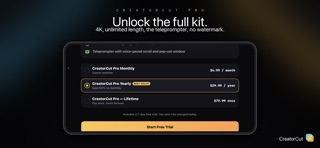
The free tier includes dual-output capture, face tracking, all nine color looks, beautify, 1080p recording, and takes up to 60 seconds. Upgrade to Pro for:
• Unlimited recording length
• Up to 4K (where your camera supports it)
• The teleprompter — overlay, pop-out, and voice-pace
• Watermark control — move it, restyle it, or remove it
Pro is available monthly or yearly (each with a 7-day free trial), or as a one-time, family-shareable Lifetime purchase.
SUBSCRIPTION TERMS
CreatorCut Pro Monthly ($4.99) and Yearly ($29.99) are auto-renewable subscriptions, each with a 7-day free trial. Lifetime ($79.99) is a one-time purchase. Payment is charged to your Apple Account at confirmation. Subscriptions renew automatically unless auto-renew is turned off at least 24 hours before the current period ends; your account is charged for renewal within 24 hours before the period ends. Manage or cancel in your App Store account settings. Any unused portion of a free trial is forfeited when you buy a subscription. Prices may vary by region.
Terms of Use: https://rohitsainier.github.io/pages/creatorcut/terms/
Privacy Policy: https://rohitsainier.github.io/pages/creatorcut/privacy/
Requires iOS 17 or macOS 14 Sonoma or later.
Safety and technology
Found in the app by AppBrain- Price
- Free
- App size
- 1.19 MB
- Content rating
- Everyone
Technologies used by CreatorCut
Releases
Updates seen on the App Store- Version
- 1.1
- Launched
- May 2026
No changelog data
Alternatives
Similar apps and more from Rohit KumarAlternatives to CreatorCut


Rankings
App Store top chartsApp Store Rankings for CreatorCut
About the app and developer
About CreatorCut
CreatorCut is a photo & video app developed by Rohit Kumar.
User Ratings
The app has no ratings yet.
App Information
CreatorCut is freely available from the App Store. The app size is 1.19 MB. The latest version available is 1.1. The last update was on August 17, 2026.
Technical Requirements
The app has a content rating of Everyone. The app has been available on the App Store since May 2026.
Developer information for Rohit Kumar
Address:
Frequently asked questions about CreatorCut
Is CreatorCut free?
Yes. CreatorCut is free on the App Store.
Is CreatorCut still available?
Yes. CreatorCut is on the App Store, and the last update we saw was on August 17, 2026.
How large is CreatorCut?
CreatorCut is 1.19 MB.
Is CreatorCut suitable for children?
App Store rates the content of CreatorCut as suitable for everyone.
Who made CreatorCut?
CreatorCut was developed by Rohit Kumar. It is listed in the photo & video category on the App Store.
What are the best alternatives to CreatorCut?
People looking at CreatorCut also look at these photo & video apps: iPrompter Studio by StatsKey, Wandershot, 1Take: UGC Video Teleprompter, Whisprompt: Teleprompter, Active Follow Cam.