

Crest Browser is made and published by Paul Davis. AppBrain is an independent app data site and isn't affiliated with Paul Davis. The app name, icon, screenshots and description belong to Paul Davis and are shown as published on the App Store.
AppBrain's verdict
New- Rating on App Store
- 4.71
- 7 ratings
- Last updated
- October 13, 2026
Crest Browser came out 53 days ago. It doesn't have enough ratings yet to judge what users think.
Rankings
App Store top chartsApp Store Rankings for Crest Browser
Competitors
Similar apps and more from Paul DavisAlternatives to Crest Browser


More from Paul Davis


Releases
Updates seen on the App Store- Version
- 0.8.0
- Launched
- September 2026
No changelog data
User feedback
Ratings and reviews on the App StoreComments on Crest Browser for iOS
We don't have enough comments to show example comments. Please check back later.
Technology
Found in the app by AppBrain- Price
- Free
- App size
- 58.7 MB
- Content rating
- High
Technologies used by Crest Browser
About the app and developer
About Crest Browser
Crest Browser is an utilities app developed by Paul Davis.
What is the rating of Crest Browser?
Crest Browser is rated 4.71 out of 5 stars, based on 7 ratings.
Is Crest Browser free?
Crest Browser is free. The app size is 58.72 MB. The latest version available is 0.8.0. The last update was on October 13, 2026.
What are the requirements for Crest Browser?
The app has a content rating of High Maturity. The app has been available on the App Store since September 2026.
Developer information for Paul Davis
Address:
Store listing
By Paul Davis, from the App Store


Description by Paul Davis Written by the developer, not by AppBrain. Click to read.
KEEP YOUR ACCOUNTS SEPARATE
Each Space has its own tabs, cookies, website data, history, passwords, and site permissions. Stay signed in to different accounts on the same website. Switch from work to personal browsing without carrying the wrong session with you.
GIVE EVERY TAB A PLACE
Pin the sites you use every day. Save pages in folders. Keep today's tabs close and completed work in the archive. Select and move tabs, folders, and Split View groups together. On iPhone, bring in the sidebar with a gesture; on iPad, keep it beside your page.
MAKE IT YOUR OWN
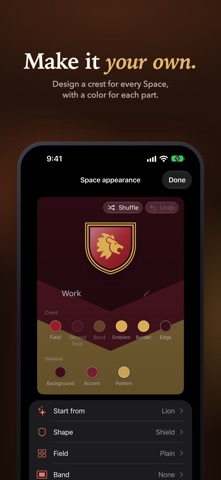
Start from Winter, Lion, or another template in Crest Studio, then choose a color for each part of the crest and the sidebar. Choose a crest, emoji, monogram, or symbol. Appearance settings adjust the window border, sidebar material, tab corners, borders, and default page zoom.
KEEP RELATED PAGES TOGETHER
Group two to four pages in Split View. On iPad, browse them side by side and resize the columns. On iPhone, swipe across the compact toolbar to move between pages in the group. Peek lets you check supported links without losing your place, then keep the page as a tab when you need it.
TOOLS FOR EVERYDAY BROWSING
Choose one default search for every Space and another for Private Browsing, or pick one for a single Space. Search from a new tab to find the pages and tabs you use most. Translate webpages on device with Apple's Translation framework. Read supported articles in Reader, find text on a page, adjust zoom, share links, and export pages. Content blocking and site permissions give you control over each Space. Language availability varies, and translation may require a language download.
PRIVATE WHEN YOU NEED IT
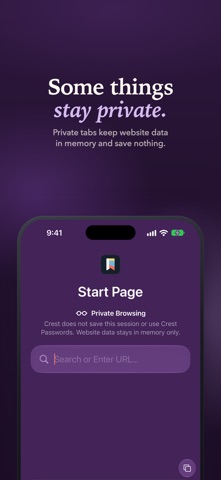
Private Browsing uses temporary website storage. Private tabs stay out of saved history, restoration, archive, and sync. Crest does not run an advertising SDK, collect browsing analytics, or require a Crest account.
PICK UP ON ANOTHER DEVICE
Optional iCloud sync keeps supported Space and tab organization available across your Apple devices through your private iCloud database. Crest is also available for Mac.
Crest is free and open source, built with Apple's WebKit. Requires iOS 26.1 or iPadOS 26.1 or later. Some website features and integrations vary by device.