

Crew | Manage Simply
Crew | Manage Simply is made and published by Hayden Davidson. AppBrain is an independent app data site and isn't affiliated with Hayden Davidson. The app name, icon, screenshots and description belong to Hayden Davidson and are shown as published on the App Store.
AppBrain's verdict
- Last updated
- November 2, 2021
Rankings
App Store top chartsApp Store Rankings for Crew | Manage Simply
Competitors
Similar apps and more from Hayden DavidsonAlternatives to Crew | Manage Simply




Releases
Updates seen on the App Store- Version
- 1.0
- Launched
- November 2021
No changelog data
User feedback
Ratings and reviews on the App StoreComments on Crew | Manage Simply for iOS
We don't have enough comments to show example comments. Please check back later.
Technology
Found in the app by AppBrain- Price
- Free
- App size
- 11.2 MB
- Content rating
- Everyone
Technologies used by Crew | Manage Simply
About the app and developer
About Crew | Manage Simply
Crew | Manage Simply is a productivity app developed by Hayden Davidson.
User Ratings
The app has no ratings yet.
App Information
Crew | Manage Simply is freely available from the App Store. The app size is 11.20 MB. The latest version available is 1.0. The last update was on November 2, 2021.
Technical Requirements
The app has a content rating of Everyone. The app has been available on the App Store since November 2021.
Developer information for Hayden Davidson
Address:
Store listing
By Hayden Davidson, from the App Store




Description by Hayden Davidson Written by the developer, not by AppBrain. Click to read.
Features
- Create your business
- Create clients
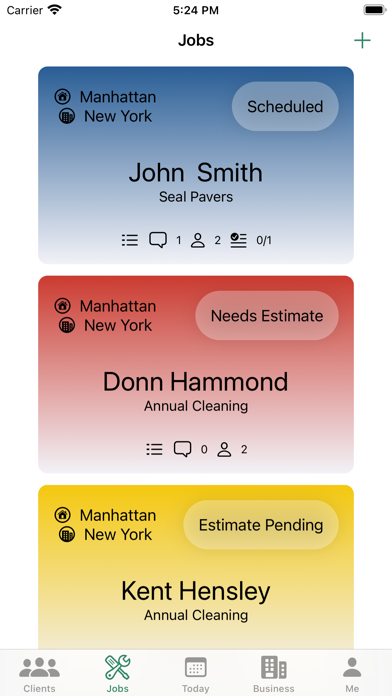
- Create Jobs
- Invite crew members to join your business
- Manage crew member roles and permissions
- Remove crew members from your business
- Easily contact your crew members through the app
- Create custom crews and easily assign them to jobs.
- Create your own materials list and easily add individual items to a job
- Add pictures and comments to each job or client to keep track of important notes.
- Create to-do items for each job.
- See a log of all activity on a job or client card.
- Easily create a schedule and send shift requests to individual crew members or whole crews.
- Easily get directions to the next Job
- Manage job status like “needs an estimate” or “scheduled” with the push of a button on the job card.
- Easily see a your schedule
Future updates
- Create and send estimates
- Create and send invoices
- Time tracking for crew members
- Barcode scanning for quick addition of materials
- Web Client for more advanced scheduling
- Login/Signup with Apple