CrimeSceneCapture is a lifestyle app developed by Tomoyuki Okawa.
User Ratings
The app has no ratings yet.
App Information
CrimeSceneCapture is freely available from the App Store. The app size is 82.70 MB. The latest version available is 1.1.2. The last update was on October 15, 2026.
Technical Requirements
The app has a content rating of Everyone. The app has been available on the App Store since July 2025.
CrimeSceneCapture is made and published by
Tomoyuki Okawa.
AppBrain is an independent app data site and isn't affiliated with Tomoyuki Okawa.
The app name, icon, screenshots and description belong to Tomoyuki Okawa and are shown as published on the App Store.
Description by Tomoyuki Okawa(from the App Store)
Watching crime-solving stories on the Internet, we know how important it is to meticulously collect evidence at the crime scene. Failing to do so could lead to an acquittal even if an obvious suspect were indicted. So each piece of evidence must be photographed with a numbered marker before it's bagged. What if you find an important piece of physical evidence after forensic photographers have left? Call and bring them back to the scene again? What can you do about it if all you have right now is an iPhone in your pocket?
CrimeSceneCapture is an AR (augmented reality) app that lets you photo-document evidence at crime scenes with your iOS device (iPhone & iPad). Use CrimeSceneCapture to project numbered cubic markers on the camera screen so that you can photo-document evidence. Simply, tap the camera screen to set a numbered cubic marker. When you are done, tap the camera button to take a screenshot of the camera screen and save it to Photos.
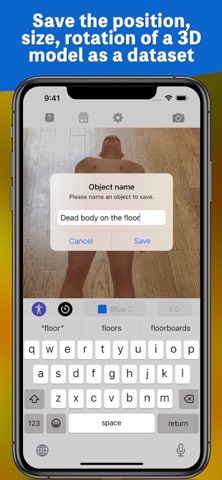
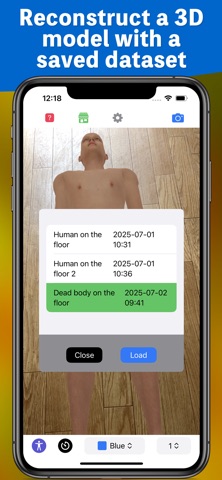
- Features - 1. Project as many as 999 cubic markers on the camera screen at a time. Simply, tap the camera screen to set a cubic marker. 2. Tap an existing cubic marker to remove from the camera screen. 3. Select the height of cubic markers. 4. Select the color of the number on cubic markers. 5. Tap the camera button on the toolbar menu at the top to take a screenshot and save it to Photos. 6. Automatically increment marker number or set an arbitrary number to a next cubic marker. 7. Use a countdown timer to delay in taking a screenshot. 8. Project cubic markers with a color of your selection on the camera screen. 9. Project one or more built-in 3D objects (body, knife, pistol, ruler) on the camera screen. 10.Change the position, size, rotation of the selected 3D object. 11.Save the position, size, rotation of the current 3D object as a dataset. 12.Recontruct a 3D object from a saved dataset. 13.The app comes with an 8-page user’s guide. Tap the ? button on the toolbar menu.
- System requirements - 1. iOS 17.0 or higher 2. iPhone or iPad
- Limitations - 1. The number of cubic markers that the user can project on the camera screen is limited to 5 without an in-app purchase (Infinite number of markers). 2. The app becomes highly CPU-intensive when the user projects one or more 3D objects on the camera screen. The use of 3D objects (especially, pistol) on the camera screen may not be suitable for some iOS devices. 3. Since it's CPU-intensive, continuous use of this app can completely drain your device's battery in a matter of several hours or less. 4. The app seems to require some warmup time. When you tap the camera screen right after you start up the app, it may be ignored. 5. You cannot set cubic markers anywhere on the camera screen. Your tap is likely to succeed on a horizontal surface.
Each subscription will automatically renew 3 days before the expiration date for
the same time period. Subscriptions can be cancelled at any time before the renewal.