AppBrain
AppBrain
  • Apps
  • Apps being viewed right now Trending apps today Most popular apps All-time most installed apps Top rated apps iPhone and iPad apps
  • Intelligence ▾
    Intelligence overview → Track any Android app or your whole market
    Track & analyze
    Keyword Tracker & OptimizerTrack & improve Play rankings App Performance ReportOne-off PDF for any app StatisticsFree Android & Play market stats
    Promote your app
    Featured Apps App Links
  • Intelligence
  • Pricing
  • Dashboard
  • Sign up
  • Log in
App Store Apps > Utilities > Crisp Document Scanner
App profile & analytics · Utilities · Data updated 2026-10-13
Crisp Document Scanner icon

Crisp Document Scanner

by Agimem · Free · Version 2.0
Availability On the App Store since February 2026 ↗
Rating on App Store
–
Rating
–
0 reviews
Best rank
–
not in the top lists
Last updated
February 16, 2026
2.0

Crisp Document Scanner is made and published by Agimem. AppBrain is an independent app data site and isn't affiliated with Agimem. The app name, icon, screenshots and description belong to Agimem and are shown as published on the App Store.

About Crisp Document Scanner

Crisp Document Scanner is an utilities app developed by Agimem.

User Ratings

The app has no ratings yet.

App Information

Crisp Document Scanner is freely available from the App Store. The app size is 3.07 MB. The latest version available is 2.0. The last update was on February 16, 2026.

Technical Requirements

The app has a content rating of Everyone. The app has been available on the App Store since February 2026.

Description by Agimem (from the App Store)
Crisp Document Scanner is built on a simple idea: scanning a document shouldn't require an account, a subscription, or sending your data to a third-party server. All processing happens on your iPhone or iPad, using Apple's own frameworks. Your scans are saved to iCloud and accessible from the Files app on all your devices. No compromises.

SCAN IN ONE TAP
Open the app and tap Scan. That's it. Automatic edge detection finds the edges of your document and perspective correction straightens it instantly. Scan a single receipt or a 50-page contract in one session. The camera adapts to your environment and captures sharp, clean pages every time.

SEARCHABLE PDFs WITH OCR
Every scan is automatically processed with on-device text recognition. The result: PDFs where you can search for any word, select text, and copy it to other apps. Looking for an amount on a 20-page statement? Just search. Need to copy an address from a letter? Select and copy. OCR supports English, Spanish, and French, with automatic language detection. Even handwritten text is recognized.

PERFECT FOR EVERYDAY DOCUMENTS
- Invoices and bills
- Receipts and purchase confirmations
- Bank and credit card statements
- Contracts and agreements
- Letters and official correspondence
- Meeting notes and memos
- Certificates and forms
- Any paper document you want to digitize

SAVED TO iCLOUD
All your scans are saved directly to iCloud and accessible from the Files app on any of your Apple devices. Browse, rename, organize into folders, and manage your documents the way you already manage all your other files. No proprietary format, no lock-in — just standard PDF files in your iCloud Drive.

SHARE INSTANTLY
Send your scans anywhere. Use AirDrop to share with nearby devices, attach to an email or message, or share directly from the Files app. Works with every app that accepts PDF files.

PRIVATE BY DESIGN
This is not just a feature — it is the foundation of the app.
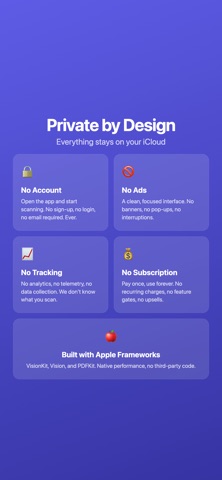
- No account required. Open the app and start scanning.
- No third-party servers. Your documents go to your iCloud, not ours.
- No analytics or tracking. We don't know what you scan.
- No ads. A clean interface, nothing else.
- No subscription. Pay once, use forever.
All text recognition and document processing happens locally using Apple's native Vision and VisionKit frameworks. Your documents are yours and yours alone.

BUILT WITH APPLE FRAMEWORKS
Document Scanner relies entirely on Apple's native technologies: VisionKit for camera scanning, Vision for text recognition, PDFKit for PDF generation, and iCloud for seamless sync. This means fast performance, low battery usage, and seamless integration with iOS. No third-party libraries, no external dependencies, no surprises.
Show more Show less

More data about Crisp Document Scanner

Price Free
Rating No ratings
Ranking Not ranked
Version 2.0
App size 3.07 MB
Suitable for Everyone

Screenshots

Crisp Document Scanner Screenshot 1 of 4
Crisp Document Scanner Screenshot 2 of 4
Crisp Document Scanner Screenshot 3 of 4
Crisp Document Scanner Screenshot 4 of 4
Screenshots by Agimem, from the the App Store listing
Official page on the App Store

Changelog of Crisp Document Scanner

No changelog data

Developer information for Agimem

Agimem

Address:

Share Crisp Document Scanner

Comments on Crisp Document Scanner for iOS

We don't have enough comments to show example comments. Please check back later.

App Store Rankings for Crisp Document Scanner

This app is not ranked

Technologies used by Crisp Document Scanner

Today's trending apps Price drops on Google Play Top new apps Popular Utilities Apps Apps other people are watching
More hot apps 🔥
Overview Reviews Rankings Technology
AppBrain Intelligence premium content

Subscribe now to get full and unlimited access to AppBrain Intelligence. You'll have access to:

  • App Intelligence dashboard (performance timeline, competitor comparison, country rankings, insight cards)
  • Detailed ranking data per app
  • Full timeline per developer
  • Device market shares data per country
  • Unlimited keyword tracking
1 Month

$75/mo
(billed every month)

SAVE 0%
Subscribe
3 Months

$65/mo
($195 billed every 3 months)

SAVE 13%
Subscribe
1 Year

$57.50/mo
($690 billed every year)

SAVE 23%
Subscribe
Each subscription will automatically renew 3 days before the expiration date for the same time period. Subscriptions can be cancelled at any time before the renewal.

AppBrain is an app data site, we track rankings, ratings, installs for all apps and games on Google Play and the App Store. AppBrain doesn't host app files or APKs, all install links go directly to the official store. All trademarks are owned by their respective owners.

More apps

  • Top Android apps being viewed
  • 99: Rides, Food, Pay
  • FingerLens: Magic Gesture for Android
  • Paranormal Observation

App statistics

  • Android statistics
  • Google Play Developer stats
  • Trending Android Apps
  • Trending iOS apps
  • Top popular Apps
  • Buy the best Android phone
  • Buy & sell app businesses

About AppBrain

  • Contact
  • Privacy
  • Documentation
  • DMCA takedowns
  • Articles
  • Blog
  • The AppBrain advertising system
© 2010-2026 - AppBrain