

Cronus - AI Time Tracker
Cronus - AI Time Tracker is made and published by Moritz Wallawitsch. AppBrain is an independent app data site and isn't affiliated with Moritz Wallawitsch. The app name, icon, screenshots and description belong to Moritz Wallawitsch and are shown as published on the App Store.
AppBrain's verdict
- Last updated
- October 4, 2026
Rankings
App Store top chartsApp Store Rankings for Cronus - AI Time Tracker
Competitors
Similar apps and more from Moritz WallawitschAlternatives to Cronus - AI Time Tracker


Releases
Updates seen on the App Store- Version
- 1.0.3
- Launched
- September 2026
No changelog data
User feedback
Ratings and reviews on the App StoreComments on Cronus - AI Time Tracker for iOS
We don't have enough comments to show example comments. Please check back later.
Technology
Found in the app by AppBrain- Price
- Free
- App size
- 31.6 MB
- Content rating
- Everyone
Technologies used by Cronus - AI Time Tracker
About the app and developer
About Cronus - AI Time Tracker
Cronus - AI Time Tracker is a productivity app developed by Moritz Wallawitsch.
User Ratings
The app has no ratings yet.
App Information
Cronus - AI Time Tracker is freely available from the App Store. The app size is 31.58 MB. The latest version available is 1.0.3. The last update was on October 4, 2026.
Technical Requirements
The app has a content rating of Everyone. The app has been available on the App Store since September 2026.
Developer information for Moritz Wallawitsch
Address:
Store listing
By Moritz Wallawitsch, from the App Store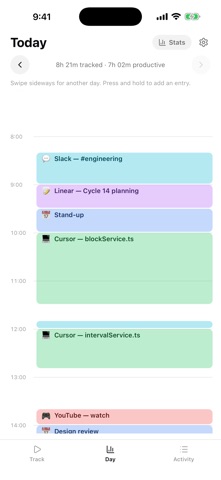
Description by Moritz Wallawitsch Written by the developer, not by AppBrain. Click to read.
The Mac app watches what you actually work on and builds your day for you, with no timers to start and nothing to remember. This app puts that day in your pocket, and adds the two things a laptop cannot see: the time you spend away from it, and the time you spend on your phone.
SEE WHERE YOUR TIME ACTUALLY GOES
Open the app and today is already drawn: every block of work, every distraction, to scale. Pinch to zoom into a busy afternoon, swipe sideways to compare it to yesterday. No stopwatch, no tags to maintain, no timesheet to fill in on Friday.
FIX A CATEGORY IN ONE TAP
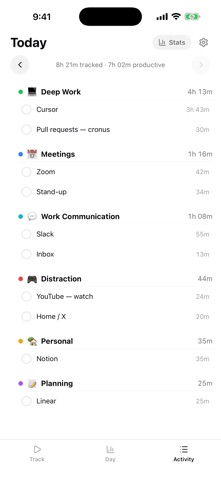
Cronus is context-aware rather than rule-based, because a rule cannot know that half an hour on LinkedIn was recruiting and the other half was doom scrolling. When it gets one wrong, tap the block and pick the right category. The correction stands from that day onward, and your Mac follows it.
LOG THE TIME YOU WERE NOT AT A COMPUTER
A conference, a coffee, a walk that turned into the best thinking of the week. Start an entry from the Track tab and stop it when you are done, or press and hold anywhere on the timeline to fill in a stretch you already spent.
ADD YOUR PHONE'S DISTRACTIONS, IF YOU WANT THEM
Instagram at 11pm is part of your day whether or not it happened on a laptop. Name an app, pick it once in the Screen Time picker iOS shows you, and the time you spend there lands on the same calendar as everything else. This is entirely opt-in and entirely specific: Cronus only ever sees the apps you point it at, it never gets a list of what is on your phone, and the names it stores are the names you typed.
THE WEEK AT A GLANCE
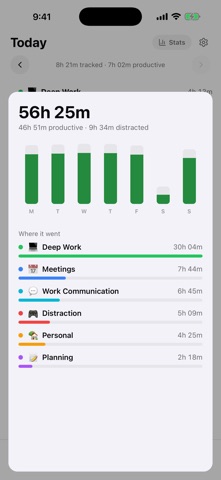
Seven days of bars, your categories ranked biggest first, and the apps and sites inside each one. Select a run of them and move them all to another category at once.
WHAT YOU NEED
Cronus for iPhone requires a Cronus account and the Cronus app for Mac, which is where the automatic tracking happens. The Mac app is free for 21 days of actual use, days you do not open it do not count, and $6 a month after that. There is no purchase inside this app.
ON PRIVACY
Cronus never captures, saves or transmits an image of your screen, on any platform. On the phone, the only thing measured is how long you spent in the specific apps you added yourself, and Apple's Screen Time API is built so that we cannot learn anything else: iOS hands the app an opaque token, never an app name, so what reaches our server is the label you chose and a duration. Screen Time access is optional and can be revoked in Settings at any time.
Read the full policy at https://cronushq.com/privacy