

CropCamera
CropCamera is made and published by Shinji Nishijima. AppBrain is an independent app data site and isn't affiliated with Shinji Nishijima. The app name, icon, screenshots and description belong to Shinji Nishijima and are shown as published on the App Store.
AppBrain's verdict
- Rating on App Store
- 5.00
- 1 ratings
- Last updated
- October 3, 2026
- Size
- 11.9 MB
It doesn't have enough ratings yet to judge what users think.
User feedback
Ratings and reviews on the App StoreComments on CropCamera for iOS
We don't have enough comments to show example comments. Please check back later.
Store listing
By Shinji Nishijima, from the App Store

Description by Shinji Nishijima Written by the developer, not by AppBrain. Click to read.
Frame everyday scenes and travel memories with your favorite composition and color, and transform each moment into something unforgettable.
This camera app lets you shoot exactly as you see through a camera viewfinder. Crop your composition in real time and capture it with your own custom look—so your photos are ready the moment you press the shutter. No editing required.
Features
* Choose from multiple focal lengths (35mm equivalent*) as if you’re switching between prime lenses on a camera.
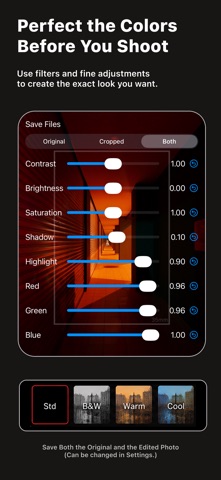
* Select from four beautifully crafted filters: Std, B&W, Warm, and Cool.
* Fine-tune the contrast, saturation, highlights, and shadows of each filter to create your own signature look.
* Record video instantly by simply pressing the red REC button—no need to switch camera modes.
* Capture Live Photos.
* Adjust the aperture (f-stop) to create beautiful background blur.
* Record videos in 4K or Full HD at 30 fps or 24 fps.
* Turn HDR (High Dynamic Range) capture on or off.
* Take photos with a silent shutter.
* Save both your customized photo and the original unedited image at the same time (optional in Settings).
How to Use
1. Select a focal length (35mm equivalent*).
2. Check the semi-transparent framing guide.
* Double-tap the screen to zoom into the selected frame for a closer preview.
3. Compose your shot.
4. Tap the subject to lock focus.
5. Adjust the exposure (EV).
6. Press the shutter button.
Notes
* Photos are saved to Apple’s built-in Photos app.
* This app does not include an image preview gallery. Please use the Photos app to view your captured photos.
* Videos are always recorded in a 16:9 aspect ratio, regardless of the selected photo aspect ratio.
* Photos are saved after being cropped to the selected frame. As a result, image resolution may be reduced at certain focal lengths. Please keep this in mind if you plan to print your photos.
* Focal lengths are approximate 35mm-equivalent values and are provided for reference only.
Safety and technology
Found in the app by AppBrain- Price
- $2.99
- App size
- 11.9 MB
- Content rating
- Everyone
Technologies used by CropCamera
Releases
Updates seen on the App Store- Version
- 3.0.1
- Launched
- March 2022
No changelog data
Alternatives
Similar apps and more from Shinji NishijimaAlternatives to CropCamera






More from Shinji Nishijima


Rankings
App Store top chartsApp Store Rankings for CropCamera
About the app and developer
About CropCamera
CropCamera is a photo & video app developed by Shinji Nishijima.
User Ratings
CropCamera is rated 5.00 out of 5 stars. The rating is based on one rating ratings.
App Information
CropCamera costs $2.99. The app size is 11.86 MB. The latest version available is 3.0.1. The last update was on October 3, 2026.
Technical Requirements
The app has a content rating of Everyone. The app has been available on the App Store since March 2022.
Developer information for Shinji Nishijima
Address: