AppBrain
AppBrain
  • Apps
  • Apps being viewed right now Trending apps today Most popular apps All-time most installed apps Top rated apps iPhone and iPad apps
  • Intelligence ▾
    Intelligence overview → Track any Android app or your whole market
    Track & analyze
    Keyword Tracker & OptimizerTrack & improve Play rankings App Performance ReportOne-off PDF for any app StatisticsFree Android & Play market stats
    Promote your app
    Featured Apps App Links
  • Intelligence
  • Pricing
  • Dashboard
  • Sign up
  • Log in
App Store Apps > Productivity > Cross Paste: Phone to PC Sync
Cross Paste: Phone to PC Sync icon

Cross Paste: Phone to PC Sync

2.2.0
Mobile Tech Media, LLC
3.67
3 reviews
Free

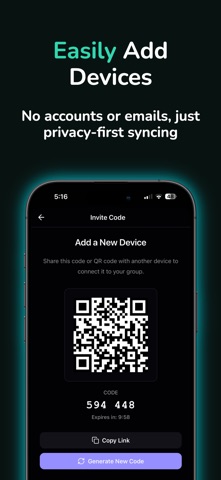
Cross Paste: Phone to PC Sync Screenshot 1 of 4
Cross Paste: Phone to PC Sync Screenshot 2 of 4
Cross Paste: Phone to PC Sync Screenshot 3 of 4
Cross Paste: Phone to PC Sync Screenshot 4 of 4
Screenshots by Mobile Tech Media, LLC, from the the App Store listing
View on the App Store Also on Google Play

About Cross Paste: Phone to PC Sync

Cross Paste: Phone to PC Sync is a productivity app developed by Mobile Tech Media, LLC.

User Ratings

Cross Paste: Phone to PC Sync is rated 3.67 out of 5 stars. The rating is based on 3 ratings.

App Information

Cross Paste: Phone to PC Sync is freely available from the App Store. The app size is 70.40 MB. The latest version available is 2.2.0. The last update was on October 29, 2026.

Technical Requirements

The app has a content rating of Everyone. The app has been available on the App Store since December 2025.

Cross Paste: Phone to PC Sync is made and published by Mobile Tech Media, LLC. AppBrain is an independent app data site and isn't affiliated with Mobile Tech Media, LLC. The app name, icon, screenshots and description belong to Mobile Tech Media, LLC and are shown as published on the App Store.

Description by Mobile Tech Media, LLC (from the App Store)
Copy on your iPhone, paste on your Windows PC. With Pro, send files and photos up to 25 MB each from your phone to your laptop. Cross Paste connects your phone and computer with one shared, end-to-end encrypted clipboard, across iPhone, iPad, Mac, Windows, Linux and the web.

No cables, no emailing yourself, no account.

WHY CROSS PASTE

• Phone to PC clipboard sync: copy text or a link on one device and access it on your other paired devices.
• Send files and photos (Pro): pick a photo, PDF or document on one device and save it on another, up to 25 MB each.
• Truly cross-platform: iPhone to Windows and Linux, not only Mac.
• No account needed: pair devices by scanning a QR code. No sign-up, no email, no password.
• End-to-end encrypted: your clipboard content, files and photos are encrypted on your device before syncing. We cannot read their contents.

FEATURES

• Clipboard sync across all your paired devices
• Clipboard history with search
• Send photos and files between devices (Pro)
• Buckets to keep clips organized
• Read copied text aloud
• Open links with one tap
• A recovery key to restore access to your group

HOW IT WORKS

1. Install Cross Paste on your phone and your computer
2. Scan the QR code to pair them
3. Copy text or a link on one device and pick it up on the other. Send files and photos with Pro.

FREE AND PRO

Cross Paste is free to use. The free version includes:
• Up to 3 paired devices
• 1 bucket
• 24 hours of clipboard history

Cross Paste Pro adds:
• Unlimited devices
• Up to 5 buckets
• Unlimited clipboard history
• Photo and file transfer between devices, up to 25 MB each

Pro on one device covers every device in your group. Choose monthly, yearly or lifetime (pay once, Pro forever). The yearly plan starts with a 7-day free trial for new subscribers.

Start with free clipboard sync. Upgrade to Pro to send files and photos between your phone and PC.

Terms of Use (EULA): https://www.apple.com/legal/internet-services/itunes/dev/stdeula/
Show more Show less

More data about Cross Paste: Phone to PC Sync

Price Free
Rating 3.67 based on 3 ratings
Ranking Not ranked
Version 2.2.0
App size 70.4 MB
Suitable for Everyone

Also available on Google Play

Cross Paste: Clipboard Sync icon Cross Paste: Clipboard Sync
Mobile Tech Media
0.0
Free
500+

Alternatives to Cross Paste: Phone to PC Sync

Orca IDE icon Orca IDE
Lovecast LLC
4.7
Free
71 ratings
Ultimate Unit Converter T icon Ultimate Unit Converter T
Tecinus
0.0
Free
Asynq Buddy: Coding agents icon Asynq Buddy: Coding agents
Zdenek Hofler
0.0
Free
Ttapp-remote icon Ttapp-remote
myoeng yoep song
0.0
Free
Vibe: Ready Web Prompts for AI icon Vibe: Ready Web Prompts for AI
Melissa Michael
0.0
Free
Appeeky: Sales Analytics icon Appeeky: Sales Analytics
WEbMOb
0.0
Free
Format JSON for Safari icon Format JSON for Safari
Pierre Stanislas
0.0
$1.99
Mitmo icon Mitmo
Evan Connelly
0.0
Free

More from Mobile Tech Media, LLC

Glento: AI Eisenhower Matrix icon Glento: AI Eisenhower Matrix
Mobile Tech Media, LLC
4.5
Free
6 ratings
Rekal - AI Voice Quiz Maker icon Rekal - AI Voice Quiz Maker
Mobile Tech Media, LLC
5.0
Free
1 ratings
ActionMind: Voice Brain Dump icon ActionMind: Voice Brain Dump
Mobile Tech Media, LLC
5.0
Free
1 ratings
Key Capture - Piano Streamer icon Key Capture - Piano Streamer
Mobile Tech Media, LLC
0.0
Free
RealAd AI: UGC Ad Maker icon RealAd AI: UGC Ad Maker
Mobile Tech Media, LLC
0.0
Free
Inkhare: Color by Number icon Inkhare: Color by Number
Mobile Tech Media, LLC
0.0
Free

Changelog of Cross Paste: Phone to PC Sync

No changelog data

Developer information for Mobile Tech Media, LLC

Mobile Tech Media, LLC

Address:

Share Cross Paste: Phone to PC Sync

Comments on Cross Paste: Phone to PC Sync for iOS

We don't have enough comments to show example comments. Please check back later.

App Store Rankings for Cross Paste: Phone to PC Sync

This app is not ranked

Technologies used by Cross Paste: Phone to PC Sync

Frequently asked questions about Cross Paste: Phone to PC Sync

Is Cross Paste: Phone to PC Sync free?

Yes. Cross Paste: Phone to PC Sync is free on the App Store.

Is Cross Paste: Phone to PC Sync still available?

Yes. Cross Paste: Phone to PC Sync is on the App Store, and the last update we saw was on October 29, 2026.

How large is Cross Paste: Phone to PC Sync?

Cross Paste: Phone to PC Sync is 70.40 MB.

Is Cross Paste: Phone to PC Sync suitable for children?

App Store rates the content of Cross Paste: Phone to PC Sync as suitable for everyone.

How do people rate Cross Paste: Phone to PC Sync?

Cross Paste: Phone to PC Sync scores 3.67 out of 5 stars, from 3 ratings on the App Store.

Who made Cross Paste: Phone to PC Sync?

Cross Paste: Phone to PC Sync was developed by Mobile Tech Media, LLC. It is listed in the productivity category on the App Store.

What are the best alternatives to Cross Paste: Phone to PC Sync?

People looking at Cross Paste: Phone to PC Sync also look at these productivity apps: Orca IDE, Ultimate Unit Converter T, Asynq Buddy: Coding agents, Ttapp-remote, Vibe: Ready Web Prompts for AI.

Today's trending apps Apps other people are watching Top new apps Popular Productivity Apps Price drops on Google Play
Orca IDE icon Orca IDE
Ultimate Unit Converter T icon Ultimate Unit Converter T
Asynq Buddy: Coding agents icon Asynq Buddy: Coding agents
Ttapp-remote icon Ttapp-remote
Vibe: Ready Web Prompts for AI icon Vibe: Ready Web Prompts for AI
Appeeky: Sales Analytics icon Appeeky: Sales Analytics
Format JSON for Safari icon Format JSON for Safari
Mitmo icon Mitmo
AppBrain Intelligence premium content

Subscribe now to get full and unlimited access to AppBrain Intelligence. You'll have access to:

  • App Intelligence dashboard (performance timeline, competitor comparison, country rankings, insight cards)
  • Detailed ranking data per app
  • Full timeline per developer
  • Device market shares data per country
  • Unlimited keyword tracking
1 Month

$75/mo
(billed every month)

SAVE 0%
Subscribe
3 Months

$65/mo
($195 billed every 3 months)

SAVE 13%
Subscribe
1 Year

$57.50/mo
($690 billed every year)

SAVE 23%
Subscribe
Each subscription will automatically renew 3 days before the expiration date for the same time period. Subscriptions can be cancelled at any time before the renewal.

AppBrain is an app data site, we track rankings, ratings, installs for all apps and games on Google Play and the App Store. AppBrain doesn't host app files or APKs, all install links go directly to the official store. All trademarks are owned by their respective owners.

More apps

  • Top Android apps being viewed
  • Reeze - Movies & TV Series stats
  • VFC - Volume Fast Control
  • WonderLang

App statistics

  • Android statistics
  • Google Play Developer stats
  • Trending Android Apps
  • Trending iOS apps
  • Top popular Apps
  • Buy the best Android phone
  • Buy & sell app businesses

About AppBrain

  • Contact
  • Privacy
  • Documentation
  • DMCA takedowns
  • Blog
  • Android App Marketing: Learn how to better market your Android app
© 2010-2026 - AppBrain