

CrossDrop: Camera & File Share
CrossDrop: Camera & File Share is made and published by Vladislav Alikov. AppBrain is an independent app data site and isn't affiliated with Vladislav Alikov. The app name, icon, screenshots and description belong to Vladislav Alikov and are shown as published on the App Store.
AppBrain's verdict
- Last updated
- April 16, 2026
Rankings
App Store top chartsApp Store Rankings for CrossDrop: Camera & File Share
Competitors
Similar apps and more from Vladislav AlikovAlternatives to CrossDrop: Camera & File Share


More from Vladislav Alikov





Also available on Google Play

Releases
Updates seen on the App Store- Version
- 1.4
- Launched
- February 2026
No changelog data
User feedback
Ratings and reviews on the App StoreComments on CrossDrop: Camera & File Share for iOS
We don't have enough comments to show example comments. Please check back later.
Technology
Found in the app by AppBrain- Price
- Free
- App size
- 169.6 MB
- Content rating
- Everyone
Technologies used by CrossDrop: Camera & File Share
About the app and developer
About CrossDrop: Camera & File Share
CrossDrop: Camera & File Share is an utilities app developed by Vladislav Alikov.
What is the rating of CrossDrop: Camera & File Share?
CrossDrop: Camera & File Share has no ratings yet.
Is CrossDrop: Camera & File Share free?
CrossDrop: Camera & File Share is free. The app size is 169.64 MB. The latest version available is 1.4. The last update was on April 16, 2026.
What are the requirements for CrossDrop: Camera & File Share?
The app has a content rating of Everyone. The app has been available on the App Store since February 2026.
Developer information for Vladislav Alikov
Address:
Store listing
By Vladislav Alikov, from the App Store



Description by Vladislav Alikov Written by the developer, not by AppBrain. Click to read.
Whether you're sending large documents to a colleague, moving photos to your computer, or streaming your mobile camera to a tablet, CrossDrop makes it instant and secure. Because everything happens locally over your WiFi network, there are no file size limits and speeds are incredibly fast.
Key Features:
• Instant Auto-Discovery: Devices find each other automatically on your network. No IP addresses to type (unless you want to!).
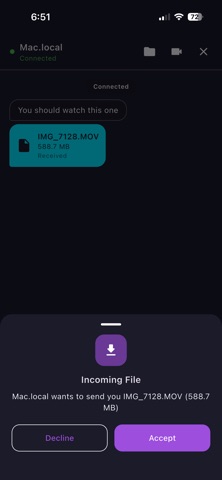
• Cross-Platform Sharing: Send files of any size between phones, tablets, and computers instantly.
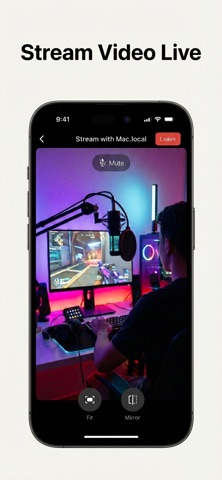
• Video Streaming: Stream your device's camera live to another screen over WebRTC.
• Local Chat: Send instant, secure messages directly between connected devices.
• QR Connect: Simply point your camera at a peer's QR code to link up instantly.
• Multiple Themes: Customize your experience with 6 beautiful themes (including Dark, Neon, and Coffee).
No cables. No internet required. Just launch CrossDrop and connect.