

CRPlayer is made and published by Kazuo Kamata. AppBrain is an independent app data site and isn't affiliated with Kazuo Kamata. The app name, icon, screenshots and description belong to Kazuo Kamata and are shown as published on the App Store.
AppBrain's verdict
- Rating on App Store
- 1.50
- 2 ratings
- Last updated
- November 3, 2023
It doesn't have enough ratings yet to judge what users think.
Rankings
App Store top chartsApp Store Rankings for CRPlayer
Competitors
Similar apps and more from Kazuo KamataAlternatives to CRPlayer






More from Kazuo Kamata




Releases
Updates seen on the App Store- Version
- 1.3.0
- Launched
- August 2022
No changelog data
User feedback
Ratings and reviews on the App StoreComments on CRPlayer for iOS
We don't have enough comments to show example comments. Please check back later.
Technology
Found in the app by AppBrain- Price
- Free
- App size
- 18.1 MB
- Content rating
- Everyone
Technologies used by CRPlayer
About the app and developer
About CRPlayer
CRPlayer is an entertainment app developed by Kazuo Kamata.
User Ratings
CRPlayer is rated 1.50 out of 5 stars. The rating is based on 2 ratings.
App Information
CRPlayer is freely available from the App Store. The app size is 18.14 MB. The latest version available is 1.3.0. The last update was on November 3, 2023.
Technical Requirements
The app has a content rating of Everyone. The app has been available on the App Store since August 2022.
Developer information for Kazuo Kamata
Address:
Frequently asked questions about CRPlayer
Is CRPlayer free?
Yes. CRPlayer is free on the App Store.
Is CRPlayer still available?
Yes. CRPlayer is on the App Store, and the last update we saw was on November 3, 2023.
How large is CRPlayer?
CRPlayer is 18.14 MB.
Is CRPlayer suitable for children?
App Store rates the content of CRPlayer as suitable for everyone.
How do people rate CRPlayer?
CRPlayer scores 1.50 out of 5 stars, from 2 ratings on the App Store.
Who made CRPlayer?
CRPlayer was developed by Kazuo Kamata. It is listed in the entertainment category on the App Store.
What are the best alternatives to CRPlayer?
People looking at CRPlayer also look at these entertainment apps: EveryMovie – Random movie, Planet Gravity - SimulateOrbit, Find my phone - Device Finder, Fluids & Particle Simulation, Lightsaber: Force of Light.
Store listing
By Kazuo Kamata, from the App Store


Description by Kazuo Kamata Written by the developer, not by AppBrain. Click to read.
Enjoy the feeling of listening to records on a record player to your heart's content.
Feature
- The jacket and turntable display are fun to look at.
- Free selection from your music library.
- 4 types of vinyl disk form from donut record to LP record.
- A cool animation of the record playback process.
- Auto start behavior like a real player.
- The front of the jacket depicts the artwork.
- Tap the edge of the jacket to flip it over to the back of the jacket.
- On the back of the jacket is a list of songs that can be selected by tapping.
- Use the slider on the back of the jacket to freely seek within the song.
- Split multiple songs into side 1 and side 2 like a real record.
- A prank of slowing down by touching the record disk with a finger.
- Scrubbing play by moving the turntable with your finger.
- Stop the tone arm with your finger and play a needle jumping prank.
- Tap the tonearm with your finger continuously to generate short repeats.
In-app purchases add the following features.
(You can try it out for 2 weeks with a free in-app purchase.)
- Auto stop behavior like a real player.
- Adjust and change single-sided/double-sided settings to your liking.
- Select rotation of 33⅓ or 45.
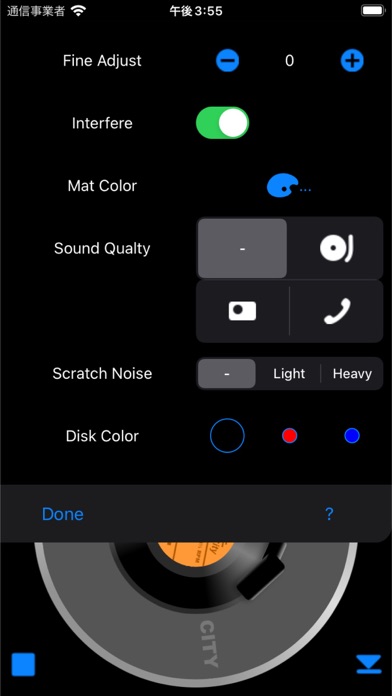
- Fine tune between 200 cents above and below in 25 cent increments.
- Add scratch noise to enhance the feeling of playing a record
- Retro sounds from portable players, transistor radios and telephones.
- Select record disk color from black, red and blue.
- Select the label color from 7 colors.
- Change the color of the turntable mat to your liking.
- You can save the record coordinated to your liking as a virtual record on apps record shelf.
Note: Playing songs outside the iPod library is not supported.
Compatibility
Requires: iOS 12.0 or later
Compatible with iPhone, iPod touch and iPad