

Cruse Control: Driving Log
Cruse Control: Driving Log is made and published by DAVID ADAM CRUSE. AppBrain is an independent app data site and isn't affiliated with DAVID ADAM CRUSE. The app name, icon, screenshots and description belong to DAVID ADAM CRUSE and are shown as published on the App Store.
AppBrain's verdict
- Rating on App Store
- 5.00
- 4 ratings
- Last updated
- June 11, 2026
It doesn't have enough ratings yet to judge what users think.
Rankings
App Store top chartsApp Store Rankings for Cruse Control: Driving Log
Competitors
Similar apps and more from DAVID ADAM CRUSEAlternatives to Cruse Control: Driving Log


Also available on Google Play

Releases
Updates seen on the App Store- Version
- 1.3.2
- Launched
- May 2026
No changelog data
User feedback
Ratings and reviews on the App StoreComments on Cruse Control: Driving Log for iOS
We don't have enough comments to show example comments. Please check back later.
Technology
Found in the app by AppBrain- Price
- Free
- App size
- 21.3 MB
- Content rating
- Everyone
Technologies used by Cruse Control: Driving Log
About the app and developer
About Cruse Control: Driving Log
Cruse Control: Driving Log is an education app developed by DAVID ADAM CRUSE.
What is the rating of Cruse Control: Driving Log?
Cruse Control: Driving Log is rated 5.00 out of 5 stars, based on 4 ratings.
Is Cruse Control: Driving Log free?
Cruse Control: Driving Log is free. The app size is 21.32 MB. The latest version available is 1.3.2. The last update was on June 11, 2026.
What are the requirements for Cruse Control: Driving Log?
The app has a content rating of Everyone. The app has been available on the App Store since May 2026.
Developer information for DAVID ADAM CRUSE
Address:
Store listing
By DAVID ADAM CRUSE, from the App Store


Description by DAVID ADAM CRUSE Written by the developer, not by AppBrain. Click to read.
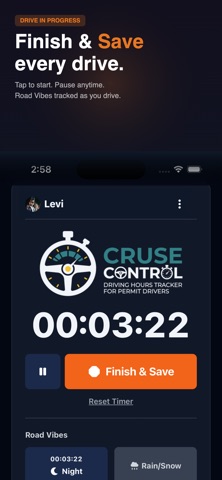
Start a drive with a single tap. The built-in timer tracks your session in real time — pause, resume, and save whenever you're done. Toggle night and rain/snow conditions while you drive, and each condition is timed separately so your log is always accurate. Select your co-pilot (supervising driver) for every session so you have a complete record.
Pick your US state and instantly see how close you are to meeting your total, night, and weather hour requirements with clear progress bars. All 50 states are supported with up-to-date hour requirements.
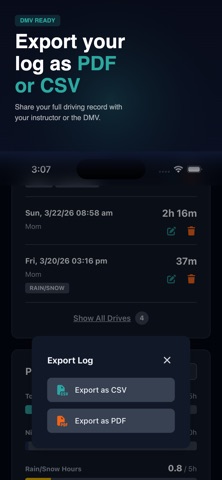
Your full driving history is saved and easy to manage. View, edit, or delete past sessions — each one records the date, duration, co-pilot, conditions, and any custom tags you add. When you're ready, export your entire driving log as a CSV file for printing or submitting to your DMV.
Sign in with Google and your data syncs automatically across all your devices. Start a drive on your phone, review your progress on your tablet — everything stays up to date.
Features at a glance:
• One-tap drive timer with pause and resume
• Separate night and rain/snow condition tracking
• Co-pilot selection for every session
• State-specific progress tracking for all 50 US states
• Full session history with edit and delete
• PDF and CSV export for DMV submission or personal records
• Google sign-in with automatic cross-device sync
• Timer persists even if the app refreshes mid-drive
Built for teen drivers, parents, and anyone working toward a full license. Cruse Control keeps your driving log organized so you can focus on the road.