

Crux: Screen time control
Crux: Screen time control is made and published by Idan Rachmani. AppBrain is an independent app data site and isn't affiliated with Idan Rachmani. The app name, icon, screenshots and description belong to Idan Rachmani and are shown as published on the App Store.
AppBrain's verdict
- Last updated
- September 11, 2026
Rankings
App Store top chartsApp Store Rankings for Crux: Screen time control
Competitors
Similar apps and more from Idan RachmaniAlternatives to Crux: Screen time control





More from Idan Rachmani

Releases
Updates seen on the App Store- Version
- 1.2.0
- Launched
- June 2026
No changelog data
User feedback
Ratings and reviews on the App StoreComments on Crux: Screen time control for iOS
We don't have enough comments to show example comments. Please check back later.
Technology
Found in the app by AppBrain- Price
- Free
- App size
- 15.8 MB
- Content rating
- Everyone
Technologies used by Crux: Screen time control
About the app and developer
About Crux: Screen time control
Crux: Screen time control is a productivity app developed by Idan Rachmani.
User Ratings
The app has no ratings yet.
App Information
Crux: Screen time control is freely available from the App Store. The app size is 15.82 MB. The latest version available is 1.2.0. The last update was on September 11, 2026.
Technical Requirements
The app has a content rating of Everyone. The app has been available on the App Store since June 2026.
Developer information for Idan Rachmani
Address:
Frequently asked questions about Crux: Screen time control
Is Crux: Screen time control free?
Yes. Crux: Screen time control is free on the App Store.
Is Crux: Screen time control still available?
Yes. Crux: Screen time control is on the App Store, and the last update we saw was on September 11, 2026.
How large is Crux: Screen time control?
Crux: Screen time control is 15.82 MB.
Is Crux: Screen time control suitable for children?
App Store rates the content of Crux: Screen time control as suitable for everyone.
Who made Crux: Screen time control?
Crux: Screen time control was developed by Idan Rachmani. It is listed in the productivity category on the App Store.
What are the best alternatives to Crux: Screen time control?
People looking at Crux: Screen time control also look at these productivity apps: Zenith: Screen Time & Focus, Focus Cat: Earn Screen Time, Screen Time Control: Pip, Focus Timer - Studious, Zensi - AI Screen Time Control.
Store listing
By Idan Rachmani, from the App Store




Description by Idan Rachmani Written by the developer, not by AppBrain. Click to read.
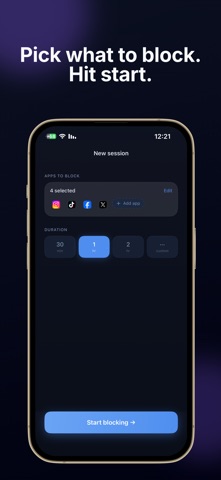
Set a session, pick the apps to block, and put your phone down. Crux uses
Apple's Screen Time technology to enforce the block system-wide, even if you
close the app.
FOCUS SESSIONS
Block any app for as long as you need. Crux holds the block until the session
ends — no cheating.
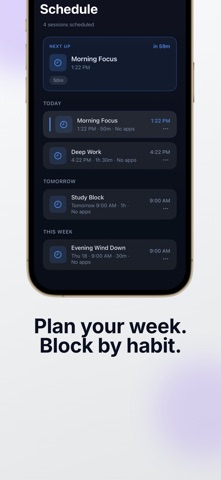
SCHEDULED SESSIONS
Set recurring blocks in advance. Your protection runs automatically, even if
you never open the app.
NIGHT MODE
Block apps during your sleep window. Wake up to how many times you reached for
your phone, how long you were on it, and which apps kept you up.
INSIGHTS
See where your day actually went — hour by hour, and which apps took it. Crux
marks the hours it protected for you, and tells you how today compares with
your usual pace.
HOME SCREEN WIDGET
See what's coming without opening the app — your next session, tonight's sleep
window, and a live countdown while a block is running.
STREAKS & STATS
See your focus streak and total time saved grow over time.
YOUR DATA STAYS ON YOUR PHONE
Crux reads your Screen Time data inside Apple's sandbox, and it never leaves
your device. We never see which apps you use, or which ones you block.
No gimmicks. No fake willpower tricks. Just a hard block on the apps that
shouldn't have your attention.
Privacy Policy: https://idanrach.github.io/crux-legal/privacy.html
Terms of Use: https://idanrach.github.io/crux-legal/terms.html
EULA: https://www.apple.com/legal/internet-services/itunes/dev/stdeula/