

Cube Mentor: 3x3 Solver
Cube Mentor: 3x3 Solver is made and published by Vishnu Vidyadharan. AppBrain is an independent app data site and isn't affiliated with Vishnu Vidyadharan. The app name, icon, screenshots and description belong to Vishnu Vidyadharan and are shown as published on the App Store.
AppBrain's verdict
- Last updated
- September 11, 2026
Rankings
App Store top chartsApp Store Rankings for Cube Mentor: 3x3 Solver
Competitors
Similar apps and more from Vishnu VidyadharanAlternatives to Cube Mentor: 3x3 Solver


More from Vishnu Vidyadharan


Releases
Updates seen on the App Store- Version
- 1.0
- Launched
- September 2026
No changelog data
User feedback
Ratings and reviews on the App StoreComments on Cube Mentor: 3x3 Solver for iOS
We don't have enough comments to show example comments. Please check back later.
Technology
Found in the app by AppBrain- Price
- Free
- App size
- 22.1 MB
- Content rating
- Everyone
Technologies used by Cube Mentor: 3x3 Solver
About the app and developer
About Cube Mentor: 3x3 Solver
Cube Mentor: 3x3 Solver is an education app developed by Vishnu Vidyadharan.
User Ratings
The app has no ratings yet.
App Information
Cube Mentor: 3x3 Solver is freely available from the App Store. The app size is 22.06 MB. The latest version available is 1.0. The last update was on September 11, 2026.
Technical Requirements
The app has a content rating of Everyone. The app has been available on the App Store since September 2026.
Developer information for Vishnu Vidyadharan
Address:
Store listing
By Vishnu Vidyadharan, from the App Store




Description by Vishnu Vidyadharan Written by the developer, not by AppBrain. Click to read.
Point your camera at each face. Cube Mentor reads the colors, works out which stage your cube is already at, and coaches you from there. No memorizing a wall of notation, no scrubbing back through a video, no guessing what "R U R' U'" is supposed to mean.
HOW IT WORKS
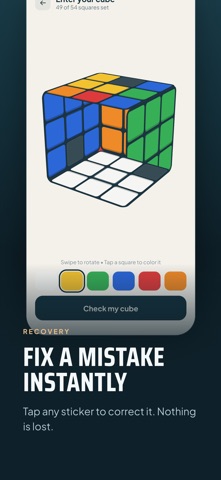
1. Scan — hold up each face and let the camera read it. Or type the colors in by hand if you'd rather.
2. Learn — Cube Mentor works out the stage your cube is actually at, and teaches that stage.
3. Turn — a 3D cube shows every move with an arrow. Follow along on the cube in your hands.
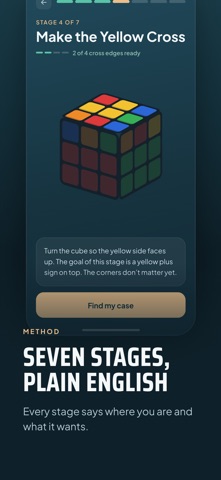
THE SEVEN STAGES
1. White cross — four white edges around the white center
2. White corners — finish the first layer
3. Middle layer — the left and right algorithms
4. Yellow cross — a yellow plus sign on top
5. Yellow face — all nine yellow squares
6. Corner positions — move corners into place
7. Final edges — the last four pieces
Finish a stage and Cube Mentor names what you just achieved and what it means for the cube in your hands.
WHY CUBE MENTOR
• Learn to solve it. You are taught the moves, not handed an answer to copy.
• Never guess your next turn. The arrow shows you the face and the direction.
• Built for complete beginners. No cube vocabulary needed to start.
• Camera scanning, with a manual color editor available at every step.
• It tells you when to rotate the whole cube, so you always know how to hold it.
• Pick up where you left off — your stage is remembered between sessions.
• Screen-reader labels throughout, and every move described in plain language.
• Reduced-motion support, and layouts that hold up at double text size.
PRIVACY
• Makes no network requests at all. There is no server, and nothing to sync.
• Works completely offline. Always. There is no online mode to fall back to.
• No ads.
• No account, no sign-up, no email address.
• No analytics, no tracking, no third-party SDKs.
• The camera is the only permission you are ever asked for, and it is used only to read the colors on your cube.
WHO IT'S FOR
Anyone holding a scrambled 3x3 who has never solved one. Anyone who followed a tutorial once, got lost somewhere around the middle layer, and put the cube back in a drawer. Anyone who has quietly meant to learn this for years and never got round to it.
Looking for a cube solver that explains itself instead of just printing a solution? That's this.
Cube Mentor covers the standard 3x3 cube. Once installed it appears on your home screen as Cube Coach.
You already own the cube. This is the coach.