

CubeNook
CubeNook is made and published by Seiichirou Tanaka. AppBrain is an independent app data site and isn't affiliated with Seiichirou Tanaka. The app name, icon, screenshots and description belong to Seiichirou Tanaka and are shown as published on the App Store.
AppBrain's verdict
Established- Rating on App Store
- 4.50
- 22 ratings
- Last updated
- October 27, 2026
It doesn't have enough ratings yet to judge what users think.
Rankings
App Store top chartsApp Store Rankings for CubeNook
Competitors
Similar apps and more from Seiichirou TanakaAlternatives to CubeNook





More from Seiichirou Tanaka


Releases
Updates seen on the App Store- Version
- 3.0.0
- Launched
- December 2020
No changelog data
User feedback
Ratings and reviews on the App StoreComments on CubeNook for iOS
We don't have enough comments to show example comments. Please check back later.
Technology
Found in the app by AppBrain- Price
- Free
- App size
- 71.4 MB
- Content rating
- Everyone
Technologies used by CubeNook
About the app and developer
About CubeNook
CubeNook is an entertainment app developed by Seiichirou Tanaka.
User Ratings
CubeNook is rated 4.50 out of 5 stars. The rating is based on 22 ratings.
App Information
CubeNook is freely available from the App Store. The app size is 71.36 MB. The latest version available is 3.0.0. The last update was on October 27, 2026.
Technical Requirements
The app has a content rating of Everyone. The app has been available on the App Store since December 2020.
Developer information for Seiichirou Tanaka
Address:
Store listing
By Seiichirou Tanaka, from the App Store


Description by Seiichirou Tanaka Written by the developer, not by AppBrain. Click to read.
LEARN
• All 119 cases (F2L 41, OLL 57, PLL 21) with 239 algorithms
• Replay any algorithm on a 3D cube (0.5x, 1x, 2x), with mirrors that show the hidden faces
• Mark each case as not started, learning or learned, and choose the algorithm you use
• Today's review: practice the learning and learned cases that are due
PRACTICE
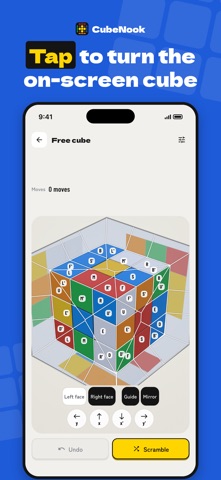
• Virtual cube: tap the on-screen cube to turn it. The guide shows where to tap and which move it makes
• Zero-setup practice: solve Cross, F2L, OLL and PLL cases one after another without rescrambling your cube, with recognition time, execution time and move count
• Solve practice: full solves from scrambles
• Notation drill: turn the moves you are shown to learn notation and common triggers
TRACK
• Timer with 15-second inspection, +2 and DNF, sessions, best, Ao5 and Ao12
• Time with the virtual cube or a smart cube to see the time and moves of each CFOP step and replay the solve
SMART CUBE
• Connects directly over Bluetooth to the GAN i4 (Gen4 protocol) and detects every move
ALSO
• Choose how you hold the cube (top and front colors)
• Light and dark appearance
• 7 languages: English, Japanese, Chinese (Simplified), Korean, Spanish, Portuguese, French
About CFOP:
CFOP is the most popular speedcubing method. It has four steps:
• Cross: solve the cross on the bottom
• F2L (First Two Layers): finish the first two layers (41 cases)
• OLL (Orientation of the Last Layer): orient the top layer (57 cases)
• PLL (Permutation of the Last Layer): permute the top layer to finish (21 cases)