

Cue It - Interval Timer
Cue It - Interval Timer is made and published by Justin Hopkins. AppBrain is an independent app data site and isn't affiliated with Justin Hopkins. The app name, icon, screenshots and description belong to Justin Hopkins and are shown as published on the App Store.
AppBrain's verdict
Established- Rating on App Store
- 4.59
- 17 ratings
- Last updated
- March 21, 2024
- Size
- 25.6 MB
It doesn't have enough ratings yet to judge what users think.
User feedback
Ratings and reviews on the App StoreComments on Cue It - Interval Timer for iOS
We don't have enough comments to show example comments. Please check back later.
Store listing
By Justin Hopkins, from the App Store



Description by Justin Hopkins Written by the developer, not by AppBrain. Click to read.
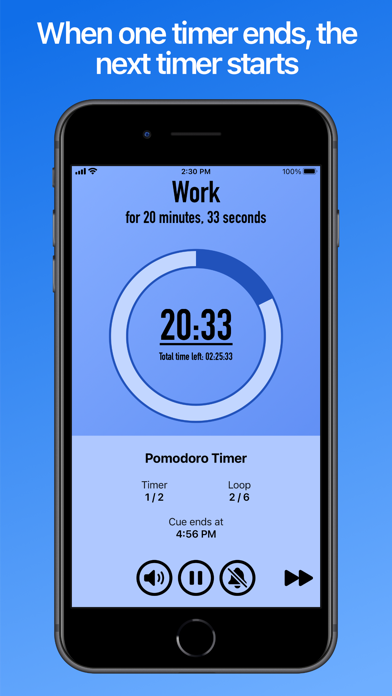
Create lists of timers, called “Cues”, to stay on track for each step in a routine of yours. When one timer on your list ends, the next timer starts.
For when you need to track time on something split into smaller parts, Cue It makes sure you don't miss a beat.
- Stay in shape: Create Cues for your fitness routines, with timers for each exercise and break
- Get productive: Create a Cue with a Pomodoro Timer loop (25 minutes of work, followed by a 5 minute break)
- Find relaxation: Create a Cue for meditation breathing techniques to relax or help with sleep, such as 4-7-8 Breathing
When you start a Cue, two countdown timers will be displayed - one for your current individual timer, and another for how much time is left in total. If you aren't able to keep constant focus on your device, you can also enable features such as Sound Effects, Vibrations, or Text-to-Speech Narration whenever a new timer starts.
Cues can be created for all kinds of purposes, including:
- Fitness/Workout Routines (Interval Timers)
- Productivity (Pomodoro Timers)
- Meditation/Breathing Techniques
- Basic Food Preparation
- Presentation Practice
Need to multitask with Cue In the background? While a Cue is active, you can also toggle the Notification Bell to enable/disable notifications for when a new timer starts, if you are away from Cue It.
If you want to stick to a schedule, you can also set timed reminders to perform a Cue at a later time - either for a specific time and date, or repeating reminders on specific weekdays at a particular time.
Safety and technology
Found in the app by AppBrain- Price
- $2.99
- App size
- 25.6 MB
- Content rating
- Everyone
Technologies used by Cue It - Interval Timer
Releases
Updates seen on the App Store- Version
- 1.7.2
- Launched
- March 2021
No changelog data
Alternatives
Similar apps and more from Justin HopkinsAlternatives to Cue It - Interval Timer







More from Justin Hopkins

Rankings
App Store top chartsApp Store Rankings for Cue It - Interval Timer
About the app and developer
About Cue It - Interval Timer
Cue It - Interval Timer is an utilities app developed by Justin Hopkins.
User Ratings
Cue It - Interval Timer is rated 4.59 out of 5 stars. The rating is based on 17 ratings.
App Information
Cue It - Interval Timer costs $2.99. The app size is 25.59 MB. The latest version available is 1.7.2. The last update was on March 21, 2024.
Technical Requirements
The app has a content rating of Everyone. The app has been available on the App Store since March 2021.
Developer information for Justin Hopkins
Address:
Frequently asked questions about Cue It - Interval Timer
Is Cue It - Interval Timer free?
No. Cue It - Interval Timer costs $2.99 on the App Store.
Is Cue It - Interval Timer still available?
Yes. Cue It - Interval Timer is on the App Store, and the last update we saw was on March 21, 2024.
How large is Cue It - Interval Timer?
Cue It - Interval Timer is 25.59 MB.
Is Cue It - Interval Timer suitable for children?
App Store rates the content of Cue It - Interval Timer as suitable for everyone.
How do people rate Cue It - Interval Timer?
Cue It - Interval Timer scores 4.59 out of 5 stars, from 17 ratings on the App Store.
Who made Cue It - Interval Timer?
Cue It - Interval Timer was developed by Justin Hopkins. It is listed in the utilities category on the App Store.
What are the best alternatives to Cue It - Interval Timer?
People looking at Cue It - Interval Timer also look at these utilities apps: Padlok - Door & Gate Codes, Kiosk — Editable Browser, McClockface – Flip Clock, Brainwaves Frequency Generator, Time’s Up! — Visual Timer.