

Cueboard - Creator Shot Lists
Cueboard - Creator Shot Lists is made and published by Dominic Esposito. AppBrain is an independent app data site and isn't affiliated with Dominic Esposito. The app name, icon, screenshots and description belong to Dominic Esposito and are shown as published on the App Store.
AppBrain's verdict
- Rating on App Store
- 5.00
- 6 ratings
- Last updated
- October 30, 2026
It doesn't have enough ratings yet to judge what users think.
Rankings
App Store top chartsApp Store Rankings for Cueboard - Creator Shot Lists
Competitors
Similar apps and more from Dominic EspositoAlternatives to Cueboard - Creator Shot Lists


More from Dominic Esposito

Releases
Updates seen on the App Store- Version
- 1.2.0
- Launched
- December 2025
No changelog data
User feedback
Ratings and reviews on the App StoreComments on Cueboard - Creator Shot Lists for iOS
We don't have enough comments to show example comments. Please check back later.
Technology
Found in the app by AppBrain- Price
- Free
- App size
- 15.5 MB
- Content rating
- Everyone
Technologies used by Cueboard - Creator Shot Lists
About the app and developer
About Cueboard - Creator Shot Lists
Cueboard - Creator Shot Lists is a photo & video app developed by Dominic Esposito.
What is the rating of Cueboard - Creator Shot Lists?
Cueboard - Creator Shot Lists is rated 5.00 out of 5 stars, based on 6 ratings.
Is Cueboard - Creator Shot Lists free?
Cueboard - Creator Shot Lists is free. The app size is 15.51 MB. The latest version available is 1.2.0. The last update was on October 30, 2026.
What are the requirements for Cueboard - Creator Shot Lists?
The app has a content rating of Everyone. The app has been available on the App Store since December 2025.
Developer information for Dominic Esposito
Address:
Store listing
By Dominic Esposito, from the App Store
Description by Dominic Esposito Written by the developer, not by AppBrain. Click to read.
Cueboard turns scattered ideas into a clear, confident shot list that travels with you from concept to delivery. Build folders, create projects in seconds, and shape them with cues, subcues, details, media types, and visuals (storyboards) that stay exactly where you need them. The built-in demo project shows the full rhythm of a shot list the moment you open the app, so you can start creating right away.
FLOW MODE: CREATE WITHOUT FRICTION
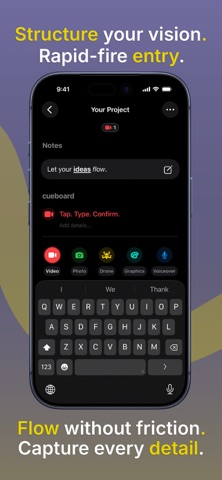
Flow Mode is your rapid-fire shot list builder. Tap once, type, hit Return to commit, and the next cue appears instantly. Tap. Type. Confirm. The lightweight type picker sits right above the keyboard, so switching formats mid-thought stays one-thumbable even when you're juggling gear on set.
STRUCTURE THAT MATCHES HOW YOU THINK
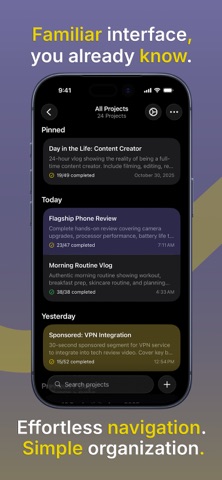
Folders organize productions. Projects hold shot lists. Cues outline your beats. Subcues refine the details. Every cue can carry its own media type, notes, and you can add visuals, so your shot list reflects the way your mind maps a scene.
WORKS EVERYWHERE — EVEN OFFLINE
Cueboard saves everything locally first so you can plan in airplane mode, on remote sets, or anywhere without service. When you reconnect, Cueboard syncs quietly over iCloud. No accounts. No sign-in. Everything syncs automatically when you’re back online, without interrupting your flow. This provides uninterruptible offline reliability.
CUSTOM CUES, COLORS, AND CONTROL
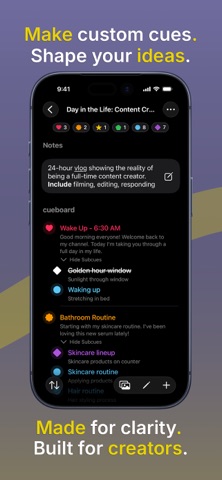
Cueboard adapts to your workflow. Create unlimited custom cue types with your own color and shape. The structure and custom cue types are embedded in any shared project, guaranteeing fidelity across the whole team.
CUE DIRECTOR: AI-POWERED PLANNING
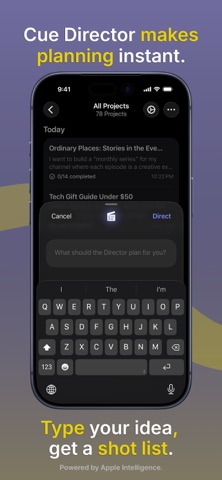
Turn any idea into a structured shot list with AI planning, powered by Apple Intelligence. Private, on-device processing. Unlimited generations. No subscription required. Type your thoughts and let Cue Director create your shot list instantly. Works on iOS 26 with supported devices.
ICLOUD SHARING MADE SIMPLE
Sharing with Cueboard is effortless. You can share a project or an entire folder with collaborators, team members, or clients. Edits made by participants appear in the project’s Changes View, so you can stay up to date at a glance.
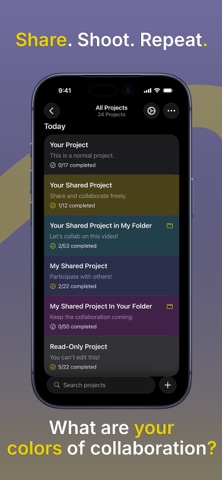
WHAT ARE YOUR COLORS OF COLLABORATION?
Shared work is always clear at a glance:
• Yellow means you own and share the project (Owner confirmation).
• Indigo means a project was shared with you (Primary participant).
• Purple marks a participant project inside your folder (Collaborator work).
• Cyan shows your project inside someone else’s folder (Ownership separation).
• Gray means read-only (Universal safety color).
Permissions are enforced in the interface, so nobody can accidentally edit what they should not. Ask your crew, "What are your colors of collaboration?"
EXPORT, COPY, AND TEMPLATE ANY CUT
Export to DOCX (Microsoft Word compatible, editable post-production data) or PDF (High-fidelity client signoff, preserves color-coding).
CUEBOARD TEMPLATES: INSTANT SHOT LISTS
Package entire projects as reusable templates for recurring formats or clients. Templates preserve structure and custom cues, while visuals and notes stay private.
Copy as List produces a clean, formatted shot list with media labels and strikethroughs that pastes perfectly into Notes, Docs, or Pages for instant, informal communication.
KEYBOARD SHORTCUTS FOR POWER USERS
Cueboard is as fast as a desktop editor wherever you work.
Every major action is shortcut ready on iPad keyboards and Apple Silicon Macs:
• ⌘F enters Flow Mode (Rapid input)
• ⌘E edits (Inline refining)
• ⌘R reorders (Visual hierarchy)
• ⌘1 through ⌘9 switch cue types instantly
• ⌘⇧S creates a subcue in Flow Mode
• ⌘B / ⌘I / ⌘U format notes quickly
Cueboard is the calm creative command center for every production. Fast. Visual. Organized. Ready wherever you shoot.
cue it. do it.