CueDeck - Live Broadcast Deck is made and published by
Onur AKSOY.
AppBrain is an independent app data site and isn't affiliated with Onur AKSOY.
The app name, icon, screenshots and description belong to Onur AKSOY and are shown as
published on the App Store.
About CueDeck - Live Broadcast Deck
CueDeck - Live Broadcast Deck is an utilities app developed by Onur AKSOY.
What is the rating of CueDeck - Live Broadcast Deck?
CueDeck - Live Broadcast Deck has no ratings yet.
Is CueDeck - Live Broadcast Deck free?
CueDeck - Live Broadcast Deck is free. The app size is 30.84 MB. The latest version available is 2026.9.22. The last update was on October 10, 2026.
What are the requirements for CueDeck - Live Broadcast Deck?
The app has a content rating of Everyone. The app has been available on the App Store since October 2026.
Description by Onur AKSOY(from the App Store)
CueDeck turns your iPhone and iPad into a professional, zero-latency live production switcher and high-performance Stream Deck alternative.
Say goodbye to expensive physical macro keys, recurring subscriptions, and desktop bridge software! CueDeck communicates directly with OBS Studio 28+ using the native OBS WebSocket v5 protocol. Simply scan the connection QR code on your monitor and take command in under a second.
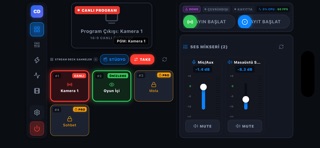
1. DYNAMIC SCENE MATRIX AND CONFIDENCE MONITOR - Zero Hardcoding: OBS scenes, names, and sequence are discovered dynamically. - Built-In 16:9 Confidence Monitor: View live program video directly on your device. - Solo Mode (Quick-Switch): Tap any scene to cut live instantly. - Studio Mode Switching: Full Preview (Green Tally) and Program (Red Tally) workflow. - Giant TAKE / CUT Button: Queue up your next shot and cut with tactile confidence.
2. UNIVERSAL AUDIO MIXER AND 60 FPS VU METERS - GPU Peak VU Meters: Powered by Flutter Impeller for silky smooth 60 FPS volume monitoring. - Smooth Faders: Adjust microphones, desktop audio, game sound, and music fluidly. - Instant Mute: Glowing red mute indicators ensure you never speak off-air unmuted.
3. SMART LAYER AND OVERLAY VISIBILITY - Scene-Aware Items: Overlays, facecam frames, and alerts update dynamically. - Quick Eye Toggles: Show or hide any graphic element with a single responsive tap.
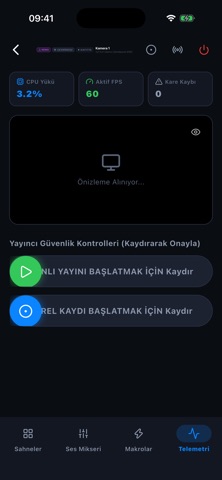
4. BROADCASTER SAFETY: SLIDE-TO-CONFIRM - Eliminate Stream Disasters: Slide-to-Confirm switch prevents accidental stream or rec stops. - Live Telemetry and Timers: Track uptime, REC duration badge, dropped frames, and health. - Quick Controls: Accessible broadcast triggers across all workspace tabs.
5. CUSTOMIZABLE MACRO DECK - Multi-Action Chaining: Fire simultaneous actions - switch scene, mute mic, trigger media. - Create specialized profiles for BRB, Starting Soon, or Gaming Climax moments.
3-STEP SETUP IN 1 SECOND 1. Launch OBS Studio 28 or newer on your PC or Mac. 2. Go to Tools, then WebSocket Server Settings and click Show Connect Info. 3. Open CueDeck and scan the QR code. You are immediately connected!
100% FREE CORE VS. CUEDECK PRO LIFETIME - Free Core App: Full live reji switching for 2 scenes, 16:9 confidence live monitor, 60 FPS audio mixer, and slide-to-confirm stream/rec safety controls. - CueDeck Pro Lifetime (0.99 USD): A single symbolic, one-time in-app purchase unlocking 16+ scene banks, smart auto-mute mic matrix, custom macro decks, and lifetime updates. Zero recurring subscriptions!
WHY STREAMERS CHOOSE CUEDECK - Free to Start: Core broadcast controls at zero cost with no ads. - No Subscriptions: Pay once (0.99 USD for Pro), own forever. No recurring monthly fees. - Zero Extra Software: Plugs directly into OBS Studio native WebSocket v5 engine. - Ultra-Low Latency: Operates over your local Wi-Fi network (under 8 ms response). - Haptic Confirmation: Hardware vibration gives every tap a physical feel. - 100% Privacy: No accounts, no data collection, no telemetry, no tracking.
Elevate your live broadcast on Twitch, Kick, YouTube Gaming, TikTok Live, or Facebook Gaming with CueDeck!
DISCLAIMER & TRADEMARKS CueDeck is an independent application and is not affiliated with, endorsed, sponsored, or supported by the OBS Project or OBS Studio. "OBS" and "OBS Studio" are registered trademarks of the OBS Project.
Each subscription will automatically renew 3 days before the expiration date for
the same time period. Subscriptions can be cancelled at any time before the renewal.