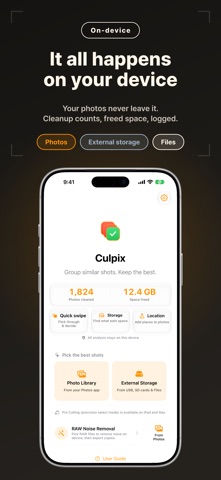
Culpix: Photo Culling, Cleaner is a photo & video app developed by HAEDUN KIM.
User Ratings
Culpix: Photo Culling, Cleaner is rated 5.00 out of 5 stars. The rating is based on 2 ratings.
App Information
Culpix: Photo Culling, Cleaner is freely available from the App Store. The app size is 11.20 MB. The latest version available is 1.8.5. The last update was on November 11, 2026.
Technical Requirements
The app has a content rating of Everyone. The app has been available on the App Store since June 2026.
Culpix: Photo Culling, Cleaner is made and published by
HAEDUN KIM.
AppBrain is an independent app data site and isn't affiliated with HAEDUN KIM.
The app name, icon, screenshots and description belong to HAEDUN KIM and are shown as published on the App Store.
Description by HAEDUN KIM(from the App Store)
Duplicate photos and bursts eating your storage? Culpix is now free to download. It groups duplicates, bursts, and screenshots, picks the best shot, and lets you delete the rest to free up space. 100% on device, no ads, no tracking. A one-time purchase unlocks everything, no subscription.
■ Automatic grouping On-device AI gathers bursts and look-alikes for you. Screenshots, documents, and receipts are sorted out too, so you can declutter your gallery in one pass.
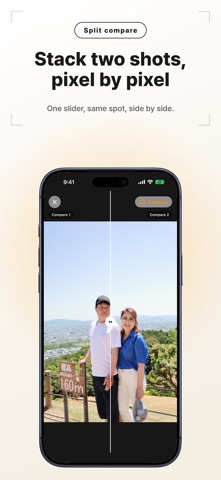
■ AI best pick Culpix weighs blur, faces, framing, and open eyes to suggest the best shot in each group—and shows you why it stood out, so you can trust the pick at a glance. The final call is always yours, and you can compare two photos up close with a draggable split.
■ Face & expression compare From a burst or a group of similar shots, Culpix crops the face out of every frame and lines them up side by side, so you can spot open vs. closed eyes and the best expression at a glance. The AI's pick is highlighted to get you started. All on device with Apple Vision.
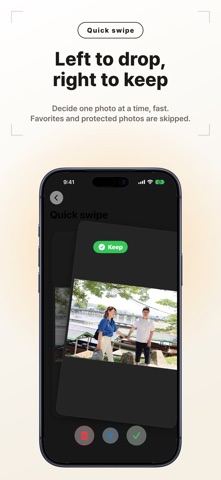
■ Clean up with confidence Deleted photos go to Recently Deleted, so they stay recoverable, and your Favorites and protected albums are automatically excluded. Had second thoughts? Undo a cleanup right after you make it.
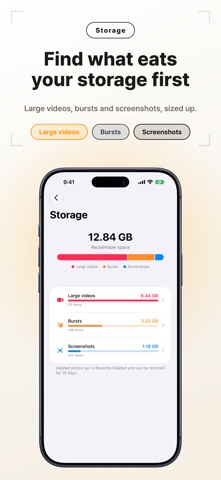
■ See what's eating your space The storage analyzer breaks down what's taking up the most room—large videos, bursts, and screenshots—with sizes and counts, so you know where to start. Select what you don't need and delete to reclaim space. Removed items go to Recently Deleted, so you can always get them back.
■ A lighter library, for good See how much you've cleared right on the home screen. Culpix remembers what it analyzed, so a second pass is much faster—and you can filter groups by type or size, or get a gentle weekly nudge to tidy up. You can even start a cleanup with Siri or Shortcuts.
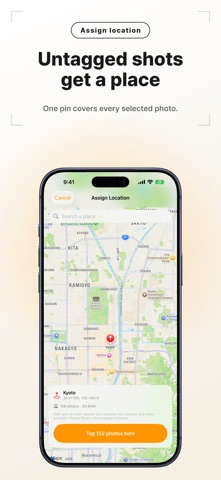
■ External storage & RAW Tidy photos on USB or SD drives, and handle RAW+JPG as a single pair. You can also assign a GPS location to your photos.
■ Truly private All analysis runs on device. No servers, no ads, no tracking—your photos never leave your device.
■ Pro Culling on iPad Sorting a big shoot? Open a RAW/JPG folder and cull at speed: pick, hold, or reject with one key, rate with stars, and tag with colors, with a live RGB histogram and EXIF right in the sidebar. The viewer reshapes itself around each shot—portrait or landscape—so the photo always gets the most room, and the freed-up space becomes a large contact sheet. On-device AI pre-marks the best frame in each burst. Export the keepers to a folder—copy or move, RAW+JPG kept together, with optional star-grade renaming.
■ Your ratings, ready for the pros Star ratings and color labels export to XMP, a sidecar file that sits alongside your RAW. Your picks open straight in Lightroom, Capture One, and other tools—no re-rating, no lock-in.
Each subscription will automatically renew 3 days before the expiration date for
the same time period. Subscriptions can be cancelled at any time before the renewal.