

Cupr: Expense Tracker
Cupr: Expense Tracker is made and published by Manuel Auer. AppBrain is an independent app data site and isn't affiliated with Manuel Auer. The app name, icon, screenshots and description belong to Manuel Auer and are shown as published on the App Store.
AppBrain's verdict
- Last updated
- October 12, 2026
- Size
- 140.1 MB
User feedback
Ratings and reviews on the App StoreComments on Cupr: Expense Tracker for iOS
We don't have enough comments to show example comments. Please check back later.
Store listing
By Manuel Auer, from the App Store


Description by Manuel Auer Written by the developer, not by AppBrain. Click to read.
Enter an amount and save. Add a description, category, or date when useful — or leave a payment Uncategorized and organize it later. You can also track income if you want, with separate categories. Turning income tracking off hides those entries without deleting them.
WHAT YOU CAN DO
- Record expenses in seconds on iPhone and iPad
- Add income alongside expenses when it suits you
- Customize categories with familiar symbols
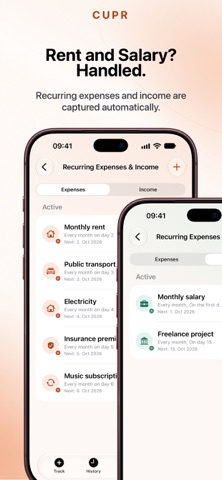
- Set up recurring expenses and income
- Schedule future payments and see the next 30 days in Coming Up
- Explore spending and optional income with weekly, monthly, quarterly, and yearly Insights
- Search and filter your complete payment history
- Use a full iPad layout with recent entries, side-by-side History, and multi-column Insights
- Set up Apple Pay automation in Shortcuts on iPhone, or track an expense with Siri, Spotlight, or Shortcuts
- Quickly record expenses and optional income on Apple Watch
- Keep multiple currencies separate, without automatic conversion
- Get optional reminders when Uncategorized payments are waiting
- Export your expenses and income separately as CSV for free
Cupr Pro is a one-time purchase. It unlocks expanded Insights and sharing, unlimited recurring payments, Home Screen and Lock Screen widgets, a Control Center control, and Universal CSV Import. Tracking, History, categories, and CSV export remain available without Pro.
YOUR PAYMENTS, YOUR DATA
Cupr requires no account or bank connection. Payments are stored on your devices and, when available, synced through your private iCloud database. Each payment keeps its original currency, and totals in different currencies stay separate.
SUPPORTED CURRENCIES
Euro (EUR), US Dollar (USD), British Pound (GBP), Japanese Yen (JPY), Swiss Franc (CHF), Chinese Yuan (CNY), Canadian Dollar (CAD), Australian Dollar (AUD), Hong Kong Dollar (HKD), Singapore Dollar (SGD), Swedish Krona (SEK), Danish Krone (DKK), Polish Złoty (PLN), Czech Koruna (CZK), Hungarian Forint (HUF), Romanian Leu (RON), Norwegian Krone (NOK), Icelandic Króna (ISK), New Zealand Dollar (NZD), Indian Rupee (INR), South Korean Won (KRW), Turkish Lira (TRY), Ukrainian Hryvnia (UAH), UAE Dirham (AED), Brazilian Real (BRL), Mexican Peso (MXN), South African Rand (ZAR).
WHY CUPR
The name comes from Cu, the chemical symbol for copper — a metal associated with money for centuries. Cupr brings that idea into the digital age: a simple place to remember your payments and understand your spending.
Remember your payments. Understand your money.
Safety and technology
Found in the app by AppBrain- Price
- Free
- App size
- 140.1 MB
- Content rating
- Everyone
Technologies used by Cupr: Expense Tracker
Releases
Updates seen on the App Store- Version
- 1.2.3
- Launched
- September 2026
No changelog data
Rankings
App Store top chartsApp Store Rankings for Cupr: Expense Tracker
About the app and developer
About Cupr: Expense Tracker
Cupr: Expense Tracker is a finance app developed by Manuel Auer.
User Ratings
The app has no ratings yet.
App Information
Cupr: Expense Tracker is freely available from the App Store. The app size is 140.09 MB. The latest version available is 1.2.3. The last update was on October 12, 2026.
Technical Requirements
The app has a content rating of Everyone. The app has been available on the App Store since September 2026.
Developer information for Manuel Auer
Address:
Frequently asked questions about Cupr: Expense Tracker
Is Cupr: Expense Tracker free?
Yes. Cupr: Expense Tracker is free on the App Store.
Is Cupr: Expense Tracker still available?
Yes. Cupr: Expense Tracker is on the App Store, and the last update we saw was on October 12, 2026.
How large is Cupr: Expense Tracker?
Cupr: Expense Tracker is 140.09 MB.
Is Cupr: Expense Tracker suitable for children?
App Store rates the content of Cupr: Expense Tracker as suitable for everyone.
Who made Cupr: Expense Tracker?
Cupr: Expense Tracker was developed by Manuel Auer. It is listed in the finance category on the App Store.