

cURL Send is made and published by Kenneth Poon. AppBrain is an independent app data site and isn't affiliated with Kenneth Poon. The app name, icon, screenshots and description belong to Kenneth Poon and are shown as published on the App Store.
AppBrain's verdict
- Last updated
- July 4, 2026
- Size
- 3.91 MB
User feedback
Ratings and reviews on the App StoreComments on cURL Send for iOS
We don't have enough comments to show example comments. Please check back later.
Store listing
By Kenneth Poon, from the App Store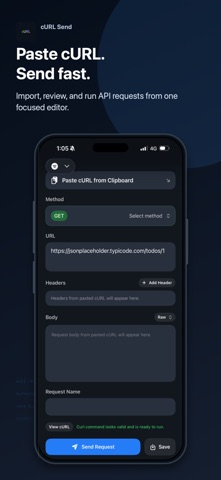

Description by Kenneth Poon Written by the developer, not by AppBrain. Click to read.
Paste a cURL command from your clipboard, review the method, URL, headers, and body, then send the request in a focused mobile workspace. It is designed for quick API checks, debugging, backend testing, webhook inspection, and working with REST endpoints when you are away from your desktop.
Import cURL instantly
Paste a cURL command from your clipboard and turn it into an editable request. cURL Send parses the request into clear fields so you can inspect and adjust the method, URL, headers, and body before sending.
Test APIs from your iPhone
Send HTTP requests and view response status, headers, and body in a clean dark interface. JSON responses are formatted for easier reading, with response search to help you find fields quickly.
Save response values
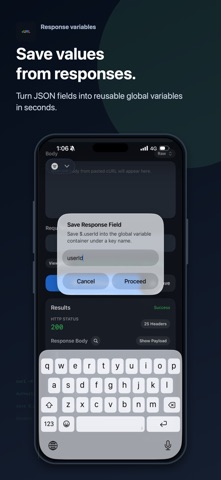
Capture supported JSON response fields into a global container. Save IDs, tokens, status values, or other response data under reusable keys.
Reuse values in headers
Use saved global values in header fields for follow-up requests. This helps with common API workflows like saving a user ID, session value, token, or other response field and reusing it in the next request.
Built for mobile API workflows
cURL Send is ideal for:
- Testing REST APIs
- Debugging HTTP requests
- Inspecting JSON responses
- Running copied cURL commands
- Reusing response values in headers
- Checking backend endpoints from iPhone
- Quick API validation without opening a desktop tool
Whether you are debugging a backend service, checking a webhook, validating an endpoint, or testing an API while mobile, cURL Send gives you a simple cURL-first workflow on iPhone.
Safety and technology
Found in the app by AppBrain- Price
- Free
- App size
- 3.91 MB
- Content rating
- Everyone
Technologies used by cURL Send
Releases
Updates seen on the App Store- Version
- 0.3.0
- Launched
- May 2026
No changelog data
Alternatives
Similar apps and more from Kenneth PoonAlternatives to cURL Send


Rankings
App Store top chartsApp Store Rankings for cURL Send
About the app and developer
About cURL Send
cURL Send is an utilities app developed by Kenneth Poon.
What is the rating of cURL Send?
cURL Send has no ratings yet.
Is cURL Send free?
cURL Send is free. The app size is 3.91 MB. The latest version available is 0.3.0. The last update was on July 4, 2026.
What are the requirements for cURL Send?
The app has a content rating of Everyone. The app has been available on the App Store since May 2026.
Developer information for Kenneth Poon
Address:
Frequently asked questions about cURL Send
Is cURL Send free?
Yes. cURL Send is free on the App Store.
Is cURL Send still available?
Yes. cURL Send is on the App Store, and the last update we saw was on July 4, 2026.
How large is cURL Send?
cURL Send is 3.91 MB.
Is cURL Send suitable for children?
App Store rates the content of cURL Send as suitable for everyone.
Who made cURL Send?
cURL Send was developed by Kenneth Poon. It is listed in the utilities category on the App Store.
What are the best alternatives to cURL Send?
People looking at cURL Send also look at these utilities apps: iCurlHTTP, Folios by TzYi, LocHook, Eye Spy App, Visual Finder|Object Detector.