

Custom Clock Widget
Custom Clock Widget is made and published by Deneisha Tieng. AppBrain is an independent app data site and isn't affiliated with Deneisha Tieng. The app name, icon, screenshots and description belong to Deneisha Tieng and are shown as published on the App Store.
AppBrain's verdict
- Last updated
- September 23, 2026
Rankings
App Store top chartsApp Store Rankings for Custom Clock Widget
Competitors
Similar apps and more from Deneisha TiengAlternatives to Custom Clock Widget


More from Deneisha Tieng


Releases
Updates seen on the App Store- Version
- 1.0
- Launched
- September 2026
No changelog data
User feedback
Ratings and reviews on the App StoreComments on Custom Clock Widget for iOS
We don't have enough comments to show example comments. Please check back later.
Technology
Found in the app by AppBrain- Price
- Free
- App size
- 1.56 MB
- Content rating
- Everyone
Technologies used by Custom Clock Widget
About the app and developer
About Custom Clock Widget
Custom Clock Widget is an utilities app developed by Deneisha Tieng.
User Ratings
The app has no ratings yet.
App Information
Custom Clock Widget is freely available from the App Store. The app size is 1.56 MB. The latest version available is 1.0. The last update was on September 23, 2026.
Technical Requirements
The app has a content rating of Everyone. The app has been available on the App Store since September 2026.
Developer information for Deneisha Tieng
Address:
Store listing
By Deneisha Tieng, from the App Store


Description by Deneisha Tieng Written by the developer, not by AppBrain. Click to read.
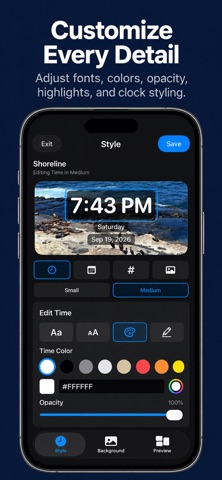
Custom Clock Widget lets you design personalized digital and analog clocks with your own fonts, colors, layouts, backgrounds, and styling. Create multiple designs, preview them in different widget sizes, and choose which design appears on your Home Screen.
CUSTOMIZE YOUR CLOCK
Choose between digital and analog clock styles and personalize the appearance to match your Home Screen.
• Digital and analog clock designs
• 12-hour and 24-hour time formats
• Custom time, day, and date display
• Adjustable fonts and text sizes
• Custom text colors and opacity
• Text highlight styling
• Custom analog clock faces, numbers, and hands
MAKE IT YOURS
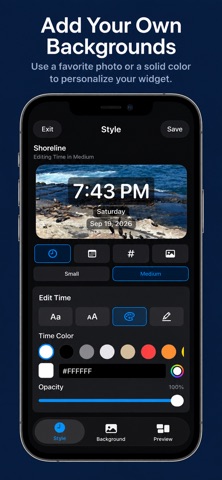
Choose a solid color background or select one of your own photos to create a more personal widget.
Photo backgrounds can be framed separately for small, medium, and large widget sizes so your design looks right wherever you use it.
SAVE MULTIPLE DESIGNS
Create and save multiple clock designs for different Home Screen styles. Duplicate an existing design, make changes, and switch your active clock whenever you want.
PREVIEW BEFORE YOU USE IT
Preview your clock in small, medium, and large widget sizes directly in the app before choosing the design you want to display.
SIMPLE WIDGET SETUP
Choose your design in the app, then add the Custom Clock widget to your iPhone Home Screen using the standard iOS widget controls.
No account required. Your clock designs and selected photo backgrounds are used locally on your device.