

Cut Silence
Cut Silence is made and published by Jhomar Maravillas. AppBrain is an independent app data site and isn't affiliated with Jhomar Maravillas. The app name, icon, screenshots and description belong to Jhomar Maravillas and are shown as published on the App Store.
AppBrain's verdict
- Last updated
- September 27, 2026
Rankings
App Store top chartsApp Store Rankings for Cut Silence
Competitors
Similar apps and more from Jhomar MaravillasMore from Jhomar Maravillas


Releases
Updates seen on the App Store- Version
- 1.0.6
- Launched
- July 2026
No changelog data
User feedback
Ratings and reviews on the App StoreComments on Cut Silence for iOS
We don't have enough comments to show example comments. Please check back later.
Technology
Found in the app by AppBrain- Price
- Free
- App size
- 785.0 KB
- Content rating
- Everyone
Technologies used by Cut Silence
About the app and developer
About Cut Silence
Cut Silence is a photo & video app developed by Jhomar Maravillas.
What is the rating of Cut Silence?
Cut Silence has no ratings yet.
Is Cut Silence free?
Cut Silence is free. The app size is 785.00 kB. The latest version available is 1.0.6. The last update was on September 27, 2026.
What are the requirements for Cut Silence?
The app has a content rating of Everyone. The app has been available on the App Store since July 2026.
Developer information for Jhomar Maravillas
Address:
Store listing
By Jhomar Maravillas, from the App Store
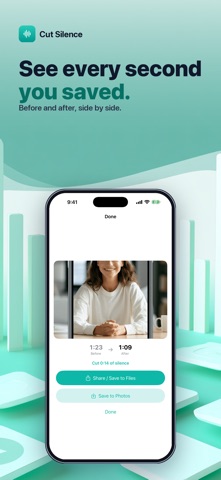


Description by Jhomar Maravillas Written by the developer, not by AppBrain. Click to read.
No ads. No subscription. Pay once and trim forever.
• AUTO-CUT SILENCE — detects the quiet gaps and splices them out, keeping your speech intact.
• THREE LEVELS — Light, Balanced, or Aggressive, so short natural pauses stay and dead air goes.
• KEEPS QUALITY — full-resolution export, audio and video stay in sync.
• 100% PRIVATE — everything happens on your iPhone. Your videos are never uploaded.
• NO ADS, NO SUBSCRIPTION — pay once, and that's it. No watermark, no weekly fee.
Perfect for podcasters, YouTubers, course creators, and anyone who records themselves talking.
Pick a video, choose how aggressively to cut, tap Remove Silence. Done.