

Cutaway: Video Editor with AI
Cutaway: Video Editor with AI is made and published by Yazan Aesmael. AppBrain is an independent app data site and isn't affiliated with Yazan Aesmael. The app name, icon, screenshots and description belong to Yazan Aesmael and are shown as published on the App Store.
AppBrain's verdict
- Last updated
- October 18, 2026
Rankings
App Store top chartsApp Store Rankings for Cutaway: Video Editor with AI
Competitors
Similar apps and more from Yazan AesmaelAlternatives to Cutaway: Video Editor with AI





More from Yazan Aesmael

Releases
Updates seen on the App Store- Version
- 1.7.0
- Launched
- September 2026
No changelog data
User feedback
Ratings and reviews on the App StoreComments on Cutaway: Video Editor with AI for iOS
We don't have enough comments to show example comments. Please check back later.
Technology
Found in the app by AppBrain- Price
- Free
- App size
- 149.1 MB
- Content rating
- Low
Technologies used by Cutaway: Video Editor with AI
About the app and developer
About Cutaway: Video Editor with AI
Cutaway: Video Editor with AI is a photo & video app developed by Yazan Aesmael.
What is the rating of Cutaway: Video Editor with AI?
Cutaway: Video Editor with AI has no ratings yet.
Is Cutaway: Video Editor with AI free?
Cutaway: Video Editor with AI is free. The app size is 149.07 MB. The latest version available is 1.7.0. The last update was on October 18, 2026.
What are the requirements for Cutaway: Video Editor with AI?
The app has a content rating of Low Maturity. The app has been available on the App Store since September 2026.
Developer information for Yazan Aesmael
Address:
Frequently asked questions about Cutaway: Video Editor with AI
Is Cutaway: Video Editor with AI free?
Yes. Cutaway: Video Editor with AI is free on the App Store.
Is Cutaway: Video Editor with AI still available?
Yes. Cutaway: Video Editor with AI is on the App Store, and the last update we saw was on October 18, 2026.
How large is Cutaway: Video Editor with AI?
Cutaway: Video Editor with AI is 149.07 MB.
Is Cutaway: Video Editor with AI suitable for children?
App Store gives Cutaway: Video Editor with AI a low maturity rating, so it is meant for older children and up.
Who made Cutaway: Video Editor with AI?
Cutaway: Video Editor with AI was developed by Yazan Aesmael. It is listed in the photo & video category on the App Store.
What are the best alternatives to Cutaway: Video Editor with AI?
People looking at Cutaway: Video Editor with AI also look at these photo & video apps: Vidsmith: Video Converter,GIF, LuminaAI - Photo Enhancer, JoinCut - Video Merge & Trim, Split Video: Lossless Cut, AI Detector - Photos & Videos.
Store listing
By Yazan Aesmael, from the App Store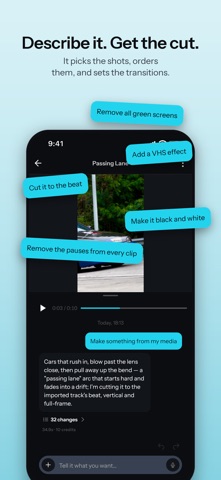


Description by Yazan Aesmael Written by the developer, not by AppBrain. Click to read.
"Start with me talking, cut to the coffee break, then back again. Black and white, and caption every line." That is the instruction, and Cutaway follows it. Not a button that guesses at your footage: a sentence you wrote, or said, applied to your clips.
Then it hands you the timeline. Every cut, caption, grade, effect and transition it made is an ordinary edit you can drag, retime, restyle or delete. A first cut you cannot argue with is worse than no first cut at all.
WHAT YOU CAN ASK IT FOR
• A cut from 15 seconds to five minutes, paced to what is actually in the footage
• A style to follow: short film, vlog, montage, old film, or let it decide
• Captions written to the cut and timed to the speech, in a style you pick
• A color grade, described rather than dialed in
• Transitions and effects chosen per cut, landing on the beat
• Your screenshots, photos and video clips placed inside the shot
• A green screen taken off one clip, or off every overlay at once
• Narration in a chosen voice, written for the edit it is making
• Music and sound effects generated for this video
• Quick changes that land almost instantly: "mute the music", "make the title bigger"
Type it, or say it: the AI chat takes voice typing.
OR EDIT IT ALL YOURSELF
• Timeline editing: split, trim and reorder
• Speed ramps: slow a moment, rush the rest, or draw your own curve
• Move, scale and rotate any clip, or give it a ready-made move: Ken Burns, drift, handheld, crash zoom
• Keyframe any move so the frame drifts, pushes in, or settles
• 47 transitions: dissolves, slides, whips, spins, glitches, cubes and more
• Effects: CRT, VHS, film grain, glitch, speed lines and more
• Film-style color filters, with intensity you can animate across a clip
• Green screen on any clip, video or photo: it finds the screen's own color and sets the strength for you, or keeps just the person with no screen at all, with any picture you like behind
• Captions, text in 292 fonts, stickers, and photos or videos over your video, at any opacity or blend mode
• Voiceover recorded with the in-app mic, as many takes as you need, and the in-app camera
• Portrait, square or landscape: one project, any shape
• Export to Photos at full quality
FREE, AND NOT A DEMO
The whole manual editor is free. No watermark on your exports, no ads, and no trial that expires. Most editors that hand you a timeline take something back at export; this one does not.
The AI features run on credits, bought or subscribed. Importing, editing, recording voiceover, the camera and export never cost anything.
YOUR FOOTAGE STAYS ON YOUR DEVICE
Editing and export run on the device, so there is no upload step and no render queue waiting on someone else's servers. Your video files never leave your iPhone or iPad. When you use an AI feature, it sends only what that feature needs, and none of it is used to train AI. We take no rights to anything you make.
Made for people who post often and would rather describe the edit than build it.
Terms of Use: https://www.apple.com/legal/internet-services/itunes/dev/stdeula/
Privacy Policy: https://cutaway.design/privacy