AppBrain
AppBrain
  • Apps
  • Apps being viewed right now Trending apps today Most popular apps All-time most installed apps Top rated apps iPhone and iPad apps
  • Intelligence ▾
    Intelligence overview → Track any Android app or your whole market
    Track & analyze
    Keyword Tracker & OptimizerTrack & improve Play rankings App Performance ReportOne-off PDF for any app StatisticsFree Android & Play market stats
    Promote your app
    Featured Apps App Links
  • Intelligence
  • Pricing
  • Dashboard
  • Sign up
  • Log in
App Store Apps > Photo & Video > Cutline: Transcript Editor
Cutline: Transcript Editor icon

Cutline: Transcript Editor

1.0
Sydcup OU
0.00
0 reviews
Free

Cutline: Transcript Editor Screenshot 1 of 10
Cutline: Transcript Editor Screenshot 2 of 10
Cutline: Transcript Editor Screenshot 3 of 10
Cutline: Transcript Editor Screenshot 4 of 10
Cutline: Transcript Editor Screenshot 5 of 10
Cutline: Transcript Editor Screenshot 6 of 10
Cutline: Transcript Editor Screenshot 7 of 10
Cutline: Transcript Editor Screenshot 8 of 10
Cutline: Transcript Editor Screenshot 9 of 10
Cutline: Transcript Editor Screenshot 10 of 10
Screenshots by Sydcup OU, from the the App Store listing
View on the App Store

About Cutline: Transcript Editor

Cutline: Transcript Editor is a photo & video app developed by Sydcup OU.

What is the rating of Cutline: Transcript Editor?

Cutline: Transcript Editor has no ratings yet.

Is Cutline: Transcript Editor free?

Cutline: Transcript Editor is free. The app size is 59.48 MB. The latest version available is 1.0. The last update was on November 23, 2026.

What are the requirements for Cutline: Transcript Editor?

The app has a content rating of Everyone. The app has been available on the App Store since November 2026.

Cutline: Transcript Editor is made and published by Sydcup OU. AppBrain is an independent app data site and isn't affiliated with Sydcup OU. The app name, icon, screenshots and description belong to Sydcup OU and are shown as published on the App Store.

Description by Sydcup OU (from the App Store)
Cutline turns your recording into a document you can edit.

Delete a sentence in the transcript and the audio and video cut with it. Drag a paragraph and the recording moves. Tap a filler word and it's gone, along with the pause behind it.

Transcription happens on your iPhone or iPad. No account, no per-minute charges. It works in airplane mode.


EDIT BY TYPING

• Delete words, sentences or whole paragraphs: the media follows
• Reorder by dragging paragraphs
• Remove every "um" and "uh" in one tap, after you review them
• Cut dead air with silence detection
• Re-record a line and splice the new take in where the old one was
• Speakers detected and labelled for you


CAPTIONS, SUBTITLES AND VERTICAL VIDEO

• Animated word-by-word captions in six styles, burned into the video
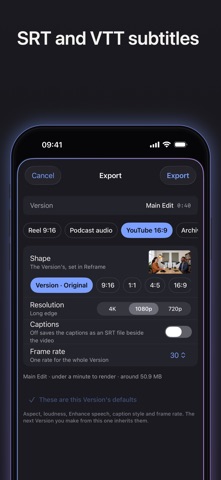
• Subtitles as SRT or VTT files
• Reframe for vertical, square, 4:5 or 16:9, with automatic subject tracking
• Add your logo as a watermark, anchored for the whole video
• Titles and name cards that follow the words they belong to


FIX ANY CUT BY HAND

• Open the timeline and drag any cut's start or end
• Roll a boundary to fix a clipped word without changing the length
• Snap to words, frames or silences, or nudge by 10 milliseconds
• Adjustments you make by hand survive re-transcription


LAYERS, AND MORE THAN ONE CUT

• Five tracks: your main recording, three layers of B-roll, and a music bed
• B-roll anchors to the words it covers, so an earlier cut never strands it
• Several Versions in one project: the full episode, a highlights reel, a vertical cut
• Loudness normalisation to -16 LUFS for podcast platforms


EXPORT WHATEVER YOU NEED

• Video in 4K, 1080p or 720p, captions burned in or off
• Audio as M4A, MP3, WAV or AIFF, with chapters and artwork
• Presets for Reels, podcasts and YouTube, and a queue for several Versions at once
• Text as TXT, Markdown, DOCX or PDF, with timecodes and speaker names
• Final Cut Pro and OTIO timelines, if you want to finish somewhere else


PROJECTS THAT FOLLOW YOU

• Turn on iCloud sync for a project and its transcript and edits stay current on every device on your iCloud account
• The media files stay on the device that has them. When you need one on another device, send it through your own iCloud Drive
• Search every transcript at once


YOUR RECORDINGS STAY ON YOUR DEVICE

Your recordings never leave your device. Your transcripts don't either, unless you turn on iCloud sync for a project; then they go to your own iCloud account, never to us. If you send a recording to your other device, it travels through your own iCloud Drive.

There's no account and no server holding your interviews, which matters if you record sources or clients.

With your permission, Cutline collects anonymous usage statistics and crash reports. They never include your audio, transcripts, file names or project names, and you can turn them off in Settings.


IN YOUR LANGUAGE

Cutline speaks 20 languages, and transcribes many more.


FREE TO TRY

Record, import, transcribe and edit anything, at any length, free. Export audio, video up to 1080p, subtitles and a transcript free for projects up to 20 minutes, with no watermark. Cutline Pro removes the length limit and adds 4K, the full timeline, five tracks, twelve Versions, one-tap filler removal, every caption style and every export format.

Cutline Pro Monthly: renews every month. No free trial on this plan.
Cutline Pro Yearly: renews every year, and starts with 7 days free if your Apple Account is eligible for the trial.

Payment is charged to your Apple Account at confirmation. A subscription renews automatically unless you cancel at least 24 hours before the period ends; manage or cancel it in Settings. Any unused part of a free trial is forfeited when you buy a subscription. If a subscription ends, nothing you made is locked away.

Terms of Use: https://cutline.sydcup.com/terms/
Privacy Policy: https://cutline.sydcup.com/privacy/
Show more Show less

More from Sydcup OU

Sona: Own Voice Affirmations icon Sona: Own Voice Affirmations
Sydcup OU
0.0
Free

Changelog of Cutline: Transcript Editor

No changelog data

Developer information for Sydcup OU

Sydcup OU

Address:

Share Cutline: Transcript Editor

Comments on Cutline: Transcript Editor for iOS

We don't have enough comments to show example comments. Please check back later.

App Store Rankings for Cutline: Transcript Editor

This app is not ranked

Technologies used by Cutline: Transcript Editor

Frequently asked questions about Cutline: Transcript Editor

Is Cutline: Transcript Editor free?

Yes. Cutline: Transcript Editor is free on the App Store.

Is Cutline: Transcript Editor still available?

Yes. Cutline: Transcript Editor is on the App Store, and the last update we saw was on November 23, 2026.

How large is Cutline: Transcript Editor?

Cutline: Transcript Editor is 59.48 MB.

Is Cutline: Transcript Editor suitable for children?

App Store rates the content of Cutline: Transcript Editor as suitable for everyone.

Who made Cutline: Transcript Editor?

Cutline: Transcript Editor was developed by Sydcup OU. It is listed in the photo & video category on the App Store.

Top new apps Price drops on Google Play Apps other people are watching Today's trending apps Popular Photo & Video Apps
More hot apps 🔥
AppBrain Intelligence premium content

Subscribe now to get full and unlimited access to AppBrain Intelligence. You'll have access to:

  • App Intelligence dashboard (performance timeline, competitor comparison, country rankings, insight cards)
  • Detailed ranking data per app
  • Full timeline per developer
  • Device market shares data per country
  • Unlimited keyword tracking
  • AI assistant access via MCP (Claude, Cursor or any MCP client)
1 Month

$75/mo
(billed every month)

SAVE 0%
Subscribe
3 Months

$65/mo
($195 billed every 3 months)

SAVE 13%
Subscribe
1 Year

$57.50/mo
($690 billed every year)

SAVE 23%
Subscribe
Each subscription will automatically renew 3 days before the expiration date for the same time period. Subscriptions can be cancelled at any time before the renewal.

AppBrain is an app data site, we track rankings, ratings, installs for all apps and games on Google Play and the App Store. AppBrain doesn't host app files or APKs, all install links go directly to the official store. All trademarks are owned by their respective owners.

More apps

  • Top Android apps being viewed
  • AppDialer 12–T9 app search
  • View Doctor 24By7
  • View JLab

App statistics

  • Android statistics
  • Google Play Developer stats
  • Trending Android Apps
  • Trending iOS apps
  • Top popular Apps
  • Buy the best Android phone
  • Buy & sell app businesses

About AppBrain

  • Contact
  • Privacy
  • Documentation
  • DMCA takedowns
  • Blog
  • Free App-Ads.Txt Validation
© 2010-2026 - AppBrain