

CW Decoder is made and published by Keiya Chiba. AppBrain is an independent app data site and isn't affiliated with Keiya Chiba. The app name, icon, screenshots and description belong to Keiya Chiba and are shown as published on the App Store.
AppBrain's verdict
- Rating on App Store
- 2.00
- 1 ratings
- Last updated
- October 4, 2026
- Size
- 12.4 MB
It doesn't have enough ratings yet to judge what users think.
User feedback
Ratings and reviews on the App StoreComments on CW Decoder for iOS
We don't have enough comments to show example comments. Please check back later.
Store listing
By Keiya Chiba, from the App Store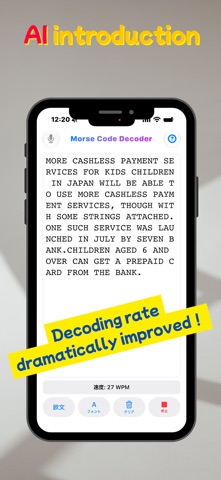

Description by Keiya Chiba Written by the developer, not by AppBrain. Click to read.
An AI model now drives the decoding, raising the hit rate on real
on-air signals. Sample-by-sample signal processing keeps it steady
in noise. Try the free version first and hear what it can pull out
of the band.
■ Free version vs. Full Version
The decoding engine itself is free for everyone to try.
[Free version]
• Each decoding session runs up to 2 minutes (restart as often as you like)
• Standard font
• Audio input from the built-in microphone only
→ Ideal for trying the app out or checking a short QSO.
[Full Version (paid add-on)]
• No time limit — built for long ragchews and for leaving it running
while you monitor
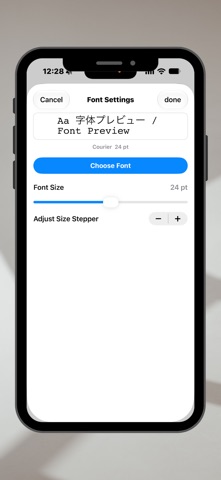
• Font settings — pick the typeface and size that read best for you
• USB-C audio input — wire it straight to your rig and decode without
the room getting in the way
→ Recommended if you want it on the desk for real operating, or a
study setup you never have to babysit.
■ Features and technology
(Real-time decoding)
• Speed range: 5–50 WPM (speed and thresholds adjust themselves)
• Detection range: 400 Hz – 900 Hz (locks onto the strongest signal)
(What it decodes)
• Letters, numerals and punctuation
• Prosigns, and characters run together the way operators actually
send them
(Audio input: built-in microphone or USB-C)
• Built-in microphone: no cable, nothing to set up. Point it at the
speaker and go.
• USB-C input (Full Version): connect any USB Audio Class device with
a cable and it is recognised on the spot. No driver, no settings
screen to find.
• Plugging in switches the input over automatically; unplugging hands
it back to the built-in microphone.
• Taking audio straight from your rig's headphone output or an audio
interface keeps conversation, traffic and household noise out of the
decode.
(Input source indicator)
• The icon at the top left of the screen shows which input is in use
at a glance:
Microphone icon — the built-in microphone
Connector icon — a USB-C device (shown in blue)
• Plug or unplug the cable and the icon follows along on its own.
• Connect a USB device before purchasing and a small lock appears.
Tap it for details about the Full Version.
• In landscape the icon moves to the button row at the bottom.
(Signal processing)
• Band-pass filter: a narrow window that cuts everything you did not
tune for
• AGC: tracks changes in signal strength and rides out fading
• Noise blanker: removes spike noise using median absolute deviation
• State stabilisation: multi-sample buffering so noise does not trip a
false element
■ Built for operating, not just demos
• Scrollable text, so anything you missed is still there to go back to
• Locks firmly onto the 400 Hz – 900 Hz range where CW actually lives
• A visual read-out that backs up what your ears are doing
• A direct USB-C connection to the rig gives you the same steady copy
in the shack or out portable
■ Who it is for
(New to Morse)
For anyone curious about Morse who is not sure where to start. Hearing
it and reading it at the same time means you can check yourself as you
go, which makes the learning stick far faster.
(Licensed amateurs)
• Practice: compare the decode against your own copy and find the
characters you keep missing
• Contests: a second pair of ears on fast CW, and a way to check a log
entry
• Portable: leave the laptop at home. A phone is the whole receiving
setup.
• Direct connection: over USB-C the copy stays solid even somewhere
noisy
(Returning and experienced operators)
As a backstop for ears that are not what they were, or simply to make
a long watch less tiring. Strong filtering keeps weak and crowded
signals readable.
Note: USB-C audio input requires a device with a USB-C port (iPhone 15
or later, USB-C iPad models) and a USB Audio Class compatible device.
Note: Microphone access is used only to analyse the signal. Nothing is
recorded, stored or transmitted. Audio arriving over USB-C uses the
same permission.
Safety and technology
Found in the app by AppBrain- Price
- Free
- App size
- 12.4 MB
- Content rating
- Everyone
Technologies used by CW Decoder
Releases
Updates seen on the App Store- Version
- 3.39
- Launched
- August 2025
No changelog data
Alternatives
Similar apps and more from Keiya ChibaMore from Keiya Chiba


Rankings
App Store top chartsApp Store Rankings for CW Decoder
About the app and developer
About CW Decoder
CW Decoder is an entertainment app developed by Keiya Chiba.
User Ratings
CW Decoder is rated 2.00 out of 5 stars. The rating is based on one rating ratings.
App Information
CW Decoder is freely available from the App Store. The app size is 12.42 MB. The latest version available is 3.39. The last update was on October 4, 2026.
Technical Requirements
The app has a content rating of Everyone. The app has been available on the App Store since August 2025.
Developer information for Keiya Chiba
Address:
Frequently asked questions about CW Decoder
Is CW Decoder free?
Yes. CW Decoder is free on the App Store.
Is CW Decoder still available?
Yes. CW Decoder is on the App Store, and the last update we saw was on October 4, 2026.
How large is CW Decoder?
CW Decoder is 12.42 MB.
Is CW Decoder suitable for children?
App Store rates the content of CW Decoder as suitable for everyone.
How do people rate CW Decoder?
CW Decoder has one rating of 2.00 stars on the App Store.
Who made CW Decoder?
CW Decoder was developed by Keiya Chiba. It is listed in the entertainment category on the App Store.