

CX Music Player is made and published by Coetic X LLC. AppBrain is an independent app data site and isn't affiliated with Coetic X LLC. The app name, icon, screenshots and description belong to Coetic X LLC and are shown as published on the App Store.
AppBrain's verdict
- Last updated
- August 31, 2026
Rankings
App Store top chartsApp Store Rankings for CX Music Player
Competitors
Similar apps and more from Coetic X LLCAlternatives to CX Music Player


More from Coetic X LLC

Releases
Updates seen on the App Store- Version
- 1.1.0
- Launched
- August 2026
No changelog data
User feedback
Ratings and reviews on the App StoreComments on CX Music Player for iOS
We don't have enough comments to show example comments. Please check back later.
Technology
Found in the app by AppBrain- Price
- Free
- App size
- 46.0 MB
- Content rating
- Everyone
Technologies used by CX Music Player
About the app and developer
About CX Music Player
CX Music Player is a music app developed by Coetic X LLC.
User Ratings
The app has no ratings yet.
App Information
CX Music Player is freely available from the App Store. The app size is 45.98 MB. The latest version available is 1.1.0. The last update was on August 31, 2026.
Technical Requirements
The app has a content rating of Everyone. The app has been available on the App Store since August 2026.
Developer information for Coetic X LLC
Address:
Store listing
By Coetic X LLC, from the App Store



Description by Coetic X LLC Written by the developer, not by AppBrain. Click to read.
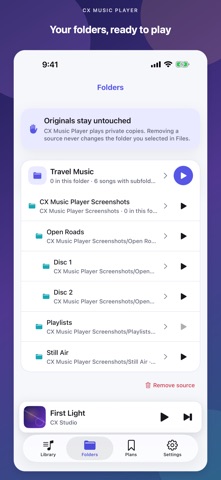
YOUR FOLDERS, YOUR CHOICE
• Choose a directory through Apple's Files picker
• Find supported audio in nested subfolders
• Exclude any folder before importing
• Keep an organized local library on your iPhone
BROWSE YOUR LIBRARY
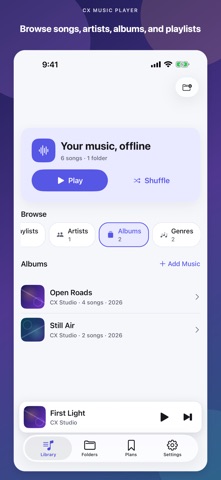
• Browse Songs, Artists, Albums, and Genres when available
• Import ordered local M3U8 playlists
• Keep the Folders view for your original organization
• Play albums in disc and track order
• Display compatible embedded JPEG or PNG cover art
COMPLETE PLAYBACK
• Play one folder alone or include its enabled subfolders
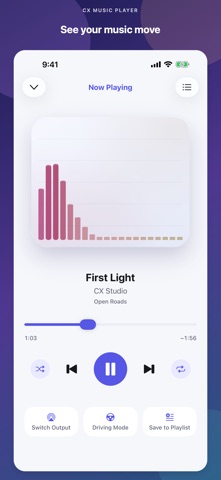
• Play, pause, seek, skip, and go back
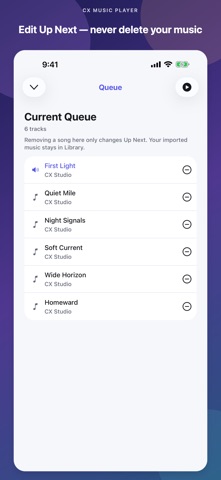
• Remove individual songs from Up Next without deleting Library music
• Shuffle and repeat your music
• Continue listening in the background
• Use lock-screen and Control Center playback controls
PLAN MUSIC FOR LATER
• Keep non-playable song ideas in Finds and Planned Playlists
• Search your imported Library and saved plans locally
• Add a title or save a public music link without downloading it
• Share or import a metadata-only CX Music Player JSON file
• Keep playable Library playlists separate from planning lists
LOW-DISTRACTION CONTROLS
• Manually switch to large Previous, Play/Pause, and Next controls
• Reach Up Next or your Folders without scrolling
• Set up music while parked and prefer car controls or Siri when available
PARKED CAR-AUDIO HELP
• See the current playback output reported by iOS
• Run a silent connection check
• Open Apple's system playback-route picker
• Review pairing and auto-connect checks for your radio
PRIVATE BY DESIGN
CX Music Player has no account, ads, subscriptions, in-app purchases, analytics, or backend. Audio, filenames, embedded tags, cover art, imported M3U8 data, Library data, Finds, and Plans are processed locally. A shared planning JSON contains metadata, notes, public source links, and portable IDs—not audio, local file paths, or API keys—and goes only to the iOS destination you choose. Current output names and types are displayed only in memory. Imported audio and its cover art are marked excluded from device backups; iOS may back up small non-audio app data.
GOOD TO KNOW
iOS does not let apps silently scan the whole phone. CX Music Player scans only the Files folder you explicitly choose. M3U8 playlists may reference only relative files inside that folder; web addresses and other arbitrary URIs are not loaded. The app does not access Apple Music or MusicKit, stream music, download from media services, or share your audio files. Importing creates a local copy and therefore uses device storage.
Direct MusicBrainz and Last.fm search is disabled in this release pending terms and privacy review. Optional Google and YouTube actions open a fixed search in Safari; CX Music Player does not scrape results, embed those sites, or download media.
Driving Mode is an in-app screen, not a CarPlay app. CX Music Player cannot pair a radio, force a Bluetooth connection, change the radio source or priority, or configure automatic reconnection. Pair and configure your car through iPhone Settings and the radio while parked.
Supported file extensions: MP3, M4A, AAC, WAV, AIFF, AIF, CAF, and FLAC. Playback depends on the file's codec and integrity.
Playlist format: UTF-8 M3U8 with local relative paths.
Choose your folder and press play. That's it.