Cyphir is an overall app developed by Veridian Software LLC.
Download Statistics
User Ratings
Cyphir is rated 5.00 out of 5 stars. The rating is based on one rating ratings.
App Information
Cyphir is FREE to download. The APK download size is 26.59 MB. The latest version available is 1.0.4. The last update was on July 1, 2026.
Technical Requirements
The app has a content rating of Everyone. The app has been available on Google Play May 2026.
Description
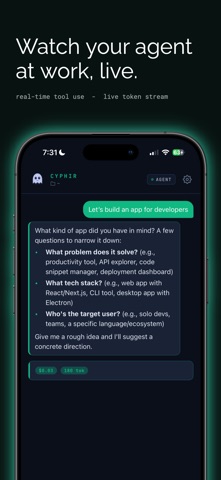
Cyphir turns your iPhone into a control surface for AI coding agents running on your Mac or PC.
Start sessions, send instructions, monitor activity, and stay close to your AI-assisted development work even when you are away from your desk.
CONTROL YOUR AI WORKFLOW
Cyphir lets you connect your phone to supported coding-agent sessions on your computer through the Cyphir bridge. From your iPhone, you can send commands, follow session activity, and keep visibility into what is happening on your machine.
BUILT FOR AI CODING AGENTS
Cyphir is designed for developers, builders, and power users who run tools like Claude Code, Codex, and other local AI-assisted coding workflows. Your computer runs the agent. Your phone becomes the command and review layer.
REMOTE SESSION VISIBILITY
Follow active sessions from your phone, review recent activity, and keep track of agent work while you move between your desk, laptop, and mobile device.
PAIR YOUR COMPUTER SECURELY
Install the Cyphir bridge on your Mac or PC, pair it with your iPhone, and connect through Cyphir’s relay infrastructure. Pairing is tied to your account and device flow so you can manage access from the app.
APPROVAL-FOCUSED CONTROL
Cyphir is built around visibility and control. Supported approval and review flows help you understand what your agent is doing and reduce the chance of unattended work moving forward without your awareness.
PRIVACY-CONSCIOUS BY DESIGN
Cyphir is designed to avoid unnecessary exposure of sensitive workflow data. Authentication, pairing, local device storage, session cleanup, and relay behavior are built with security and privacy in mind.
HOW IT WORKS
1. Install the Cyphir bridge on the computer where your AI coding agent runs. 2. Pair your iPhone using the Cyphir app. 3. Start or monitor supported sessions from your phone. 4. Review activity and stay in control while your agent works.
WHAT YOU CAN DO
• Connect your iPhone to supported AI coding workflows on your computer • Start and monitor coding-agent sessions • Send natural-language instructions • Review supported session activity from your phone • Use account-based pairing and bridge connection flows • Manage your mobile session state securely • Keep your AI coding workflow close, even when you step away from your desk
WHO CYPHIR IS FOR
Cyphir is for developers, founders, technical operators, and AI power users who want mobile visibility and control over their AI coding workflows.
REQUIREMENTS
Cyphir requires the Cyphir bridge to be installed on the Mac or PC you want to connect. Supported AI coding tools must be installed and configured separately on that computer.
A Cyphir subscription may be required after the free trial.
Each subscription will automatically renew 3 days before the expiration date for
the same time period. Subscriptions can be cancelled at any time before the renewal.