

DAC Color Contrast Checker
DAC Color Contrast Checker is made and published by Kenneth Akomea. AppBrain is an independent app data site and isn't affiliated with Kenneth Akomea. The app name, icon, screenshots and description belong to Kenneth Akomea and are shown as published on the App Store.
AppBrain's verdict
- Last updated
- February 20, 2026
Rankings
App Store top chartsApp Store Rankings for DAC Color Contrast Checker
Competitors
Similar apps and more from Kenneth AkomeaAlternatives to DAC Color Contrast Checker


More from Kenneth Akomea

Releases
Updates seen on the App Store- Version
- 2.1.1
- Launched
- December 2025
No changelog data
User feedback
Ratings and reviews on the App StoreComments on DAC Color Contrast Checker for iOS
We don't have enough comments to show example comments. Please check back later.
Technology
Found in the app by AppBrain- Price
- Free
- App size
- 5.45 MB
- Content rating
- High
Technologies used by DAC Color Contrast Checker
About the app and developer
About DAC Color Contrast Checker
DAC Color Contrast Checker is an utilities app developed by Kenneth Akomea.
User Ratings
The app has no ratings yet.
App Information
DAC Color Contrast Checker is freely available from the App Store. The app size is 5.45 MB. The latest version available is 2.1.1. The last update was on February 20, 2026.
Technical Requirements
The app has a content rating of High Maturity. The app has been available on the App Store since December 2025.
Developer information for Kenneth Akomea
Address:
Store listing
By Kenneth Akomea, from the App Store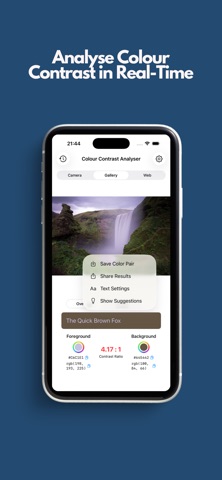



Description by Kenneth Akomea Written by the developer, not by AppBrain. Click to read.
Check colour contrast the way you work: from photos, your gallery, or any webpage. See instantly whether text and background combinations meet WCAG 2.2 and get clear, actionable feedback.
What you can do:
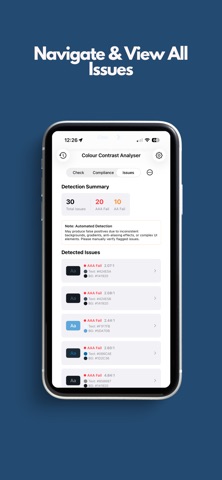
On photos from the camera or your gallery, tap "Analyse Contrast" and the app scans the image for text regions, measures each area's colour contrast, and marks where it fails WCAG AA or AAA.
Issues appear as overlays on the image and in a dedicated Issues list; tap any finding to load those colours and fix them. You can also capture a scene with the camera or pick an image from your gallery and use the pipette to sample any colour.
For the web, open any URL and sample colours directly from the page—handy for checking existing sites or matching a brand.
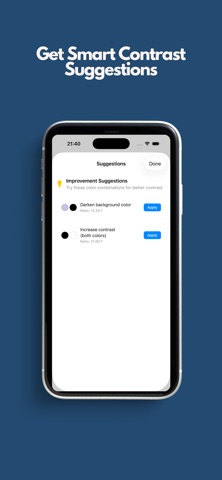
Contrast ratio and WCAG 2.2 ratings (Normal and Large text, AA and AAA) update in real time. Switch between a quick Check view and a detailed Compliance view; when you've run analysis on an image, an Issues tab shows what was detected and where. If a pair doesn't pass, the app suggests better foreground/background options—tap one to apply it and recheck. Use the sample text area with your chosen colours and adjust font size, weight, and style so the preview matches how you'll use them. Save colour pairs with an optional name and revisit them from Colour History; tap a saved pair to load it back. Share your analysis or copy hex and RGB values in one tap.
Who it's for:
Designers, developers, content creators, and anyone who cares about readable, accessible colour choices. Built with input from the Digital Accessibility Centre and aligned to WCAG 2.2, so you can trust the results whether you're designing a site, app, or document.
Privacy:
All analysis runs on your device. We don't collect, store, or send your data. Colour history stays only on your iPhone or iPad.