

Daily Notes Planner 3
Daily Notes Planner 3 is made and published by 5th & 7th LLC. AppBrain is an independent app data site and isn't affiliated with 5th & 7th LLC. The app name, icon, screenshots and description belong to 5th & 7th LLC and are shown as published on the App Store.
AppBrain's verdict
- Rating on App Store
- 4.59
- 27 ratings
- Last updated
- September 10, 2026
- Size
- 12.9 MB
It doesn't have enough ratings yet to judge what users think.
User feedback
Ratings and reviews on the App StoreComments on Daily Notes Planner 3 for iOS
We don't have enough comments to show example comments. Please check back later.
Store listing
By 5th & 7th LLC, from the App Store


Description by 5th & 7th LLC Written by the developer, not by AppBrain. Click to read.
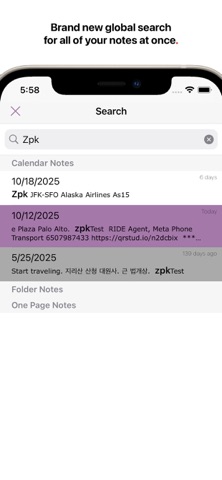
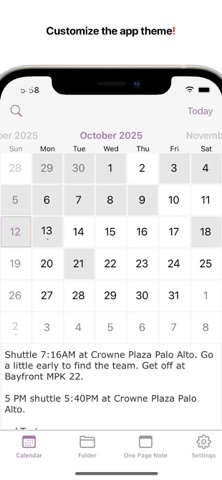
As a much simpler calendar app than the built-in iCalendar app, Daily Notes Planner 3 allows you to type in plain-text-notes for every date (no complicated hourly scheduling or reminders here). Because notes are organized by date, you will know exactly where to look for when you reference them later. Tap on the date in the calendar to go into that date and record or reference notes. The dates with notes are highlighted in the calendar.
"Folder Notes" organizes your notes with folders and files. Create folders and note files inside them. Also, you can long press any file or folder row to change its name. Also you can press "edit" button in the bottom to delete or rearrange rows.
N.B. The two notes formats: calendar notes and folder notes would satisfy all of your life's needs for notes, and they are super intuitive to use. One more super tip: it is much easier to type your notes on your Mac so please check out Daily Notes Planner 3+ in the Mac App Store too so that you can edit your notes both from the Mac and the iPhone. You just have to log in with the same Email address on those devices to sync the same notes.
"One Page Note" has just one page of note. If you need to jot something and don't want to save it permanently, this is a good place to put it.
To transfer your notes from Daily Notes Planner 2, use the Mac version of Daily Notes Planner (it is FREE to download) and in the top menu, click "Cloud" -> "Save all notes to Daily Notes Planner 3". Your notes are tied to an Email address so if you login with the same Email address in multiple devices, they all will sync automatically, securely, and instantly. In fact, you could even do real-time corroborations with multiple people because notes sync so quickly.
Privacy Policy and Terms: https://dailynotesplanner.com/privacy_policy.html
Safety and technology
Found in the app by AppBrain- Price
- Free
- App size
- 12.9 MB
- Content rating
- Everyone
Technologies used by Daily Notes Planner 3
Releases
Updates seen on the App Store- Version
- 1.31
- Launched
- May 2024
No changelog data
Alternatives
Similar apps and more from 5th & 7th LLCMore from 5th & 7th LLC


Rankings
App Store top chartsApp Store Rankings for Daily Notes Planner 3
About the app and developer
About Daily Notes Planner 3
Daily Notes Planner 3 is an utilities app developed by 5th & 7th LLC.
User Ratings
Daily Notes Planner 3 is rated 4.59 out of 5 stars. The rating is based on 27 ratings.
App Information
Daily Notes Planner 3 is freely available from the App Store. The app size is 12.88 MB. The latest version available is 1.31. The last update was on September 10, 2026.
Technical Requirements
The app has a content rating of Everyone. The app has been available on the App Store since May 2024.
Developer information for 5th & 7th LLC
Address: