Download Android Apps and Games
AppBrain
  • Apps
  • Apps being viewed right now Trending apps today Most popular apps All-time most downloaded apps Top rated apps
  • Intelligence ▾
    Intelligence overview → Track any Android app or your whole market
    Track & analyze
    Keyword Tracker & OptimizerTrack & improve Play rankings App Performance ReportOne-off PDF for any app StatisticsFree Android & Play market stats
    Promote your app
    Featured Apps App Links
  • Intelligence
  • Pricing
  • Dashboard
  • Sign up
  • Log in
Last updated on: 2026-07-27
App Store Apps > Utilities > Daily Sound Notes Professional
Daily Sound Notes Professional icon

Daily Sound Notes Professional

6.3.5
方 沈
0.00
0 reviews
$1.99

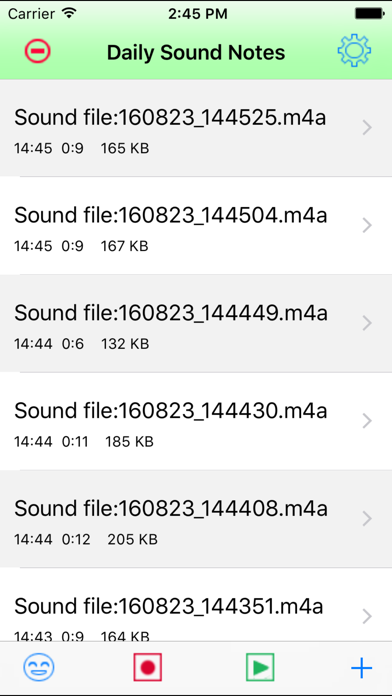
Daily Sound Notes Professional Screenshot 1 of 8
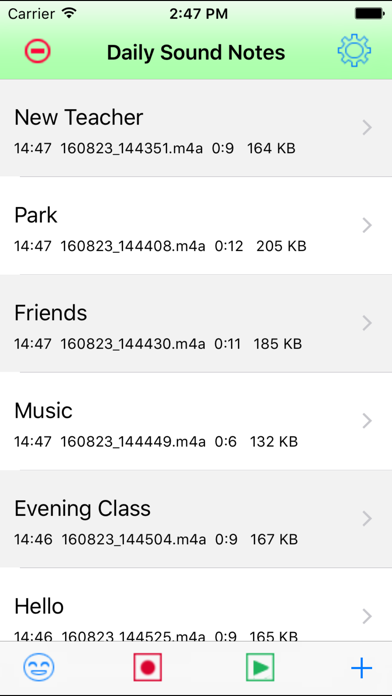
Daily Sound Notes Professional Screenshot 2 of 8
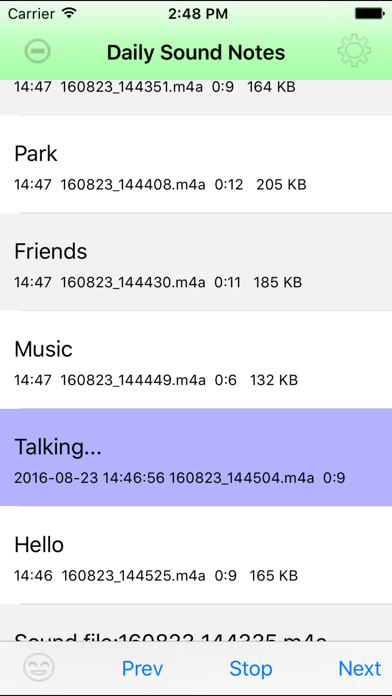
Daily Sound Notes Professional Screenshot 3 of 8
Daily Sound Notes Professional Screenshot 4 of 8
Daily Sound Notes Professional Screenshot 5 of 8
Daily Sound Notes Professional Screenshot 6 of 8
Daily Sound Notes Professional Screenshot 7 of 8
Daily Sound Notes Professional Screenshot 8 of 8
Download from the App Store

About Daily Sound Notes Professional

Daily Sound Notes Professional is an overall app developed by 方 沈.

Download Statistics

User Ratings

The app has no ratings yet.

App Information

Daily Sound Notes Professional costs $1.99 to download. The APK download size is 3.08 MB. The latest version available is 6.3.5. The last update was on June 24, 2024.

Technical Requirements

The app has a content rating of Everyone. The app has been available on Google Play June 2014.

Description
EASY TO RECORD, SIMPLE TO PLAY

Record & Play from Apple Watch,iPhone and iPad.

Record the daily sound as soon as possible. In iPhone or iPad, Make the note for the sound. Listen the talking of the note. Listen the playback of sound. Save our wonderful experience in the device.

Long press the table cell to play the single sound note. Tap the play button of main view to play all the notes repeatedly.

Features For iPhone and iPad:

1 Record the sound

1.1 Tap the record button to record
1.2 Pinch the screen to record
1.3 Shake the device to record
1.4 Add the new note and tap the record button in the single view. In this case, the user could input the text and record the sound at the same time.

In the 1.1 1.2 1.3 , we will record first and input the text later.
In the 1.4, we could add the text first and record the sound.

2 Add the text for the sound

2.1 If already record the sound, tap the single table cell, then the single note view will be displayed , so input text. By tapping the textview, we could input text by soft keyboard, or using dictation from microphone, or using camera scanning text.

2.2 If add a new note, tap the + button at the bottom right corner, then the single note view will be displayed, so input the text by soft keyboard or camera.  In the latest iOS devices, when we need to input the text content, we could just long press the text view, the live text scan button will be displayed, so we could capture the text content from the camera directly. In iOS 16, The languages currently supported by Live Text include English, French, Chinese, Italian, Spanish, Portuguese, German, Japanese, and Korean. Several old iOS devices may not support this feature.

3 Play the sound, talk the text

3.1 Tap the play button at the bottom tool bar in the main view, all of the sound and text note will be played and talked one by one.

3.2 Long press the single cell of the main list view, the sound and text in this cell will be displayed and talked repeatedly.

3.3 In the single note view, tap the play button to play the sound, tap the talk button to talk the text.

4 Other features:
4.1 Export the sound file by iTune File Sharing, Email the sound file, or to iCloud Drive. Using the email, need to already set the default email box of the device.
4.2 Rename the sound file
4.3 Share the sound file with iTunes
4.4 Only Talk text from the main view
4.5 Select the channel for the sound file: 1 channel or 2 channel
4.6 Select the sample rate for the sound file. 44100 or 8000
4.7 Select the specific language for the text. So different notes could have the different languages.
4.8 Select the codec: MPEG4AAC (*.m4a) or Linear PCM ( *.aif)

5 Incoming phone call
5.1 When this App is recording the sound , a phone call is coming, then the App will stop the recording job and save the sound file. 
5.2 Accept a phone call, then start talking feature, both sides could hear the talking.

6 Background recording should be used only when it is necessary.
6.1 When the App is recording, then the user press the home key, the recording action could work in the background status. At this time , the user could use other Apps.
6.2 When the App in the background status, the recording action is out of control, the user should let the App reactive as soon as possible.
6.3 If the recording action is in the background, the user uses other sound related App, the recording action in the background will be stop and the sound file will be saved.

Features For Apple Watch

1 Continue to record the sound when the watch screen is off. When record the sound in background, sometimes, at the top middle of watch screen , a red icon of microphone will be displayed. just tap this icon, our app will be displayed.

2 Play the sound in the background status by using blue tooth devices.
3 Display the list of sound files in Watch
4 Delete the sound file
5 Transfer the sound file to iPhone automatically
6 If we need, could transfer again by tapping the transfer button.
Show more Show less

More data about Daily Sound Notes Professional

Price $1.99
Rating No ratings
Ranking Not ranked
Version 6.3.5
App download size 3.08 MB
Suitable for Everyone

Alternative downloads for the Daily Sound Notes Professional app

CommaSurf - Watch Browser icon CommaSurf - Watch Browser
Viktor Sengel
0.0
$4.99
iCleaner Kit - Free Up Storage icon iCleaner Kit - Free Up Storage
Playorium LTD
4.6
Free
189 ratings
ZkSearch - Private AI Search icon ZkSearch - Private AI Search
Lutvi Sakir
4.7
Free
32 ratings
Calculator Vault - App Locker icon Calculator Vault - App Locker
Amit Tulsiyani
3.4
Free
7 ratings
File Explorer & Player icon File Explorer & Player
Remote Sunrise LTD
4.6
Free
122 ratings
Field Service Ministry icon Field Service Ministry
RedTracker LLC
4.5
Free
36 ratings
BurbleMe icon BurbleMe
Burble Software Company, LLC
3.2
Free
17 ratings
WiZ Pro Setup icon WiZ Pro Setup
Signify Netherlands B.V.
1.4
Free
15 ratings

More from 方 沈

Daily Talking Watch Pro icon Daily Talking Watch Pro
方 沈
2.2
$1.99
4 ratings
Flashlight Reminder icon Flashlight Reminder
方 沈
3.5
Free
2 ratings
Auto Proximity Detection icon Auto Proximity Detection
方 沈
1.0
Free
2 ratings
Daily Talking Watch icon Daily Talking Watch
方 沈
2.5
$0.99
2 ratings
Talking Reminder icon Talking Reminder
方 沈
3.0
$0.99
2 ratings
Talking Reminder Lite icon Talking Reminder Lite
方 沈
1.0
Free
2 ratings
Camera Capture Event icon Camera Capture Event
方 沈
1.0
$0.99
1 ratings
Sound Reminder icon Sound Reminder
方 沈
1.0
$0.99
1 ratings

Changelog of Daily Sound Notes Professional

No changelog data

Developer information for 方 沈

方 沈

Address:

Share Daily Sound Notes Professional

Comments on Daily Sound Notes Professional for iOS

We don't have enough comments to show example comments. Please check back later.

App Store Rankings for Daily Sound Notes Professional

This app is not ranked

Technologies used by Daily Sound Notes Professional

CommaSurf - Watch Browser icon CommaSurf - Watch Browser
iCleaner Kit - Free Up Storage icon iCleaner Kit - Free Up Storage
ZkSearch - Private AI Search icon ZkSearch - Private AI Search
Calculator Vault - App Locker icon Calculator Vault - App Locker
File Explorer & Player icon File Explorer & Player
Field Service Ministry icon Field Service Ministry
BurbleMe icon BurbleMe
WiZ Pro Setup icon WiZ Pro Setup

Back to top
AppBrain Intelligence premium content

Subscribe now to get full and unlimited access to AppBrain Intelligence. You'll have access to:

  • App Intelligence dashboard (performance timeline, competitor comparison, country rankings, insight cards)
  • Detailed ranking data per app
  • Full timeline per developer
  • Device market shares data per country
  • Unlimited keyword tracking
1 Month

$75/mo
(billed every month)

SAVE 0%
Subscribe
3 Months

$65/mo
($195 billed every 3 months)

SAVE 13%
Subscribe
1 Year

$57.50/mo
($690 billed every year)

SAVE 23%
Subscribe
Each subscription will automatically renew 3 days before the expiration date for the same time period. Subscriptions can be cancelled at any time before the renewal.

AppBrain is a directory focused on discovering great apps and games. We give statistics, rankings and search options that Google Play and the App Store don't have. All trademarks are owned by their respective owners. AppBrain doesn't offer APKs or binaries, and always lets users install the official version from Google Play or the App Store.

More apps

  • Top Android apps being viewed
  • Lawyer Diary & Case Management
  • xCanvas: Tattoo Lettering for Android
  • Starting 5 for Android

Android Statistics

  • Android statistics
  • Google Play Developer stats
  • Trending Android Apps
  • Top popular Apps
  • Buy the best Android phone

About AppBrain

  • Contact
  • Privacy
  • Documentation
  • DMCA takedowns
  • Articles
  • Blog
  • Android App Marketing: Learn how to better market your Android app
© 2010-2026 - AppBrain