It doesn't have enough ratings yet to judge what users think.
Daily Widgets - Color Themes is made and published by
Becky Shiu.
AppBrain is an independent app data site and isn't affiliated with Becky Shiu.
The app name, icon, screenshots and description belong to Becky Shiu and are shown as
published on the App Store.
About Daily Widgets - Color Themes
Daily Widgets - Color Themes is a graphics & design app developed by Becky Shiu.
What is the rating of Daily Widgets - Color Themes?
Daily Widgets - Color Themes is rated 3.50 out of 5 stars, based on 2 ratings.
Is Daily Widgets - Color Themes free?
Daily Widgets - Color Themes is free. The app size is 98.04 MB. The latest version available is 1.6.0. The last update was on October 22, 2021.
What are the requirements for Daily Widgets - Color Themes?
The app has a content rating of Everyone. The app has been available on the App Store since September 2021.
Description by Becky Shiu(from the App Store)
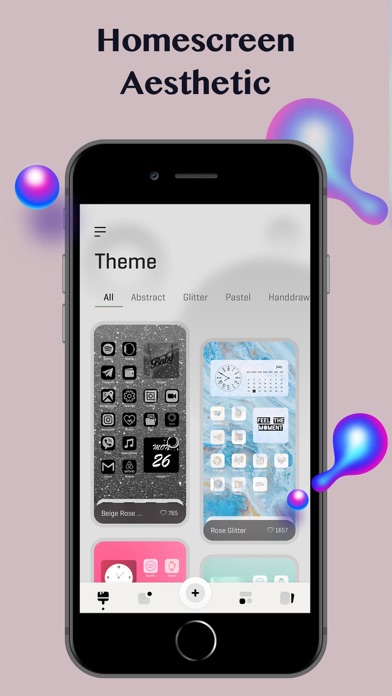
This app lets you personalize your home screen like never before.
Selected various themes for customizing your home screen design with icons and wallpapers. Every theme contains wallpapers, widgets and icons, different theme styles such as Forest, Neon, Black, etc. Choose the one you like, they’re easy to apply with the help of our guide.
App includes many kind of contents & useful widgets: Calendar, Digital Clock, Photo/Album, Daily Motivational Quotes, Contact, Weather. Get ready to make your home screen unique.
Unlimited icons, wallpapers are all available for your choice. And even more, you can customize your icons, changing the background, icon colors, icon styles etc. Just follow the instructions step-by-step, say goodbye to boring screen!
Upgrade to our VIP service and enjoy more icons, themes, widgets, wallpapers. At the same time, get rid of all Ads. - You will receive access to all the features above for the duration of the subscription. - Subscription length: Weekly and Yearly.
-----------------------------
- Payments will be charged to iTunes Account at confirmation of purchase.
- Your account will be charged for renewal within 24-hours prior to the end of the current period and identify the cost of the renewal.
- Subscriptions may be managed by the user and auto-renewal may be turned off by going to the user's Account Settings after purchase.
- Any unused portion of a free trial period (if offered) will be forfeited when the user purchases a subscription.
- You may cancel a subscription during its free period via the subscription setting through your iTunes Account. This must be done 24 hours before the end of the subscription period to avoid being charged.
Each subscription will automatically renew 3 days before the expiration date for
the same time period. Subscriptions can be cancelled at any time before the renewal.