

Dashboard: Desk Clock & Widget
Dashboard: Desk Clock & Widget is made and published by Mapletree Apps. AppBrain is an independent app data site and isn't affiliated with Mapletree Apps. The app name, icon, screenshots and description belong to Mapletree Apps and are shown as published on the App Store.
AppBrain's verdict
- Last updated
- October 2, 2026
Rankings
App Store top chartsApp Store Rankings for Dashboard: Desk Clock & Widget
Competitors
Similar apps and more from Mapletree AppsAlternatives to Dashboard: Desk Clock & Widget




More from Mapletree Apps

Releases
Updates seen on the App Store- Version
- 1.0.1
- Launched
- September 2026
No changelog data
User feedback
Ratings and reviews on the App StoreComments on Dashboard: Desk Clock & Widget for iOS
We don't have enough comments to show example comments. Please check back later.
Technology
Found in the app by AppBrain- Price
- Free
- App size
- 33.7 MB
- Content rating
- Everyone
Technologies used by Dashboard: Desk Clock & Widget
About the app and developer
About Dashboard: Desk Clock & Widget
Dashboard: Desk Clock & Widget is a productivity app developed by Mapletree Apps.
User Ratings
The app has no ratings yet.
App Information
Dashboard: Desk Clock & Widget is freely available from the App Store. The app size is 33.71 MB. The latest version available is 1.0.1. The last update was on October 2, 2026.
Technical Requirements
The app has a content rating of Everyone. The app has been available on the App Store since September 2026.
Developer information for Mapletree Apps
Address:
Frequently asked questions about Dashboard: Desk Clock & Widget
Is Dashboard: Desk Clock & Widget free?
Yes. Dashboard: Desk Clock & Widget is free on the App Store.
Is Dashboard: Desk Clock & Widget still available?
Yes. Dashboard: Desk Clock & Widget is on the App Store, and the last update we saw was on October 2, 2026.
How large is Dashboard: Desk Clock & Widget?
Dashboard: Desk Clock & Widget is 33.71 MB.
Is Dashboard: Desk Clock & Widget suitable for children?
App Store rates the content of Dashboard: Desk Clock & Widget as suitable for everyone.
Who made Dashboard: Desk Clock & Widget?
Dashboard: Desk Clock & Widget was developed by Mapletree Apps. It is listed in the productivity category on the App Store.
What are the best alternatives to Dashboard: Desk Clock & Widget?
People looking at Dashboard: Desk Clock & Widget also look at these productivity apps: Lidget, LifeOps: Personal Manager, Life-Ops, NextCheck: Schedule Dashboard, Dawnlet: Daily Life Planner.
Store listing
By Mapletree Apps, from the App Store




Description by Mapletree Apps Written by the developer, not by AppBrain. Click to read.
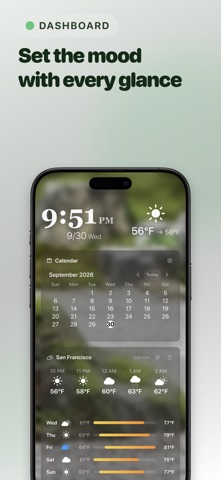
Whether sitting on your office desk, bedside nightstand, or kitchen counter, Dashboard brings together real-time weather, calendar events, clocks, news, stocks, and health data in one glanceable, beautiful screen.
— 15+ ESSENTIAL ALL-IN-ONE WIDGETS —
• Weather — Hyper-local conditions and hourly forecasts with Apple WeatherKit
• Calendar & Reminders — Today's schedule and to-dos neatly organized
• Desk Clock & World Clock — Beautiful time displays across multiple time zones
• Pomodoro Timer — 25-min focus and 5-min break routine for study and productivity
• Apple Health — Real-time Move, Exercise, and Stand activity rings
• Stocks & Forex — Daily market changes with mini trend charts
• D-Day Countdown — Count down to important deadlines and milestones
• Habit Tracker — 7-day dot matrix to maintain your daily streaks
• Smart Home — Instant one-tap control for HomeKit lights and accessories
• Everyday Utilities — Calculator, Unit Converter, Stopwatch, and Battery gauge
— COMPLETE PERSONALIZATION —
• Fully Customizable Layout — Drag, resize, and arrange widgets effortlessly
• Unlimited Pages — Organize dedicated screens for Work, Bedside, and Kitchen (1 page in Free, unlimited in Pro)
• Custom Photo Backgrounds — Turn your device into a dynamic digital photo frame
• Themes & Styles — Minimalist dark mode, clean light mode, and vibrant gradients
• Smart Display Protection — OLED burn-in prevention and Guided Access for kiosks
— FREE VS. PRO —
• Free: Complete dashboard experience with 1 page and ad-supported weather updates
• Pro:
- 100% ad-free experience
- Unlimited customizable pages for every room and routine
- Instant on-demand manual weather refresh anytime (auto-updates every 6 hours)
- Full access to all premium themes and advanced personalization
Download Dashboard today and make every glance at your desk inspiring and productive!
Terms of Use (EULA): https://www.apple.com/legal/internet-services/itunes/dev/stdeula/