Data tracker Widget :TransData is an utilities app developed by AppYogi Software.
What is the rating of Data tracker Widget :TransData?
Data tracker Widget :TransData has no ratings yet.
Is Data tracker Widget :TransData free?
Data tracker Widget :TransData costs $9.99. The app size is 2.02 MB. The latest version available is 3.4. The last update was on May 28, 2026.
What are the requirements for Data tracker Widget :TransData?
The app has a content rating of Everyone. The app has been available on the App Store since December 2016.
Description by AppYogi Software(from the App Store)
Track Internet Usage & Network Activity—Right from Your Mac’s Menu Bar.
TransData is a lightweight and powerful menu bar utility that gives you real-time insight into your Mac’s network usage. Whether you're on a data-limited connection or just curious about your traffic, TransData keeps you informed without being intrusive.
No more guessing. Stay in control of your upload and download activity with a clean, always-visible indicator.
■ TransData is the perfect solution to control and supervise your network usage.
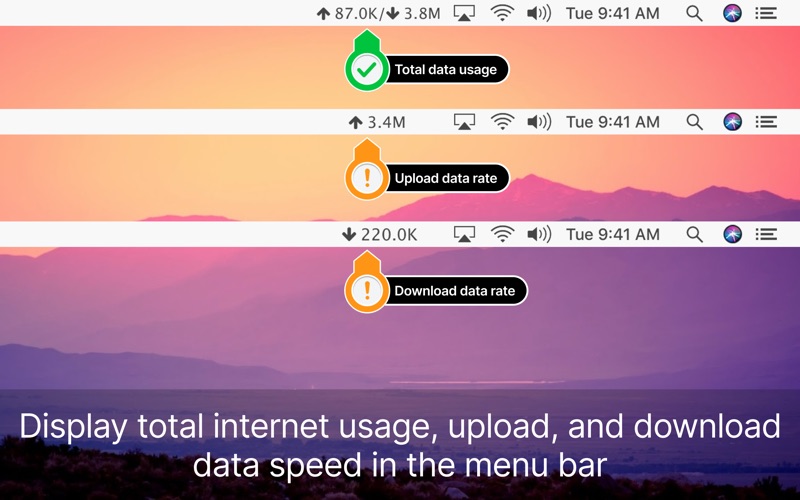
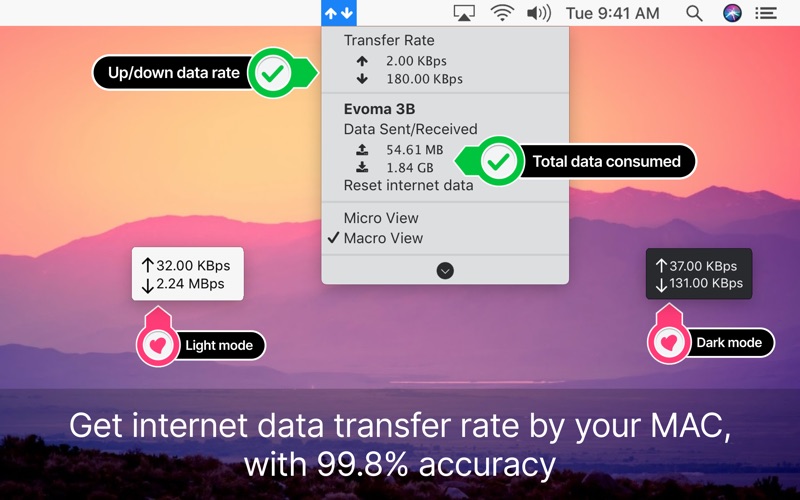
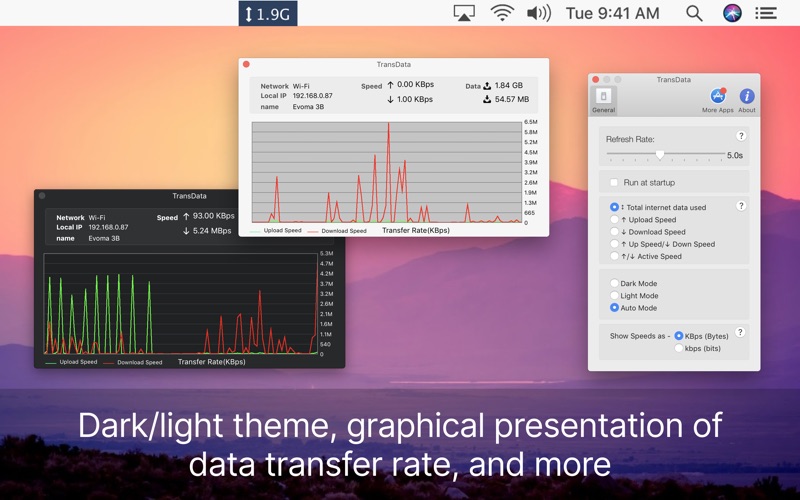
≈ Features: ≈ ◉ Shows network data transfer rate in Kbps/Mbps with up/down speed on your menu bar. ◉ Display the total data used by Mac from the start of the session. ◉ Monitor and reset Internet data usage. ◉ Displays connected Wi-Fi network in the menu. ◉ A Beautiful widget or graph that shows upload & download internet speed per second. ◉ Display refresh rate can be set in preferences. ◉ Internet data can be displayed in two formats either KB/s(Bytes) or kb/s(bits). ◉ Dark/Light mode for all macOS versions.
Ideal For — Mac users with metered or limited internet plans — Remote workers tracking network performance — Developers and power users watching background traffic — Anyone who wants better insight into Mac data usage
TransData works with MacBook Air(M1), MacBook Pro(M1), iMac, MacBook, MacPro, Mac Mini.
≈ Basics: ≈ ◎ Up/Down Speed: Upload/Download internet transfer rate per second (Kbps/Mbps) ◎ Up/Down Data: Total Upload & Download internet data used over a period of time. ◎ Micro View: Floating widget on the desktop with an Up/Down internet data transfer rate. Why Choose TransData? ◎ Macro View: Graph which shows internet data transfer rate in detail.
Why Choose TransData? Most Mac apps don’t show your real-time data usage. TransData does it seamlessly and beautifully—no clutter, no bloat. Just clear, reliable network stats.
≈ Menubar Preferences: ≈ ◎ Total Internet data used: Display the total of data sent and received. ◎ Upload speed: Display only upload internet speed. ◎ Download Speed: Display only download internet speed. ◎ Up & Down Speed: Show both upload and download speed. ◎ Active Speed: Shows upload or download, whichever is highest.
Download TransData now and take control of your Mac’s internet usage.
We'd love to answer your questions or just hear what you think about TransData. Find us online at support@appyogi.com
Each subscription will automatically renew 3 days before the expiration date for
the same time period. Subscriptions can be cancelled at any time before the renewal.