

DataTracker - Data Usage
DataTracker - Data Usage is made and published by Gerard Grundy. AppBrain is an independent app data site and isn't affiliated with Gerard Grundy. The app name, icon, screenshots and description belong to Gerard Grundy and are shown as published on the App Store.
AppBrain's verdict
- Last updated
- September 21, 2026
Rankings
App Store top chartsApp Store Rankings for DataTracker - Data Usage
Competitors
Similar apps and more from Gerard GrundyMore from Gerard Grundy


Releases
Updates seen on the App Store- Version
- 1.02
- Launched
- June 2026
No changelog data
User feedback
Ratings and reviews on the App StoreComments on DataTracker - Data Usage for iOS
We don't have enough comments to show example comments. Please check back later.
Technology
Found in the app by AppBrain- Price
- $1.99
- App size
- 3.19 MB
- Content rating
- Everyone
Technologies used by DataTracker - Data Usage
About the app and developer
About DataTracker - Data Usage
DataTracker - Data Usage is an utilities app developed by Gerard Grundy.
User Ratings
The app has no ratings yet.
App Information
DataTracker - Data Usage costs $1.99. The app size is 3.19 MB. The latest version available is 1.02. The last update was on September 21, 2026.
Technical Requirements
The app has a content rating of Everyone. The app has been available on the App Store since June 2026.
Developer information for Gerard Grundy
Address:
Store listing
By Gerard Grundy, from the App Store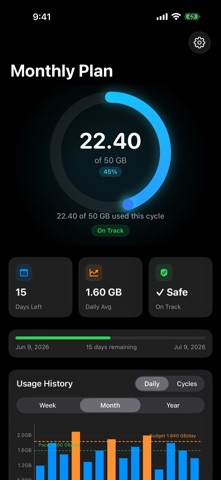


Description by Gerard Grundy Written by the developer, not by AppBrain. Click to read.
Set your plan limit and cycle dates once. DataTracker automatically tracks your cellular usage in the background and tells you exactly where you stand.
FEATURES
• Live usage tracking — monitors cellular data automatically, no manual entry needed
• Home screen widget — see your usage at a glance without opening the app
• Lock screen widget — circular gauge always visible
• Daily usage chart — bar chart showing usage day by day with zoom and tap detail
• Smart status badges — On Track, Over Pace, or Critical based on your remaining budget
• Daily budget — know exactly how many GB you can use each day to stay on track
• Run-out estimate — see the projected date you'll exhaust your plan
• Threshold alerts — notifications at 75% and 90% usage
• Adaptive app icon — icon changes automatically to reflect your current usage tier
• Cycle history — review past billing cycles
All data stays on your device. No account required. No network calls. No ads.