

Daybook: Expense Tracker
Daybook: Expense Tracker is made and published by Jin Zhang Low. AppBrain is an independent app data site and isn't affiliated with Jin Zhang Low. The app name, icon, screenshots and description belong to Jin Zhang Low and are shown as published on the App Store.
AppBrain's verdict
- Last updated
- October 20, 2026
- Size
- 95.4 MB
User feedback
Ratings and reviews on the App StoreComments on Daybook: Expense Tracker for iOS
We don't have enough comments to show example comments. Please check back later.
Store listing
By Jin Zhang Low, from the App Store



Description by Jin Zhang Low Written by the developer, not by AppBrain. Click to read.
EVERY EXPENSE AND INCOME, IN SECONDS
Add what you spend and what comes in, in a few taps. Daybook remembers each shop's category, so your morning coffee is filed correctly from the second visit. Find any record by searching a shop, a note or the words on a scanned receipt.
TAX RELIEF, READY WHEN YOU FILE (PRO)
Mark what you can claim as you go, under reliefs you name yourself, each with its own yearly limit, and keep the receipt with every claim. At year end, seal it into one file: the figures, every claim and its receipts.
SPLIT A BILL WITHOUT THE ARITHMETIC
Equally, by share or by item straight off the receipt, with service charge and tax shared fairly. Say who paid, or that you paid for someone else, and see who owes whom on one People page. What friends owe you is kept apart from your own spending, so your budget only counts your share.
PERSONAL AND BUSINESS, KEPT APART (PRO)
A second set of books for your business, with its own accounts, budgets, people and categories, one tap away. Nothing crosses between them, and each has its own colour. Paid for the business on your own card? The spending goes to the business, and it shows what it owes you back.
RECEIPTS READ BY YOUR IPHONE'S OWN AI
Point the camera at a receipt or pick a photo. The shop, date, total, tax and line items are read on your iPhone. On iPhones with Apple Intelligence, Apple's on-device model reads the hard ones too, on its own: free, no key, and nothing leaves the device. Other iPhones use Apple's on-device text recognition.
IN YOUR LANGUAGE
Daybook speaks 12 languages, including English, Malay, Chinese and Japanese.
TELL DAYBOOK
Type what you spent, like "lunch 15 with Ali", or send a photo, and check the record before it is saved. Read by Apple Intelligence where your iPhone has it, or with your own Gemini key. In Settings › Category notes, tell the AI how you file things.
PRIVATE BY DESIGN
No account, no analytics, no ads, and no bank login. Your records live on your iPhone; backups go to your own iCloud, never to us. Face ID locks the app when you leave it, and your figures are hidden in the app switcher.
BILLS, CARDS AND PAY ON A SCHEDULE
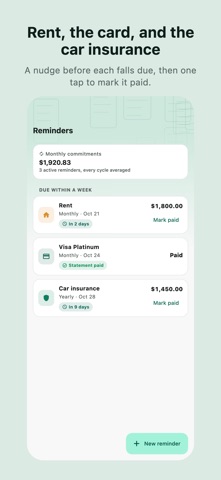
Reminders for bills and subscriptions, with Mark paid right from the alert, and a list of every reminder still to come. Auto-debits and your salary can record themselves on the day. One Shortcuts automation writes down every Apple Pay payment from your phone or watch, with a category suggested to check. Credit-card statements carry unpaid balances over and keep the rest due after part-payments.
BUDGETS AND REPORTS
A monthly budget with per-category limits, unspent money rolling over, and bills still to pay counted before they land. Monthly and yearly reports, top merchants and trends. Refunds come off what you spent.
PREFER A CLOUD AI? OPTIONAL
Add your own Google Gemini key and a receipt is sent only to Google, under your own account, only when you ask. On Google's free tier, Google may use what it is sent to improve its products; see our Privacy Policy.
WHEREVER YOU ARE
About 150 currencies. With Daybook Pro, keep an account in US dollars, euros or another currency, with what it is worth in yours.
FREE
Recording, receipts read on your iPhone, budgets, reports, reminders, splitting bills, CSV export, backups, and AI reading with your own key.
DAYBOOK PRO
Tax relief claims, a second set of books for business, the Insights report, statements as PDF or spreadsheet, every receipt photo kept for good, and accounts in other currencies. Monthly, yearly with a free trial, or once outright.
Terms of Use (EULA): https://www.cortexbizsolution.com/products/daybook/terms
Privacy Policy: https://www.cortexbizsolution.com/products/daybook/privacy
Safety and technology
Found in the app by AppBrain- Price
- Free
- App size
- 95.4 MB
- Content rating
- Everyone
Technologies used by Daybook: Expense Tracker
Releases
Updates seen on the App Store- Version
- 1.8.3
- Launched
- August 2026
No changelog data
Alternatives
Similar apps and more from Jin Zhang LowAlternatives to Daybook: Expense Tracker


Rankings
App Store top chartsApp Store Rankings for Daybook: Expense Tracker
About the app and developer
About Daybook: Expense Tracker
Daybook: Expense Tracker is a finance app developed by Jin Zhang Low.
User Ratings
The app has no ratings yet.
App Information
Daybook: Expense Tracker is freely available from the App Store. The app size is 95.44 MB. The latest version available is 1.8.3. The last update was on October 20, 2026.
Technical Requirements
The app has a content rating of Everyone. The app has been available on the App Store since August 2026.
Developer information for Jin Zhang Low
Address: