

DayGlow: Countdown Timer
DayGlow: Countdown Timer is made and published by kishan italiya. AppBrain is an independent app data site and isn't affiliated with kishan italiya. The app name, icon, screenshots and description belong to kishan italiya and are shown as published on the App Store.
AppBrain's verdict
- Last updated
- October 27, 2026
Rankings
App Store top chartsApp Store Rankings for DayGlow: Countdown Timer
Competitors
Similar apps and more from kishan italiyaAlternatives to DayGlow: Countdown Timer


More from kishan italiya


Releases
Updates seen on the App Store- Version
- 1.6
- Launched
- June 2026
No changelog data
User feedback
Ratings and reviews on the App StoreComments on DayGlow: Countdown Timer for iOS
We don't have enough comments to show example comments. Please check back later.
Technology
Found in the app by AppBrain- Price
- Free
- App size
- 10.7 MB
- Content rating
- Everyone
Technologies used by DayGlow: Countdown Timer
About the app and developer
About DayGlow: Countdown Timer
DayGlow: Countdown Timer is an utilities app developed by kishan italiya.
User Ratings
The app has no ratings yet.
App Information
DayGlow: Countdown Timer is freely available from the App Store. The app size is 10.71 MB. The latest version available is 1.6. The last update was on October 27, 2026.
Technical Requirements
The app has a content rating of Everyone. The app has been available on the App Store since June 2026.
Developer information for kishan italiya
Address:
Frequently asked questions about DayGlow: Countdown Timer
Is DayGlow: Countdown Timer free?
Yes. DayGlow: Countdown Timer is free on the App Store.
Is DayGlow: Countdown Timer still available?
Yes. DayGlow: Countdown Timer is on the App Store, and the last update we saw was on October 27, 2026.
How large is DayGlow: Countdown Timer?
DayGlow: Countdown Timer is 10.71 MB.
Is DayGlow: Countdown Timer suitable for children?
App Store rates the content of DayGlow: Countdown Timer as suitable for everyone.
Who made DayGlow: Countdown Timer?
DayGlow: Countdown Timer was developed by kishan italiya. It is listed in the utilities category on the App Store.
What are the best alternatives to DayGlow: Countdown Timer?
People looking at DayGlow: Countdown Timer also look at these utilities apps: Squelch: Spam Blocker, Moments Countdown - Widget Pro, Countdowns: Track What Matters, Countdown — Event Tracker, Birthday Reminder ۬.
Store listing
By kishan italiya, from the App Store



Description by kishan italiya Written by the developer, not by AppBrain. Click to read.
Zero data collected. Works on iPhone, iPad, and Vision.
Set it once. See it every day.
WHY DAYGLOW
No subscription. Ever.
DayGlow Pro is a one-time purchase. No recurring charges, no surprise renewals, no paywalled reminders. Pay once and own it.
Zero data collected.
DayGlow does not collect, store, or share your personal data. What you track stays on your device. Completely private.
Works across all your Apple devices.
iPhone, iPad, and Apple Vision. One app, everywhere.
16 languages supported.
English, French, German, Spanish, Italian, Japanese, Korean, Chinese, and more.
WHAT YOU CAN TRACK
• Birthdays and anniversaries — never forget the people you care about
• Trips and vacations — days until you're somewhere you love
• Weddings and engagements — count down to the biggest day
• Graduation and exams — stay focused on the finish line
• Holidays — Christmas, New Year, Diwali, Eid, and every celebration
• Deadlines — projects, launches, and important due dates
• Personal milestones — sobriety, fitness goals, big life moments
• Anything — if it matters to you, count down to it
DAYGLOW PRO — WIDGET STUDIO
Upgrade to DayGlow Pro to unlock the full Widget Studio:
• Premium widget styles — minimal, bold, colorful, and dark designs
• Advanced time formats — display weeks, months, or years remaining
• Multi-event stack widgets — show multiple countdowns in one widget slot
• Full Home Screen and Lock Screen customization
• Colors, notes, and event personalization
The free version lets you create unlimited countdowns and reminders. Pro unlocks how they look on your Home Screen and Lock Screen.
HOW IT WORKS
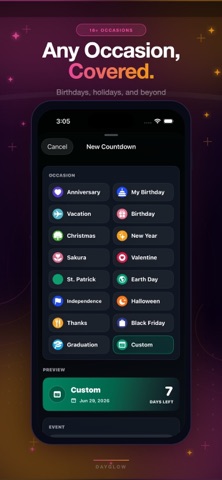
1. Create an event — choose a category, pick a date, add a color and note
2. Add the widget — long-press your Home Screen, tap + and find DayGlow
3. See it every day — your countdown is always there, at a glance
FEATURES
• Beautiful countdown cards in the app
• Home Screen widgets — small, medium, and large sizes
• Lock Screen widget support
• Birthday, anniversary, holiday, trip, wedding, and custom event types
• Repeating yearly countdowns — auto-advance each year
• Event reminders and notifications
• Notes for plans, gifts, addresses, and ideas
• Light and dark appearance
• Pin important dates to the top
• Multiple language support
Terms of Use:
https://belymoninfotech.com/app/dayglow/termsofuse.html
Privacy Policy:
https://belymoninfotech.com/app/dayglow/privacypolicy.html