AppBrain
AppBrain
  • Apps
  • Apps being viewed right now Trending apps today Most popular apps All-time most installed apps Top rated apps iPhone and iPad apps
  • Intelligence ▾
    Intelligence overview → Track any Android app or your whole market
    Track & analyze
    Keyword Tracker & OptimizerTrack & improve Play rankings App Performance ReportOne-off PDF for any app StatisticsFree Android & Play market stats
    Promote your app
    Featured Apps App Links
  • Intelligence
  • Pricing
  • Dashboard
  • Sign up
  • Log in
App Store Apps > Productivity > DayViewer
App profile & analytics · Productivity · Data updated 2026-10-17
DayViewer icon

DayViewer

by DayViewer Limited · Free · Version 1.55
Availability On the App Store since May 2022 ↗
Rating on App Store
4.00/5
1 ratings
Rating
4.00
1 reviews
Best rank
–
not in the top lists
Last updated
July 24, 2026
1.55
AppBrain's verdict

It doesn't have enough ratings yet to judge what users think.

DayViewer is made and published by DayViewer Limited. AppBrain is an independent app data site and isn't affiliated with DayViewer Limited. The app name, icon, screenshots and description belong to DayViewer Limited and are shown as published on the App Store.

About DayViewer

DayViewer is a productivity app developed by DayViewer Limited.

User Ratings

DayViewer is rated 4.00 out of 5 stars. The rating is based on one rating ratings.

App Information

DayViewer is freely available from the App Store. The app size is 21.38 MB. The latest version available is 1.55. The last update was on July 24, 2026.

Technical Requirements

The app has a content rating of Medium Maturity. The app has been available on the App Store since May 2022.

Description by DayViewer Limited (from the App Store)
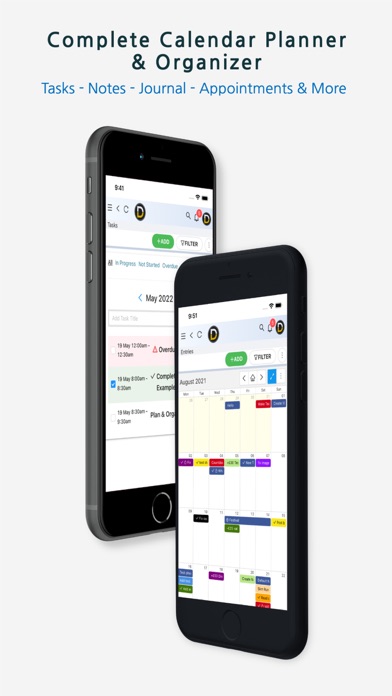
DayViewer is a highly effective calendar planner & organizer that helps you plan your schedule, manage tasks and keep notes organized.

Wake up every morning and check your DayViewer - it's the flexible time, notes, and task management app combined!

The app is derived from our web version, which already helps thousands stay organized for work, study and business.

DayViewer is a highly effective all-in-one productivity & management solution well suited for Businesses, Teams, Professionals and Students.

DayViewer is used in businesses of all sizes to help them manage jobs and tasks, schedules & appointments, calls, real estate, travel and tourism, construction, marketing agencies, field agents, production, product management and much more.

We combine many functions in one easy to use handy app, so you don't need multiple subscriptions from other services or complex integrations.

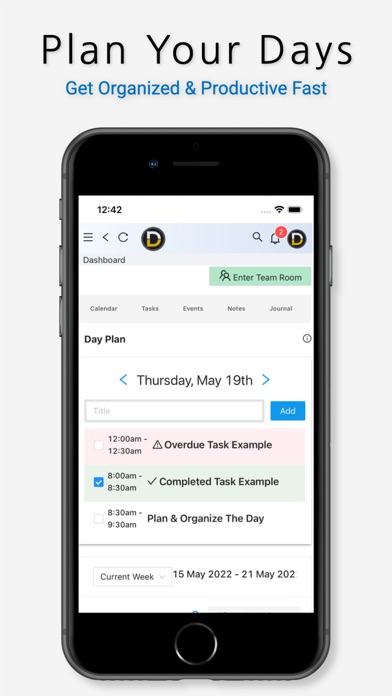
It is important to be able to clearly view what needs doing on any day - and plan your days effectively.

Simpler Plans - DayViewer Starter plan is free, with some limits and feature restrictions. The Pro subscription plan unlocks all extra features, views and lifts usage restrictions.

DayViewer has the following primary features and functionality:
Reminders & Notifications,
Calendar,
Task Management,
Journal,
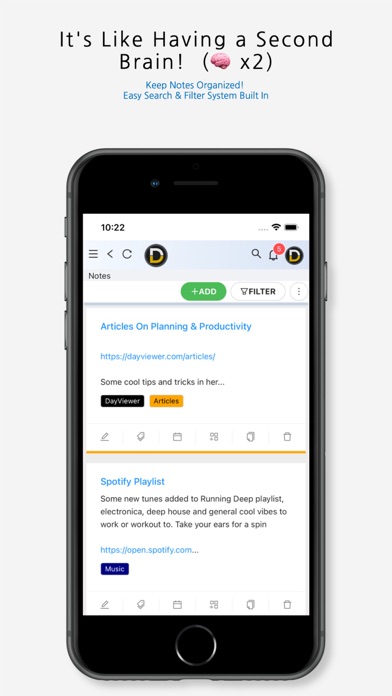
Notes System,
Create Forms,
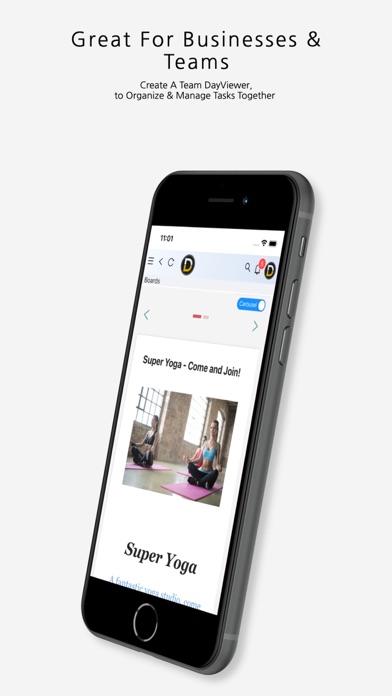
Boards System for Kanban, Slides and Cards,
Filters & Search Entries Feature,
Day Planner (Bullet System)
Tasks Progress, Priority Indicators,
Checklists & Lists in Calendar Entries,
Team Collaboration.
Fast Planner System for Week Planning & Scheduling.
Overdue Tasks
Shareable Entries, Boards & Forms (create surveys or a shareable way to get feedback).
Events System - share details for meetings, appointments or larger events.
Contacts Management.
Payments tracking and recorder (for budgeting)
Huge Range of new features including, Grids Feature, Projects, Smart Planner, Mind Maps and more.

Everything is built in so no need to connect to a multitude of apps or services that might not be around later, and no technical skills needed to operate - simply click inside the calendar to create a calendar entry, or add any other entry type as required.

Labels are the key to great organisation in DayViewer and these really help you find the right information whenever you need it. Filter via label in all major screens including calendar.

Get your whole team or project organized around one planner system, get reminded for important meetings, events and manage tasks as one super efficient team.

Note: DayViewer App requires active data connection, and is optimised for larger screen phones.


DayViewer iOS App Terms of use: https://www.apple.com/legal/internet-services/itunes/dev/stdeula/
Show more Show less

More data about DayViewer

Price Free
Rating 4.00 based on a single rating
Ranking Not ranked
Version 1.55
App size 21.4 MB
Maturity Medium Maturity

Screenshots

DayViewer Screenshot 1 of 6
DayViewer Screenshot 2 of 6
DayViewer Screenshot 3 of 6
DayViewer Screenshot 4 of 6
DayViewer Screenshot 5 of 6
DayViewer Screenshot 6 of 6
Screenshots by DayViewer Limited, from the the App Store listing
Official page on the App Store Also on Google Play

Also available on Google Play

DayViewer Planner & Organizer icon DayViewer Planner & Organizer
DayViewer Ltd
0.0
Free
1,000+

Alternatives to DayViewer

SNote - Encrypted Notes, Files icon SNote - Encrypted Notes, Files
INCOG, LLC
4.5
Free
11 ratings
Flagis: To-do List & Notes icon Flagis: To-do List & Notes
Flagis s.r.o.
0.0
Free
Smart Coach: Practice Manager icon Smart Coach: Practice Manager
Omar Al Homaidi
5.0
Free
3 ratings
Deskpro Horizon icon Deskpro Horizon
Deskpro Ltd
2.0
Free
4 ratings
v.ioNote - notes and reminders icon v.ioNote - notes and reminders
vulper.io UG (haftungsbeschrankt)
5.0
Free
1 ratings
Taskman: Smart Task Manager icon Taskman: Smart Task Manager
Zigoros EOOD
4.5
Free
2 ratings

Changelog of DayViewer

No changelog data

Developer information for DayViewer Limited

DayViewer Limited

Address:

Share DayViewer

Comments on DayViewer for iOS

We don't have enough comments to show example comments. Please check back later.

App Store Rankings for DayViewer

This app is not ranked

Technologies used by DayViewer

Today's trending apps Apps other people are watching Popular Productivity Apps Price drops on Google Play Top new apps
SNote - Encrypted Notes, Files icon SNote - Encrypted Notes, Files
Flagis: To-do List & Notes icon Flagis: To-do List & Notes
Smart Coach: Practice Manager icon Smart Coach: Practice Manager
Deskpro Horizon icon Deskpro Horizon
v.ioNote - notes and reminders icon v.ioNote - notes and reminders
Taskman: Smart Task Manager icon Taskman: Smart Task Manager
Overview Alternatives Reviews Rankings Technology
AppBrain Intelligence premium content

Subscribe now to get full and unlimited access to AppBrain Intelligence. You'll have access to:

  • App Intelligence dashboard (performance timeline, competitor comparison, country rankings, insight cards)
  • Detailed ranking data per app
  • Full timeline per developer
  • Device market shares data per country
  • Unlimited keyword tracking
1 Month

$75/mo
(billed every month)

SAVE 0%
Subscribe
3 Months

$65/mo
($195 billed every 3 months)

SAVE 13%
Subscribe
1 Year

$57.50/mo
($690 billed every year)

SAVE 23%
Subscribe
Each subscription will automatically renew 3 days before the expiration date for the same time period. Subscriptions can be cancelled at any time before the renewal.

AppBrain is an app data site, we track rankings, ratings, installs for all apps and games on Google Play and the App Store. AppBrain doesn't host app files or APKs, all install links go directly to the official store. All trademarks are owned by their respective owners.

More apps

  • Top Android apps being viewed
  • 2 Player Games: Fun Mini Games
  • TP-Link Tether
  • Strike Tracker: Work & Travel

App statistics

  • Android statistics
  • Google Play Developer stats
  • Trending Android Apps
  • Trending iOS apps
  • Top popular Apps
  • Buy the best Android phone
  • Buy & sell app businesses

About AppBrain

  • Contact
  • Privacy
  • Documentation
  • DMCA takedowns
  • Blog
  • Android Interstitial Ads: Best practices to optimize your app's earnings
© 2010-2026 - AppBrain