

Debugging: Inside the Machine
Debugging: Inside the Machine is made and published by Kevin Hare. AppBrain is an independent app data site and isn't affiliated with Kevin Hare. The app name, icon, screenshots and description belong to Kevin Hare and are shown as published on the App Store.
AppBrain's verdict
- Rating on App Store
- 5.00
- 5 ratings
- Last updated
- October 3, 2026
- Size
- 6.53 MB
It doesn't have enough ratings yet to judge what users think.
User feedback
Ratings and reviews on the App StoreComments on Debugging: Inside the Machine for iOS
We don't have enough comments to show example comments. Please check back later.
Store listing
By Kevin Hare, from the App Store


Description by Kevin Hare Written by the developer, not by AppBrain. Click to read.
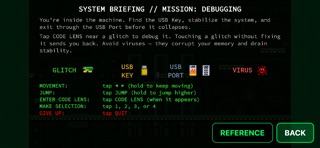
platformer for students preparing for AP Computer Science Principles
or AP Computer Science A. You're inside a corrupted machine — find the
USB Key, fix the glitches, and escape the firewall before the system
collapses.
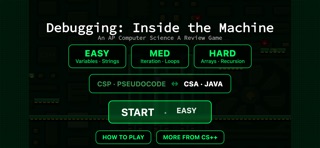
CSP and CSA modes ship in the same app. Tap once to switch.
— EASY · MED · HARD —
Each difficulty is a different level, with its own glitch tilemap and
its own question bank. CSP topics: Selection, Iteration, Functions &
Lists. CSA topics: Variables · Strings, Iteration · Loops, Arrays ·
Recursion. Two bonus levels (K-Pop Demon Hunters, Minecraft) unlock
when you've cleared all three difficulties.
— CODE LENS —
Glitches scatter across each level as collectible bugs. When you're in
range, the CODE LENS button pulses on screen. Tap it and a real
multiple-choice debugging question appears: read the broken code, pick
the actual bug from four explanations, and the glitch repairs.
Wrong answer? Stability drops 10 percent. Right answer? Stability
recovers 5 percent and the level inches closer to stable.
— Real questions, not filler —
Every question is hand-written and scoped to AP exam topics. No
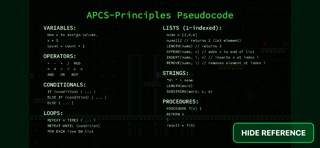
random AI hallucinations, no off-curriculum trivia. The pseudocode
reference card (CSP) and Java Quick Reference (CSA) are one tap away
during any question.
— Built for phones and tablets —
Touch controls only. Bottom-left D-pad to move, big JUMP button on the
right, hold for higher jump. Question screens use full-size answer
buttons. Designed for landscape iPhone and iPad.
— Offline, no account, no tracking —
Everything ships in the app. The game makes zero network calls,
collects zero analytics, and requires no sign-in.
— More from CS++ —
A "More from CS++" button connects you to the rest of the CS++ family:
the AP CSP and AP CSA full-curriculum apps, the CS++ Java IDE for
on-device Java practice, and the free csplusplus.com web resources
(curriculum, vocab trainer, practice exams).
For: AP CSP and AP CSA students, CS teachers building exam prep
sessions, anyone who likes finding bugs.
Safety and technology
Found in the app by AppBrain- Price
- Free
- App size
- 6.53 MB
- Content rating
- Everyone
Technologies used by Debugging: Inside the Machine
Releases
Updates seen on the App Store- Version
- 1.0.8
- Launched
- April 2026
No changelog data
Alternatives
Similar apps and more from Kevin Hare


Rankings
App Store top chartsApp Store Rankings for Debugging: Inside the Machine
About the app and developer
About Debugging: Inside the Machine
Debugging: Inside the Machine is an education app developed by Kevin Hare.
What is the rating of Debugging: Inside the Machine?
Debugging: Inside the Machine is rated 5.00 out of 5 stars, based on 5 ratings.
Is Debugging: Inside the Machine free?
Debugging: Inside the Machine is free. The app size is 6.53 MB. The latest version available is 1.0.8. The last update was on October 3, 2026.
What are the requirements for Debugging: Inside the Machine?
The app has a content rating of Everyone. The app has been available on the App Store since April 2026.
Developer information for Kevin Hare
Address:
Frequently asked questions about Debugging: Inside the Machine
Is Debugging: Inside the Machine free?
Yes. Debugging: Inside the Machine is free on the App Store.
Is Debugging: Inside the Machine still available?
Yes. Debugging: Inside the Machine is on the App Store, and the last update we saw was on October 3, 2026.
How large is Debugging: Inside the Machine?
Debugging: Inside the Machine is 6.53 MB.
Is Debugging: Inside the Machine suitable for children?
App Store rates the content of Debugging: Inside the Machine as suitable for everyone.
How do people rate Debugging: Inside the Machine?
Debugging: Inside the Machine scores 5.00 out of 5 stars, from 5 ratings on the App Store.
Who made Debugging: Inside the Machine?
Debugging: Inside the Machine was developed by Kevin Hare. It is listed in the education category on the App Store.
What are the best alternatives to Debugging: Inside the Machine?
People looking at Debugging: Inside the Machine also look at these education apps: VEX via, Merge Object Viewer, Unified Talent Mobile, Bluebook Exams, TEACHERS | TalkingPoints.