

DeckSettings: Game Settings
DeckSettings: Game Settings is made and published by WEBGEHEUER OU. AppBrain is an independent app data site and isn't affiliated with WEBGEHEUER OU. The app name, icon, screenshots and description belong to WEBGEHEUER OU and are shown as published on the App Store.
AppBrain's verdict
- Rating on App Store
- 5.00
- 16 ratings
- Last updated
- October 9, 2026
- Size
- 16.6 MB
It doesn't have enough ratings yet to judge what users think.
User feedback
Ratings and reviews on the App StoreComments on DeckSettings: Game Settings for iOS
We don't have enough comments to show example comments. Please check back later.
Store listing
By WEBGEHEUER OU, from the App Store




Description by WEBGEHEUER OU Written by the developer, not by AppBrain. Click to read.
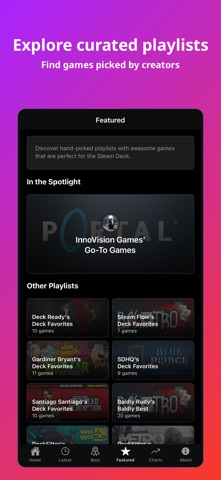
Browse Most Played charts, Latest Settings, and hand-picked playlists.
Compare trusted signals in one free companion app.
DeckSettings helps Steam Deck players explore games, get them running, and tune them without jumping between store pages, Reddit threads, and report sites.
Why Steam Deck players use DeckSettings:
- Check Deck Verified status, SteamOS compatibility, ProtonDB tiers, release details, tags, and Steam review sentiment
- Find community-tested settings from sources like ShareDeck, SteamDeckHQ, and DeckVerifiedGames when reports are available
- Compare FPS targets, battery estimates, power draw, graphics presets, and LCD/OLED notes when supported by source data
- See regional prices, discounts, free-to-play labels, and coming-soon releases
- Jump to Steam, ProtonDB, HowLongToBeat, PCGamingWiki, discussions, SteamDB, SteamCharts, and other trusted resources
- Browse Latest Settings, Best on Deck recommendations, and creator-curated playlists
How it works:
1. Search the Steam store or browse discovery feeds
2. Open a game to compare compatibility, reviews, price, and release signals
3. Use available community settings to tune FPS, battery life, and graphics faster
DeckSettings is free to use, with no login requirements, ads, or in-app purchases.
Download DeckSettings to spend less time researching and more time choosing what to play next.
Disclaimer: DeckSettings is an unofficial companion app and is not affiliated with, endorsed by, or sponsored by Valve Corporation, Steam, Steam Deck, ProtonDB, ShareDeck, SteamDeckHQ, DeckVerifiedGames, HowLongToBeat, PCGamingWiki, SteamDB, or SteamCharts. All trademarks, logos, images, and game assets belong to their respective owners.
Safety and technology
Found in the app by AppBrain- Price
- Free
- App size
- 16.6 MB
- Content rating
- Everyone
Technologies used by DeckSettings: Game Settings
Releases
Updates seen on the App Store- Version
- 1.6.1
- Launched
- October 2025
No changelog data
Alternatives
Similar apps and more from WEBGEHEUER OU


Rankings
App Store top chartsApp Store Rankings for DeckSettings: Game Settings
About the app and developer
About DeckSettings: Game Settings
DeckSettings: Game Settings is an entertainment app developed by WEBGEHEUER OU.
What is the rating of DeckSettings: Game Settings?
DeckSettings: Game Settings is rated 5.00 out of 5 stars, based on 16 ratings.
Is DeckSettings: Game Settings free?
DeckSettings: Game Settings is free. The app size is 16.55 MB. The latest version available is 1.6.1. The last update was on October 9, 2026.
What are the requirements for DeckSettings: Game Settings?
The app has a content rating of Everyone. The app has been available on the App Store since October 2025.
Developer information for WEBGEHEUER OU
Address:
Frequently asked questions about DeckSettings: Game Settings
Is DeckSettings: Game Settings free?
Yes. DeckSettings: Game Settings is free on the App Store.
Is DeckSettings: Game Settings still available?
Yes. DeckSettings: Game Settings is on the App Store, and the last update we saw was on October 9, 2026.
How large is DeckSettings: Game Settings?
DeckSettings: Game Settings is 16.55 MB.
Is DeckSettings: Game Settings suitable for children?
App Store rates the content of DeckSettings: Game Settings as suitable for everyone.
How do people rate DeckSettings: Game Settings?
DeckSettings: Game Settings scores 5.00 out of 5 stars, from 16 ratings on the App Store.
Who made DeckSettings: Game Settings?
DeckSettings: Game Settings was developed by WEBGEHEUER OU. It is listed in the entertainment category on the App Store.
What are the best alternatives to DeckSettings: Game Settings?
People looking at DeckSettings: Game Settings also look at these entertainment apps: GOS Companion, GamePal: Track Your Gaming, Gamery: Organize Your Library, Razer PC Remote Play, GamingBuddy: Game Tracker.