

Delete & Rotate PDF Pages
Delete & Rotate PDF Pages is made and published by MASATO MIYAZAWA. AppBrain is an independent app data site and isn't affiliated with MASATO MIYAZAWA. The app name, icon, screenshots and description belong to MASATO MIYAZAWA and are shown as published on the App Store.
AppBrain's verdict
- Last updated
- October 29, 2026
Rankings
App Store top chartsApp Store Rankings for Delete & Rotate PDF Pages
Competitors
Similar apps and more from MASATO MIYAZAWAAlternatives to Delete & Rotate PDF Pages


More from MASATO MIYAZAWA


Releases
Updates seen on the App Store- Version
- 1.1.8
- Launched
- July 2026
No changelog data
User feedback
Ratings and reviews on the App StoreComments on Delete & Rotate PDF Pages for iOS
We don't have enough comments to show example comments. Please check back later.
Technology
Found in the app by AppBrain- Price
- Free
- App size
- 24.2 MB
- Content rating
- Everyone
Technologies used by Delete & Rotate PDF Pages
About the app and developer
About Delete & Rotate PDF Pages
Delete & Rotate PDF Pages is a productivity app developed by MASATO MIYAZAWA.
User Ratings
The app has no ratings yet.
App Information
Delete & Rotate PDF Pages is freely available from the App Store. The app size is 24.18 MB. The latest version available is 1.1.8. The last update was on October 29, 2026.
Technical Requirements
The app has a content rating of Everyone. The app has been available on the App Store since July 2026.
Developer information for MASATO MIYAZAWA
Address:
Frequently asked questions about Delete & Rotate PDF Pages
Is Delete & Rotate PDF Pages free?
Yes. Delete & Rotate PDF Pages is free on the App Store.
Is Delete & Rotate PDF Pages still available?
Yes. Delete & Rotate PDF Pages is on the App Store, and the last update we saw was on October 29, 2026.
How large is Delete & Rotate PDF Pages?
Delete & Rotate PDF Pages is 24.18 MB.
Is Delete & Rotate PDF Pages suitable for children?
App Store rates the content of Delete & Rotate PDF Pages as suitable for everyone.
Who made Delete & Rotate PDF Pages?
Delete & Rotate PDF Pages was developed by MASATO MIYAZAWA. It is listed in the productivity category on the App Store.
What are the best alternatives to Delete & Rotate PDF Pages?
People looking at Delete & Rotate PDF Pages also look at these productivity apps: PDF Merge & Split: Page Editor, Linked Notes - Bi-directional, Compress Image: Photos, Pinotes - Video Note Taker, Compress PDF - PDF Compressor.
Store listing
By MASATO MIYAZAWA, from the App Store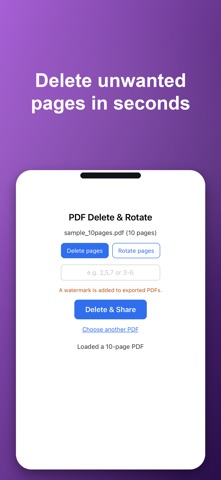


Description by MASATO MIYAZAWA Written by the developer, not by AppBrain. Click to read.
- Delete pages: specify the pages to remove with a comma-separated list (e.g. 2,4,6). Ranges work too (e.g. 3-6), and you can mix both (e.g. 1,3,5-7)
- Rotate pages: pick 90 degrees, 180 degrees, or 270 degrees, then rotate the pages you specify (or leave it blank to rotate every page) clockwise
Pricing (In-App Purchase)
- The app is free to download. Deleting and rotating pages, saving, and sharing are all free.
- PDFs made with the free version include a logo (watermark).
- Removing the logo is a one-time purchase (non-consumable). No feature limits, no usage limits.
- This is not a subscription — pay once, with no recurring charges. No ads.
Simple by design
Open the app, pick a PDF, choose delete or rotate. No manual needed. We stripped away the extras and focused on one thing: cleaning up pages.
Private by design
- Fully offline: your files never leave your device. Your privacy stays yours
- One-time purchase: buy once, use forever. No subscription
- No ads, no account required
Great for when you want to:
- Remove stray blank pages or an unwanted cover sheet from a scanned document
- Fix pages that got scanned sideways or upside down
- Trim a document down to just the pages you need before sharing it
Password-protected PDFs are not supported.