

Delivery Checklist Model Y/YL
Delivery Checklist Model Y/YL is made and published by Arch Square. AppBrain is an independent app data site and isn't affiliated with Arch Square. The app name, icon, screenshots and description belong to Arch Square and are shown as published on the App Store.
AppBrain's verdict
- Last updated
- September 2, 2026
Rankings
App Store top chartsApp Store Rankings for Delivery Checklist Model Y/YL
Competitors
Similar apps and more from Arch SquareAlternatives to Delivery Checklist Model Y/YL


More from Arch Square







Releases
Updates seen on the App Store- Version
- 1.0
- Launched
- September 2026
No changelog data
User feedback
Ratings and reviews on the App StoreComments on Delivery Checklist Model Y/YL for iOS
We don't have enough comments to show example comments. Please check back later.
Technology
Found in the app by AppBrain- Price
- $9.99
- App size
- 22.6 MB
- Content rating
- Everyone
Technologies used by Delivery Checklist Model Y/YL
About the app and developer
About Delivery Checklist Model Y/YL
Delivery Checklist Model Y/YL is an utilities app developed by Arch Square.
What is the rating of Delivery Checklist Model Y/YL?
Delivery Checklist Model Y/YL has no ratings yet.
Is Delivery Checklist Model Y/YL free?
Delivery Checklist Model Y/YL costs $9.99. The app size is 22.65 MB. The latest version available is 1.0. The last update was on September 2, 2026.
What are the requirements for Delivery Checklist Model Y/YL?
The app has a content rating of Everyone. The app has been available on the App Store since September 2026.
Developer information for Arch Square
Address:
Store listing
By Arch Square, from the App Store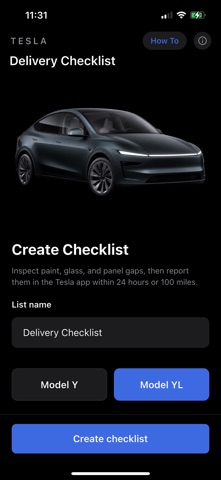

Description by Arch Square Written by the developer, not by AppBrain. Click to read.
Tesla typically expects cosmetic issues — paint, glass, scratches, and panel gaps — to be reported within 24 hours or 100 miles. This app is built for that window.
WHAT YOU GET
• About 188 inspection items, from Before You Arrive through After Delivery
• Model Y L extras (third row, captain’s chairs, and other Y L hardware) when you pick Model Y L; Model Y hides those
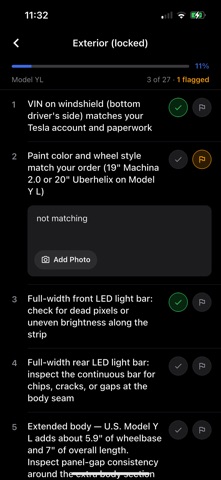
• Sections that follow a real walkaround: exterior (locked and unlocked), frunk, front cabin, second row, third row, cargo, tech, drivetrain
• Pass or flag each item
• Notes and photos on flagged defects (camera or photo library)
• Multiple named lists so you can inspect more than one car
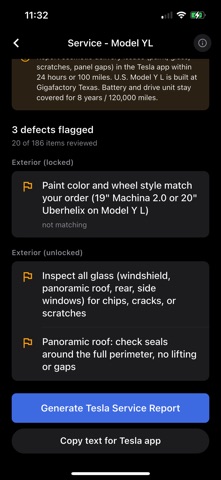
• Service report with flagged items, notes, and photos
• Share a text summary or PDF for a Tesla Service Request
• Progress PDF of pass and defect marks, plus a blank PDF to print
HOW IT WORKS
1. Create a list and choose Model Y or Model Y L.
2. Open a section and inspect each numbered item.
3. Tap the checkmark when it looks good, or the flag when it does not.
4. Add a short note and a photo on anything you flag.
5. Open Report, then copy or share the summary into a Tesla Service Request before you leave.
Works offline. Checklists stay on your iPhone.
This app is not affiliated with, endorsed by, or sponsored by Tesla, Inc. Tesla, Model Y, and related names are trademarks of Tesla, Inc.