

DeltaClock: Time Zone Planner
DeltaClock: Time Zone Planner is made and published by Ameliia Shekikhacheva. AppBrain is an independent app data site and isn't affiliated with Ameliia Shekikhacheva. The app name, icon, screenshots and description belong to Ameliia Shekikhacheva and are shown as published on the App Store.
AppBrain's verdict
- Last updated
- March 6, 2026
- Size
- 23.5 MB
User feedback
Ratings and reviews on the App StoreComments on DeltaClock: Time Zone Planner for iOS
We don't have enough comments to show example comments. Please check back later.
Store listing
By Ameliia Shekikhacheva, from the App Store


Description by Ameliia Shekikhacheva Written by the developer, not by AppBrain. Click to read.
A WORLD CLOCK YOU CAN MOVE THROUGH TIME
Most world clock apps only show “now”. DeltaClock lets you scroll time forward or backward to preview any moment:
• Add your key cities and instantly compare local time in each time zone
• Scrub the timeline to answer “What time will it be there?” in seconds
• See day and night changes, date rollovers, and time differences visually
• Reduce mistakes during daylight saving time changes (DST)
TIME ZONE REMINDERS THAT MAKE SENSE
Create reminders based on the time in another city, and DeltaClock converts it to your local time automatically.
• Schedule reminders for calls, deadlines, lessons, streams, and flights
• Set reminders by “their time” (for example 9:00 in New York) and avoid mental math
• Great for distributed teams, freelancers, and international routines
OVERLAP PLANNER FOR REMOTE TEAMS
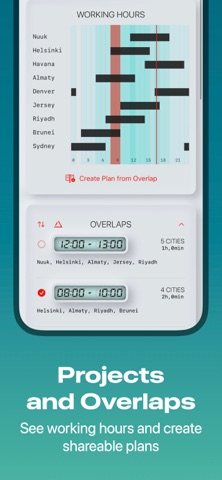
DeltaClock is also a meeting planner: it shows overlap windows across multiple time zones so you can pick a time that works for everyone.
• View overlaps for multiple cities in one planner
• Build plans from overlap blocks (for example best meeting window, handover time, deep work hours)
• Share plans as calendar events to keep everyone aligned
• Perfect for recurring meetings, standups, interviews, and cross border projects
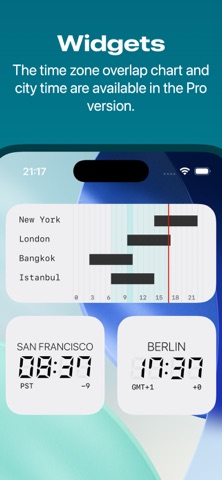
WIDGETS: SEE TIME AT A GLANCE
Add DeltaClock widgets to your Home Screen for instant time zone visibility:
• City Time Widget: a stylish widget that shows the current time in your chosen city (great for your key teammate or client location)
• Project Timeline Widget: a compact view that highlights overlap windows across your project cities so you can spot meeting friendly hours quickly
THREE BEAUTIFUL THEMES
Choose the look that fits your style:
• System / Liquid Glass
• Neumorphic
• Retro Neumorphic
A clean interface makes time zone conversion and scheduling feel effortless.
WHO IT’S FOR
DeltaClock is made for:
• Remote work and global teams
• Managers coordinating schedules across time zones
• Freelancers with international clients
• Students attending classes in another country
• Travelers planning itineraries and check ins
• Long distance relationships and families
WHY DELTACLOCK
DeltaClock combines a world clock, time zone converter, widgets, and meeting planner in one focused app:
• Fast setup: add cities, compare time zones, find overlap
• Visual timeline: understand time differences at a glance
• Fewer mistakes: avoid missed meetings caused by DST or date changes
• Calendar sharing: turn overlaps into real plans
• Widgets: your key cities and project overlaps always visible
Work across time zones with confidence. Compare time zones, plan meetings, and set time zone reminders with DeltaClock.
HOW IT WORKS
1. Add the cities you care about (work, home, clients, travel).
2. Use the World Clock timeline to slide into the future or the past.
3. Switch to the Overlap Planner to find shared working hours.
4. Create a plan and export it as a calendar event to share with others.
BUILT FOR CLARITY
DeltaClock focuses on the most common multi time zone tasks: world clock comparison, time zone conversion, and meeting planning. Instead of doing math, you see the answer:
• “Is it too late to message London?”
• “When does Sydney start work?”
• “What’s the best meeting time for New York, Berlin, and Tokyo?”
• “If the deadline is 17:00 in LA, what time is that for me?”
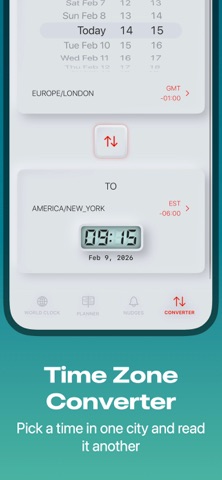
USE IT AS A TIME ZONE CONVERTER
Need a quick time zone converter? Scrub to a time in one city and read the matching time in every other city. DeltaClock makes time zone conversion fast, visual, and reliable for daily scheduling.
EULA: https://www.apple.com/legal/internet-services/itunes/dev/stdeula/
Safety and technology
Found in the app by AppBrain- Price
- Free
- App size
- 23.5 MB
- Content rating
- Everyone
Technologies used by DeltaClock: Time Zone Planner
Releases
Updates seen on the App Store- Version
- 1.1
- Launched
- March 2026
No changelog data
Alternatives
Similar apps and more from Ameliia ShekikhachevaAlternatives to DeltaClock: Time Zone Planner





More from Ameliia Shekikhacheva

Rankings
App Store top chartsApp Store Rankings for DeltaClock: Time Zone Planner
About the app and developer
About DeltaClock: Time Zone Planner
DeltaClock: Time Zone Planner is a productivity app developed by Ameliia Shekikhacheva.
User Ratings
The app has no ratings yet.
App Information
DeltaClock: Time Zone Planner is freely available from the App Store. The app size is 23.51 MB. The latest version available is 1.1. The last update was on March 6, 2026.
Technical Requirements
The app has a content rating of Everyone. The app has been available on the App Store since March 2026.
Developer information for Ameliia Shekikhacheva
Address:
Frequently asked questions about DeltaClock: Time Zone Planner
Is DeltaClock: Time Zone Planner free?
Yes. DeltaClock: Time Zone Planner is free on the App Store.
Is DeltaClock: Time Zone Planner still available?
Yes. DeltaClock: Time Zone Planner is on the App Store, and the last update we saw was on March 6, 2026.
How large is DeltaClock: Time Zone Planner?
DeltaClock: Time Zone Planner is 23.51 MB.
Is DeltaClock: Time Zone Planner suitable for children?
App Store rates the content of DeltaClock: Time Zone Planner as suitable for everyone.
Who made DeltaClock: Time Zone Planner?
DeltaClock: Time Zone Planner was developed by Ameliia Shekikhacheva. It is listed in the productivity category on the App Store.
What are the best alternatives to DeltaClock: Time Zone Planner?
People looking at DeltaClock: Time Zone Planner also look at these productivity apps: Re:plan, LocalClock, iXnote: AI Notes & Context, TimeSynco, MDWriter - Simple Text Editor.